11
Merrychef eikon e2s Quick Start Guide
Part Number 32Z3922 CE, GBR Issue 02 06/2018
The steps required to cook a particular type of food are stored
in a cookingprole. The cooking prole is created by entering
the steps in Manual Mode. The cooking proles can then be
grouped together into cookingprolegroups.
When the cooking proles have been set up, the microwave
oven can be used in one of two cooking modes:
● Quick Serve Mode is used for selecting a cooking prole from
the list of all cooking proles.
● Full Serve Mode is used for selcting a cooking prole from a
cooking prole group or from the separate Press&Go menu.
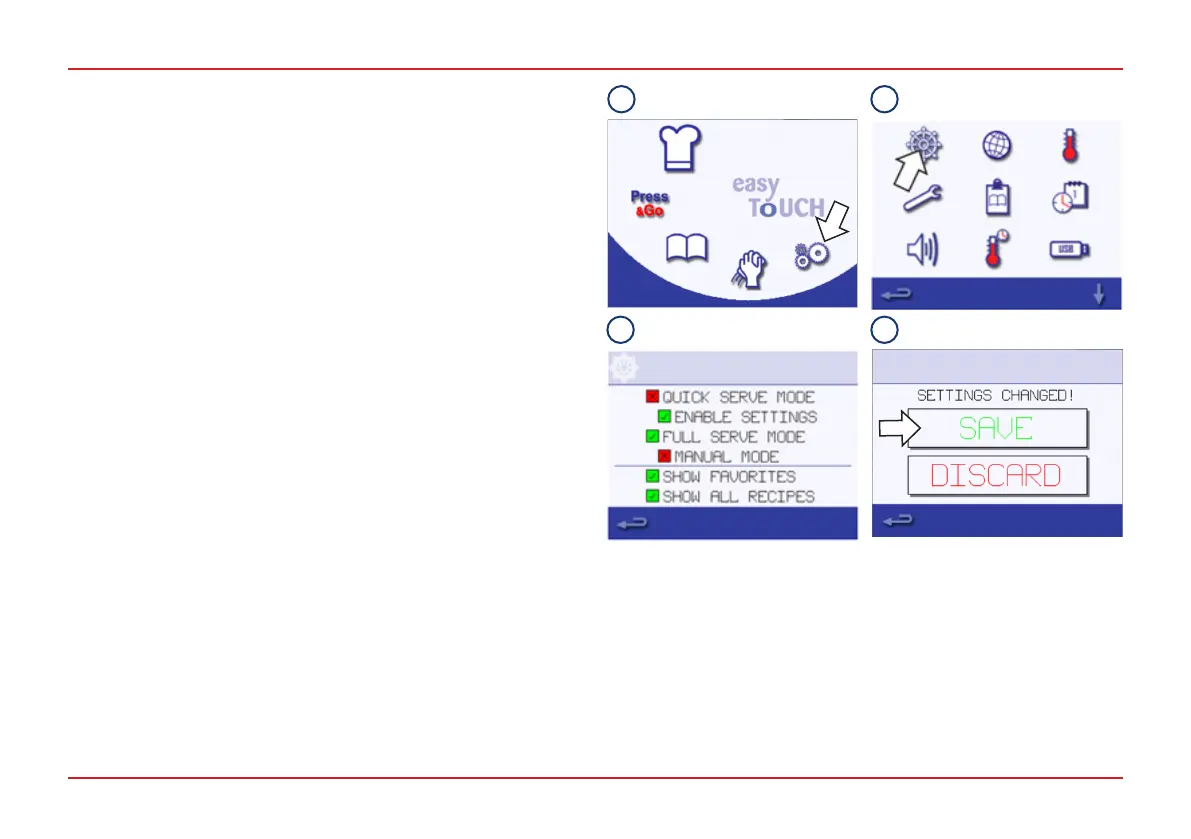
To choose the cooking mode:
1. Select the Settings symbol from the Main Menu.
2. Select the Operating Mode/Navigation symbol.
3. Select the mode (Quick Serve, Full Serve or Manual). A
green check mark indicates that the function is active.
4. Press the Backspace button to exit the Settings Menu and
select SAVE.
OPERATION MODE/NAVIGATION SETTINGS
1 2
3 4



 To Next Page