12
Merrychef eikon e2s Quick Start Guide
Part Number 32Z3922 CE, GBR Issue 02 06/2018
Cooking proles are created by entering the steps in
Development Mode and then saving them.
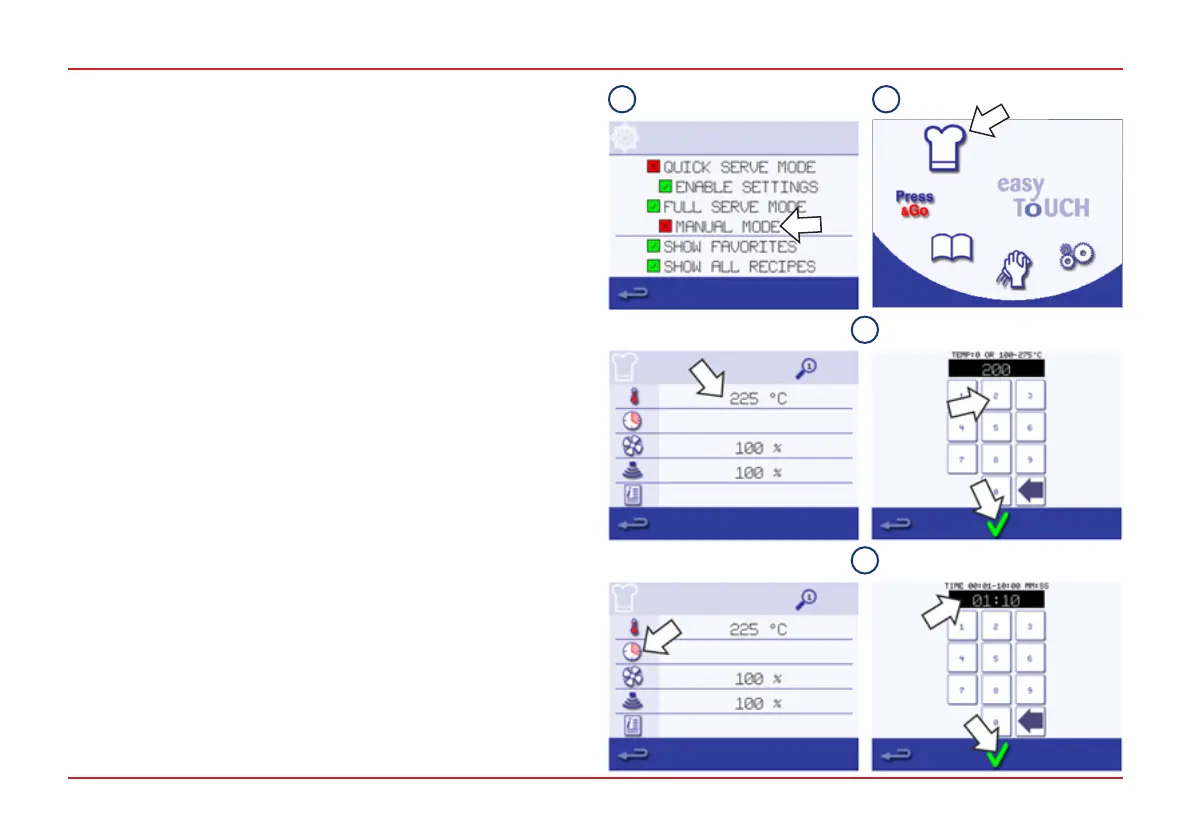
Creatingthecookingprolesteps
To create a cooking prole:
1. Select Manual Mode from the Operating Mode/Navigation
settings (see page 11). This puts you in Development Mode.
2. Select the Chef‘s Hat symbol from the Main Menu to enter
Development Mode.
3. The Temperature Value displays the set temperature
for preheating the cavity. To increase or decrease the
temperature, select the Temperature symbol and enter a
value within the limits displayed using the keypad. Select the
green tick to continue.
4. Select the Clock symbol. Enter the cooking time up to a
maximum of 10 minutes for each stage using the keypad
For example, enter 110 for 1 minute and 10 seconds.
Select the green tick to save the value.
CREATING A COOKING PROFILE
1 2
3
4



 To Next Page