18
Merrychef eikon e2s Quick Start Guide
Part Number 32Z3922 CE, GBR Issue 02 06/2018
Usingacookingprole(FullServemode)
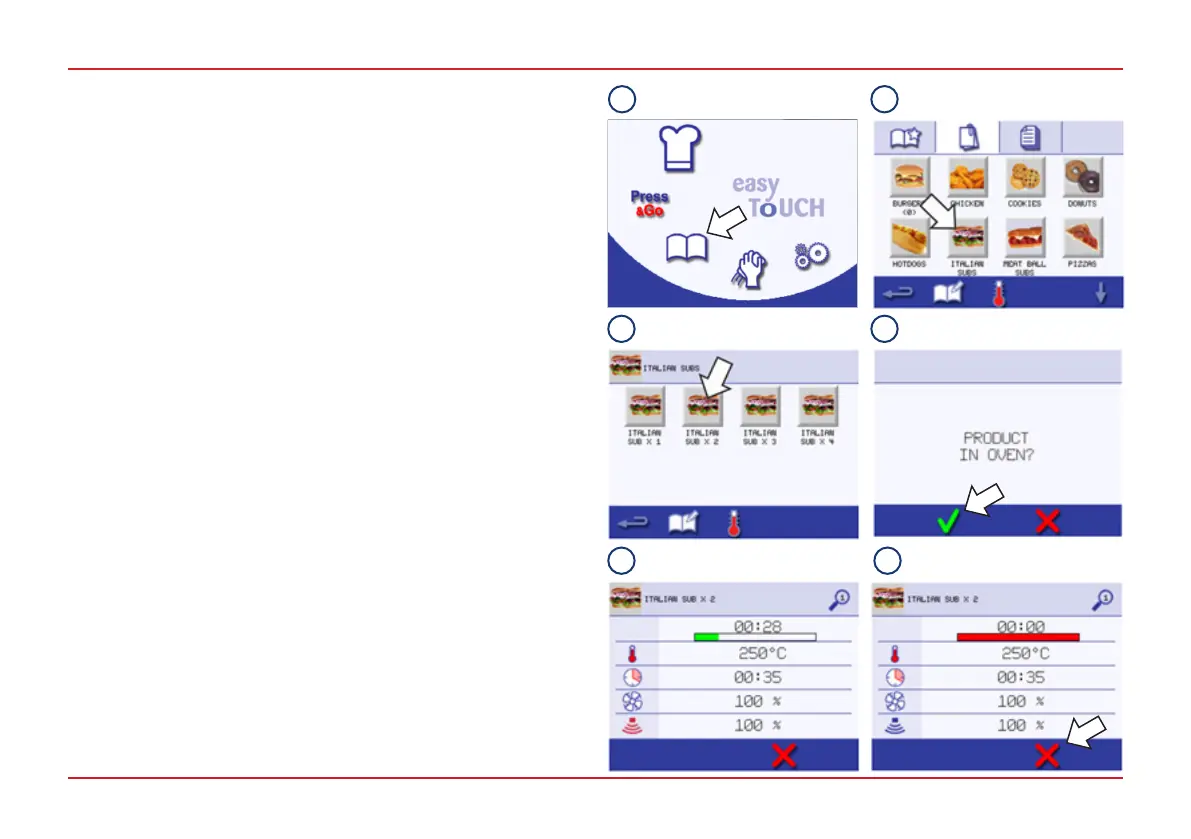
1. Select the Cookbook symbol from the Main Menu.
2. Select a group of cooking proles, for example ‘ITALIAN
SUBS’, to display the individual cooking proles.
3. Select a cooking prole to start, for example ‘ITALIAN SUB
x 2’.
4. Follow any instructions on the screen, if displayed.
Press the green tick to cook.
5. The cooking time counts down for each program stage.
6. When the cooking prole ends a red bar is displayed usually
with an audible sound. Open the door or touch the red ‘X’ to
return to the cooking prole.
NOTE:
● Opening the appliance door during cooking stops the cooking
prole and displays a warning.
● Closing the door allows the user to continue or cancel the
cooking prole.
1
2
3 4
5 6



 To Next Page