15
Merrychef eikon e2s Quick Start Guide
Part Number 32Z3922 CE, GBR Issue 02 06/2018
Usingacookingprole(QuickServemode)
Ensure that a food product is placed into the cavity before
starting a cooking prole. Open the appliance door, place the
food product into the hot cavity and close the door.
Take all the necessary precautions to ensure that you do not
burn yourself.
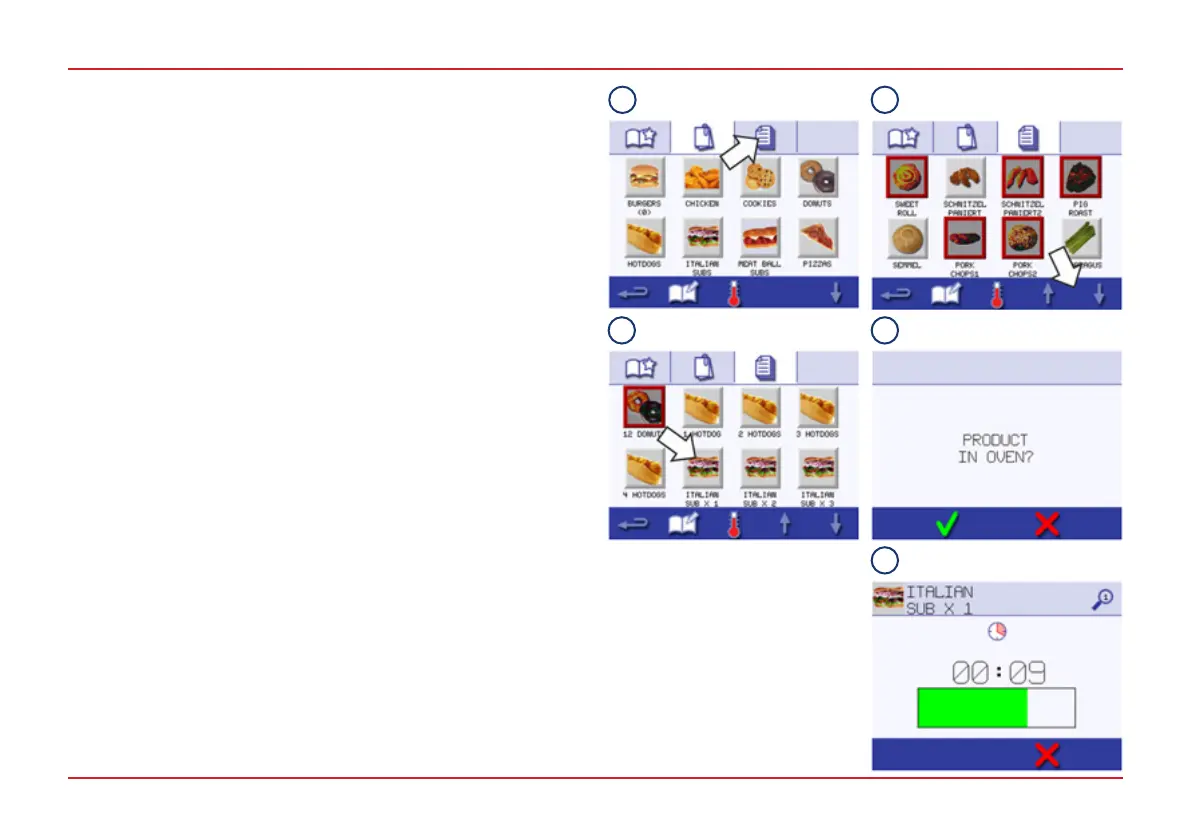
1. Select the All Menus symbol.
2. Use the scroll up/down arrows to nd the cooking prole.
NOTE: If a picture has a red frame around it the cavity
temperature is set too high or too low for that cooking prole.
See Changing the cooking chamber temperature in Section
8.2.4 of the Installation and User Manual.
3. Select the required cooking prole to start cooking. For
example: ‘ITALIAN SUB x 1‘.
WARNING: Hot surfaces at the door and in the cavity.
4. The cooking prole either starts immediately, displaying a
countdown timer, or an instruction is displayed rst.
Follow the stage instruction and then press the green tick to
start the cooking prole.
5. The cooking timer counts down to zero and makes a sound
to indicate that an operator action is required at the end of a
cooking prole or of a stage of a cooking prole.
Open the door after the cooking prole has nished and
remove the food product from the cavity.
The display returns to the Cookbook screen automatically.
To check the cavity temperature when cooking, lightly tap the
temperature displayed. The cavity temperature is shown with an
asterisk.
QUICK SERVE MODE
NOTE:
● Opening the door during
cooking stops the cooking
prole and a warning
appears.
● Closing the door allows the
user to continue or cancel
the cooking prole.
1
2
3 4
5



 To Next Page