9
Merrychef eikon e2s Quick Start Guide
Part Number 32Z3922 CE, GBR Issue 02 06/2018
Changing the settings
The options on the Settings Menu allow you to change the way
in which the oven operates. For example, you can set the date,
time and language, change the speaker sound level or select a
different operating mode.
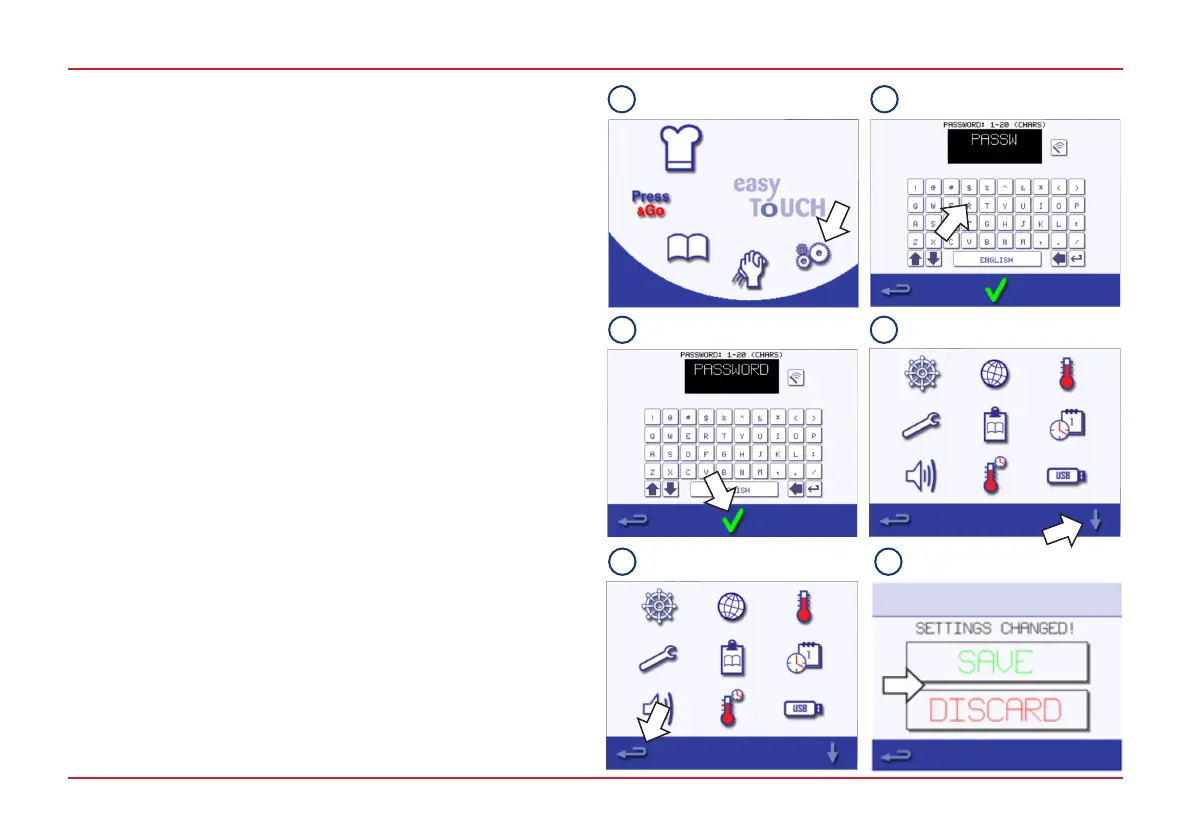
To change the settings:
1. Select the Settings symbol from the Main Menu screen.
2. Enter the password. (For information on setting a password,
see Section 8.2.6 of the Installation and User Manual.)
3. Select the green tick to display the Settings Menu.
4. Select the required setting.
● If necessary, use the down arrow at the bottom of the
screen to display the second set of functions.
● When nished with a setting, press the Backspace button
to return to the Settings Menu.
● Make any other changes to the settings as required.
5. Press the Backspace button to exit the Settings Menu.
6. A prompt appears to either ‘SAVE’ or ‘DISCARD’ any
changed settings. Select the appropriate option.
The date and time settings are described on page 10 and the
operating mode/navigation settings on page 11.
For all other settings, refer to Section 8.2.6 of the Installation
and User Manual.
5
1 2
43
5 6



 To Next Page