7
Merrychef eikon e2s Quick Start Guide
Part Number 32Z3922 CE, GBR Issue 02 06/2018
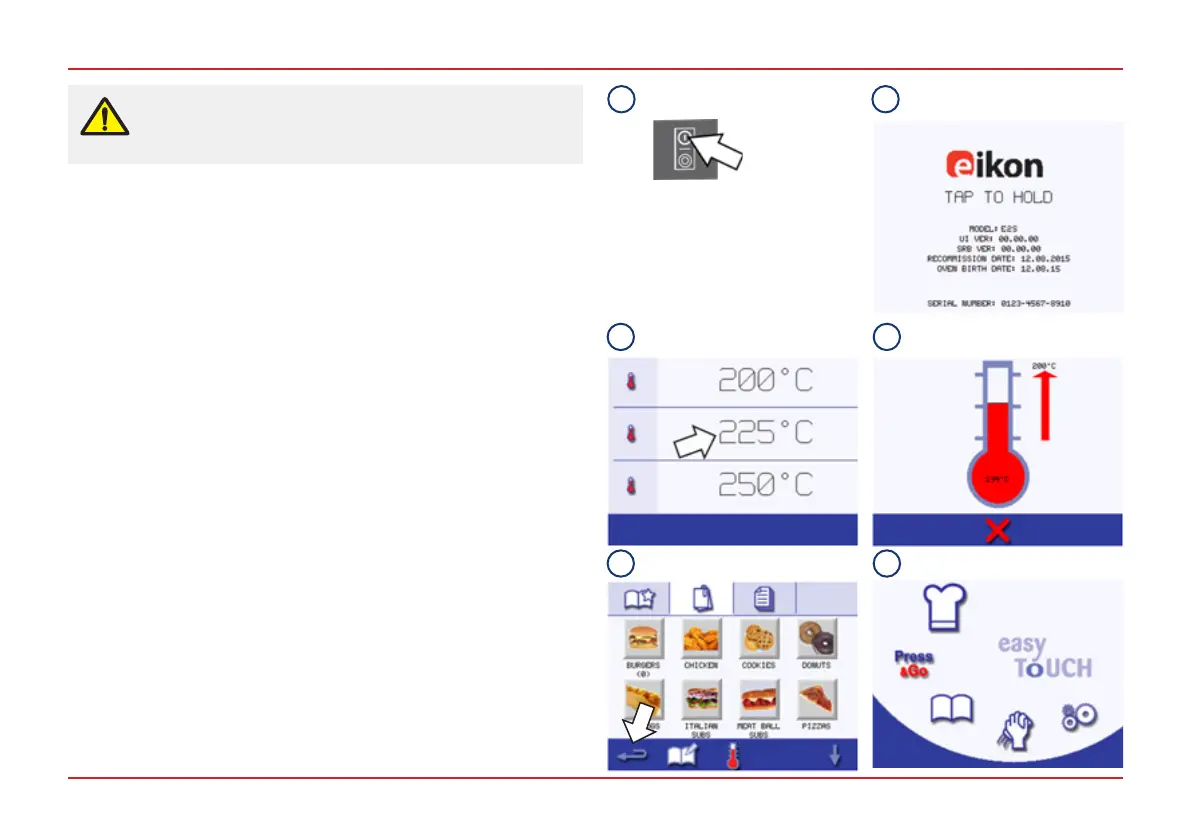
To start up the oven:
1. Make all the relevant safety checks and ensure the appliance
is clean and empty. Then switch the appliance ON.
2. The easyTouch
®
screen illuminates with the display briey
showing the serial number and appliance data. (To keep the
data on the screen, lightly tap the screen once to freeze the
display. Tap again to continue.)
3. When the appliance is set up with two or more preheating
temperatures a choice is displayed. Select the temperature
required to start preheating the cavity.
(Scroll arrows at the bottom of the screen indicate that there
are more temperature choices not shown on the screen.)
4. During preheating the display shows the progress as the
cavity heats up to the set temperature. To stop the cavity
heating up touch the red ‘X’ symbol at the bottom of the
screen.
5. The appliance is ready to use when either the Cookbook or
Main Menu is displayed. If the Cookbook is displayed, press
the Backspace button in the bottom left-hand corner of the
screen to display the Main Menu.
6. The Main Menu is displayed.
TURNING THE OVEN ON
Before turning on the oven, use the checklists in
Section 7.2 of the Installation and User Manual to
make sure that all important requirements are met.
1 2
3 4
5 6



 To Next Page