14
Merrychef eikon e2s Quick Start Guide
Part Number 32Z3922 CE, GBR Issue 02 06/2018
Runningandsavingacookingprole
The new prole is saved by running it to make sure it works
correctly and then saving it with a name and picture in the
cookbook.
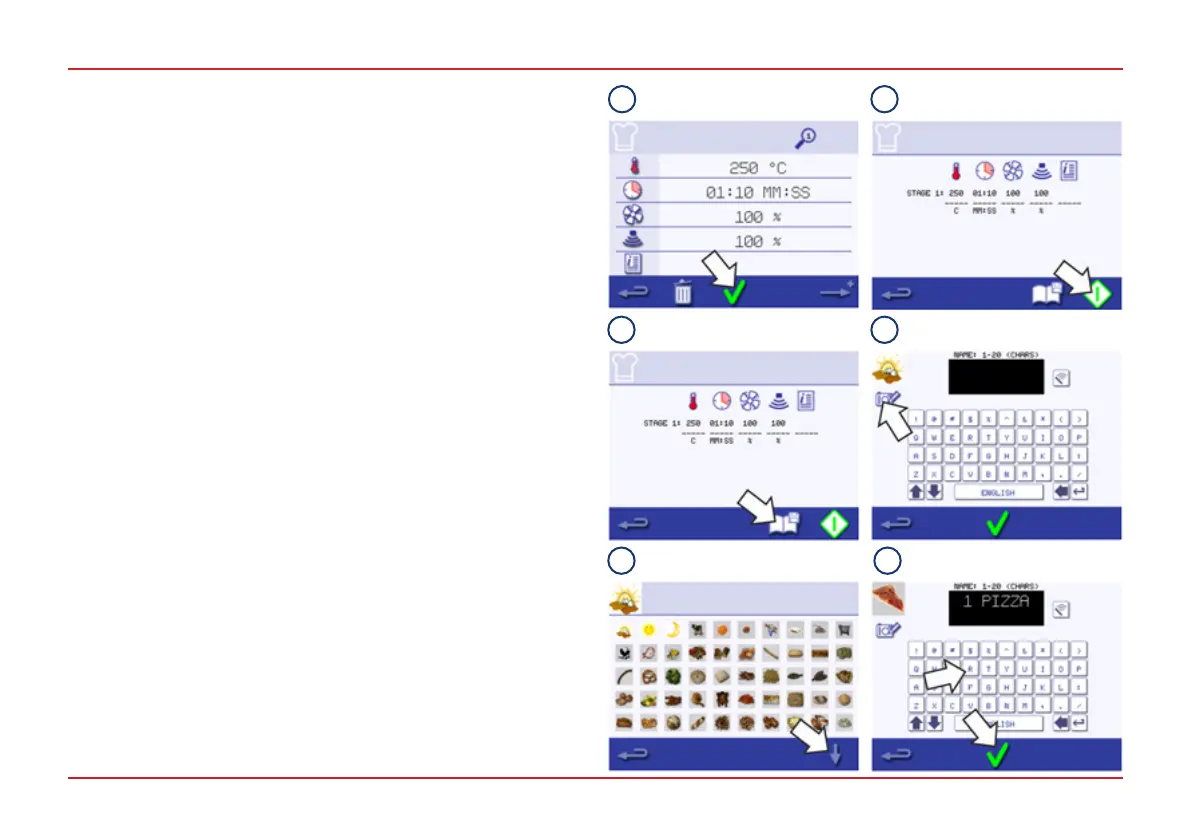
1. Press the green tick to conrm the cooking prole.
WARNING: Ensure that a food product is in the cavity and
that all safety precautions are followed before running the
cooking prole.
2. Select the Start symbol to run the cooking prole (optional).
If the results are not satisfactory, select the Backspace
symbol, change the cooking settings and re-test.
3. Select the Save Cookbook symbol to record the cooking
prole to the cookbook.
4. Select the Camera symbol to open pictures.
5. Select a picture to represent the new cooking prole.
Use the scroll arrows to display more pictures.
6. Enter a name for the cooking prole, using a maximum of 20
characters, for example, ‘1 PIZZA‘.
Press the green tick to save the cooking prole to the
cookbook.
A green tick on a cookbook symbol indicates that the cooking
prole has been saved to the cookbook.
Similar cooking proles can be grouped together in cooking
prole groups. For information on creating and managing prole
groups see Section 8.2.5 of the Installation and User Manual
and for instructions on how to add cooking proles to prole
groups, see Section 8.2.4.
1
2
3 4
5 6



 To Next Page