13
Merrychef eikon e2s Quick Start Guide
Part Number 32Z3922 CE, GBR Issue 02 06/2018
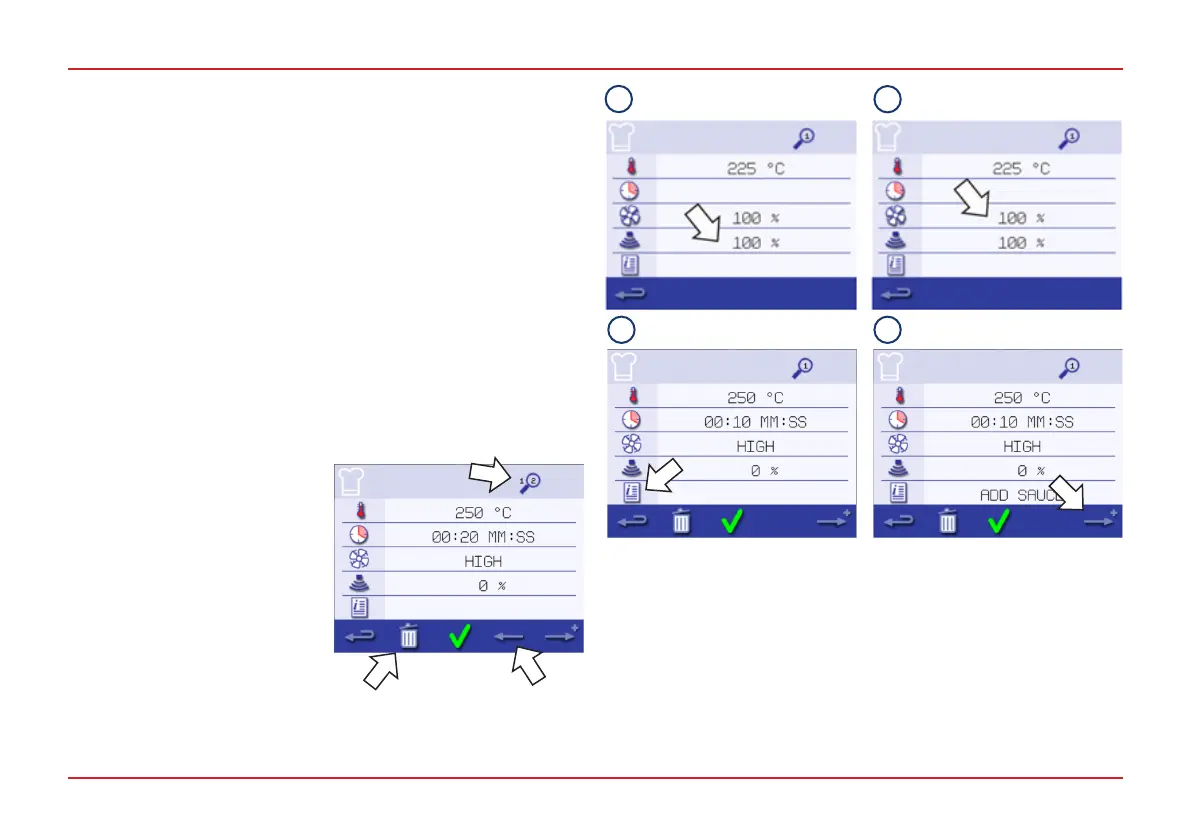
5. Select the Microwave symbol. Set the microwave power
using the keypad (0 and 5-100%). Select the green tick to
save the value.
6. Select the Fan symbol to set the fan speed within the limits
shown on the screen. Select the green tick to save the value.
7. Select the Information symbol to enter an instruction for
the stage (optional). For example, “Stage 1 - Place a food
product in the cavity“. Select the green tick to save the
instruction. When cooking the instruction appears in the
display at the beginning of the stage.
8. Select the right arrow at the bottom of the screen to add a
new stage. Repeat steps 2-6 to create a new stage.
Cooking proles can have up to a maximum of 6 stages:
● The Magnier symbol at the
top indicates which stage is
displayed on the screen.
● Select the left/right arrow
displayed at the bottom to
move between stages.
● Delete a stage by selecting
the Dustbin symbol.
5
6
87



 To Next Page