16
Merrychef eikon e2s Quick Start Guide
Part Number 32Z3922 CE, GBR Issue 02 06/2018
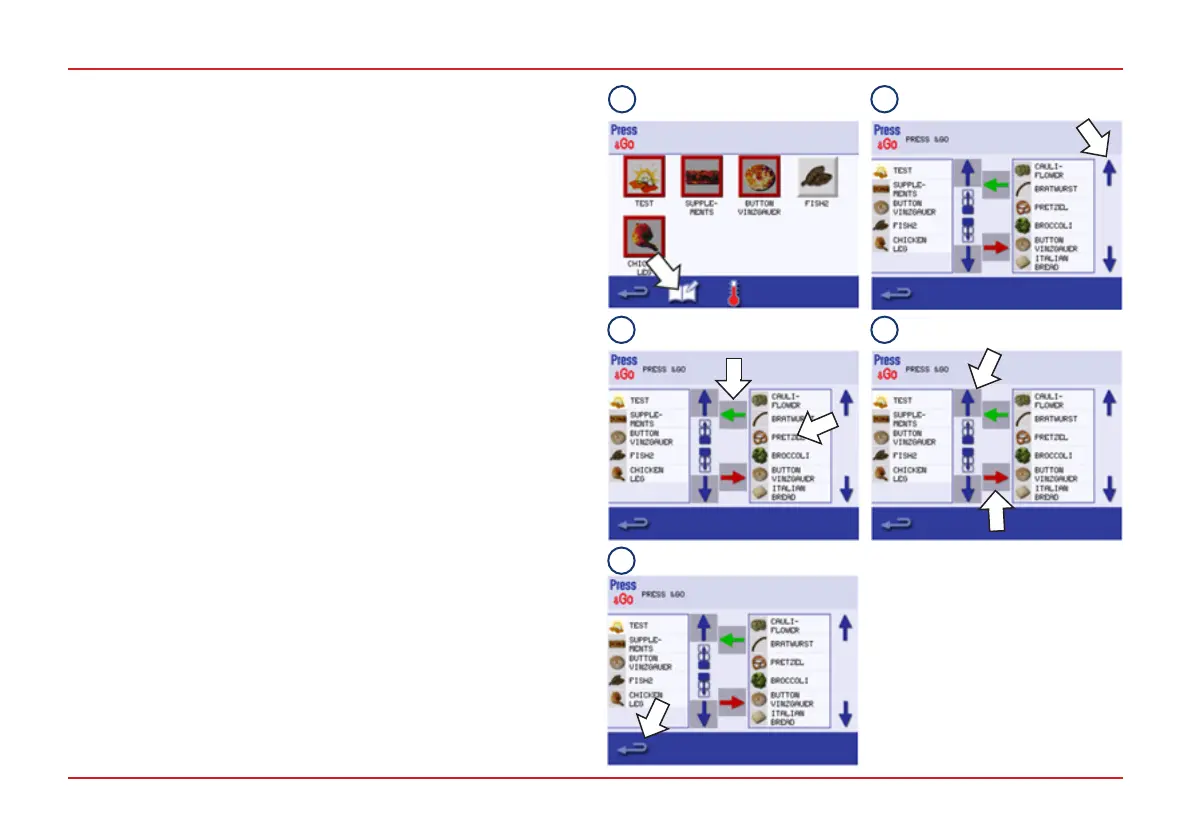
ChoosingcookingprolesforthePress&Gomenu
You can decide which of the cooking proles are included in the
Press&Go menu.
1. After selecting Press&Go from the Main Menu, select the
Edit Cookbook symbol.
2. Two lists are displayed:
● The list on the left shows the cooking proles that are part
of the ‘Press&Go’ menu.
● The list on the right shows other cooking proles that are
available.
● Both lists can be scrolled up or down using the blue arrows
on the right.
3. To make a cooking prole from the right list available in the
Press&Go menu move it into the left list by selecting it in the
list on the right and pressing the green arrow.
4. Select a cooking prole from the list on the left.
Choose whether to change its position within the list or to
remove it into the list on the right:
● To change the order of cooking proles in the left list use
the blue up/down arrows in the middle.
● To remove the selected cooking prole from the Press&Go
menu use the red arrow in the middle.
5. Select Backspace to return to the Press&Go menu when
nished.
FULL SERVE MODE
1
2
3 4
5



 To Next Page