3 Operation
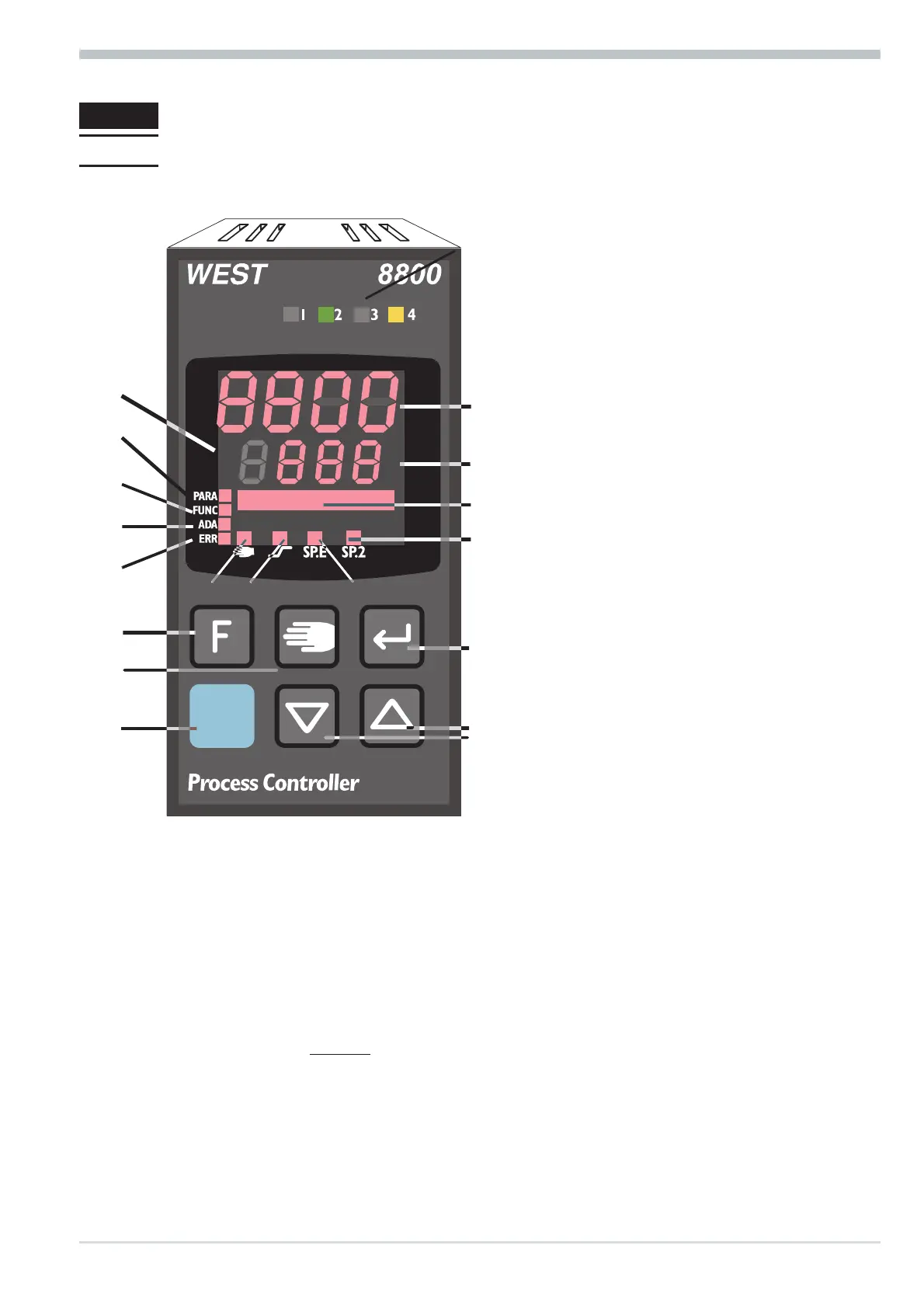
3.1 Front view
LED colours:
LED 1, 2, 3, 4: yellow
Bargraph: red
other LEDs: red
g
In the upper display line, the
process value is always
displayed.
At parameter, configuration,
calibration as well as extended
operating level, the bottom
display line changes cyclically between parameter name and parameter value.
Operation
8800 process controller 11 Front view
1 Status of switching outputs
OuT.1... 6
2 Process value display
3 Set-point, controller output
4 Signals display on °C or °F
5 Signals ConF and PArA level
6 Signals aktive function key
7 Self-tuning active
8 Entry in error list
9 Bargraph or clear text display
0 SP.2 is effective
! SP.E is effective
" Set-point gradient effective
§ Manual/automatic switch-over:
Off: Automatic
On: Manual (changing possible)
Blinks:Manual (changing not
possible
(r ConF/ Cntr/ MAn)
$ Enter key:
calls up extended operating
level / error list
% Up/down keys:
changing the set-point or the
controller output value
& Manual mode /spec. function
(→ ConF / LOGI )
/ Freely programmable function
key
( PC connection for
8800/8840 configurator
(engineering tool)



 To Next Page