WHEATON
®
OmniSpense
®
ELITE Peristaltic Pump
WHEATON | 800.225.1437 (U.S. & Canada Only) | 856.825.1100 | www.wheaton.com | P/N 50099067 Rev. 5/15/12 WMAN_001
7.5 Footswitch Operation and Connector Functions
Plug the optional footswitch into the Interface Connector found at the rear of the unit. If the unit is at idle,
pressing the footswitch once, will initiate a pump dispensing sequence, as defined by the entries made by
the user via the main front panel keypad. If the unit is running, pressing the footswitch once will stop the
pump.
In addition to connections for the above footswitch, the
interface Connector contains feedback pinouts for a Pump
Running / Pump Stopped indicator.
Pins 1 (footswitch +) and 2 (footswitch GND) are +5V TTL
compatible inputs with pull up resistors, and can be driven by
an isolated open collector device or dry contact relay, to start
and stop the unit.
Pins 3 and 5 are an isolated transistor output capable of driving
a TTL load with pull up resistor. When the pump is running,
the transistor is ON, and when the pump is stopped, the
transistor is OFF.
See Figure F for connector pin out details.
7.6 Flexible Tubing Holder
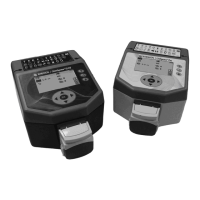
An included flexible tubing holder mounts to either side of the
unit, and can be flexed to the desired position, for hands-free
operation of unit.
8.0 Unit Setup
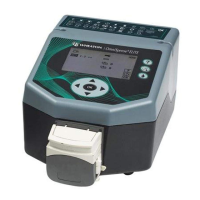
The setup menu contains a collection of lesser used functions of the unit. From the HOME screen, use
the UP and DOWN keys to navigate to the SETUP icon, and then press OK.



 To Next Page