WHEATON
®
OmniSpense
®
ELITE Peristaltic Pump
WHEATON | 800.225.1437 (U.S. & Canada Only) | 856.825.1100 | www.wheaton.com | P/N 50099067 Rev. 5/15/12 WMAN_001
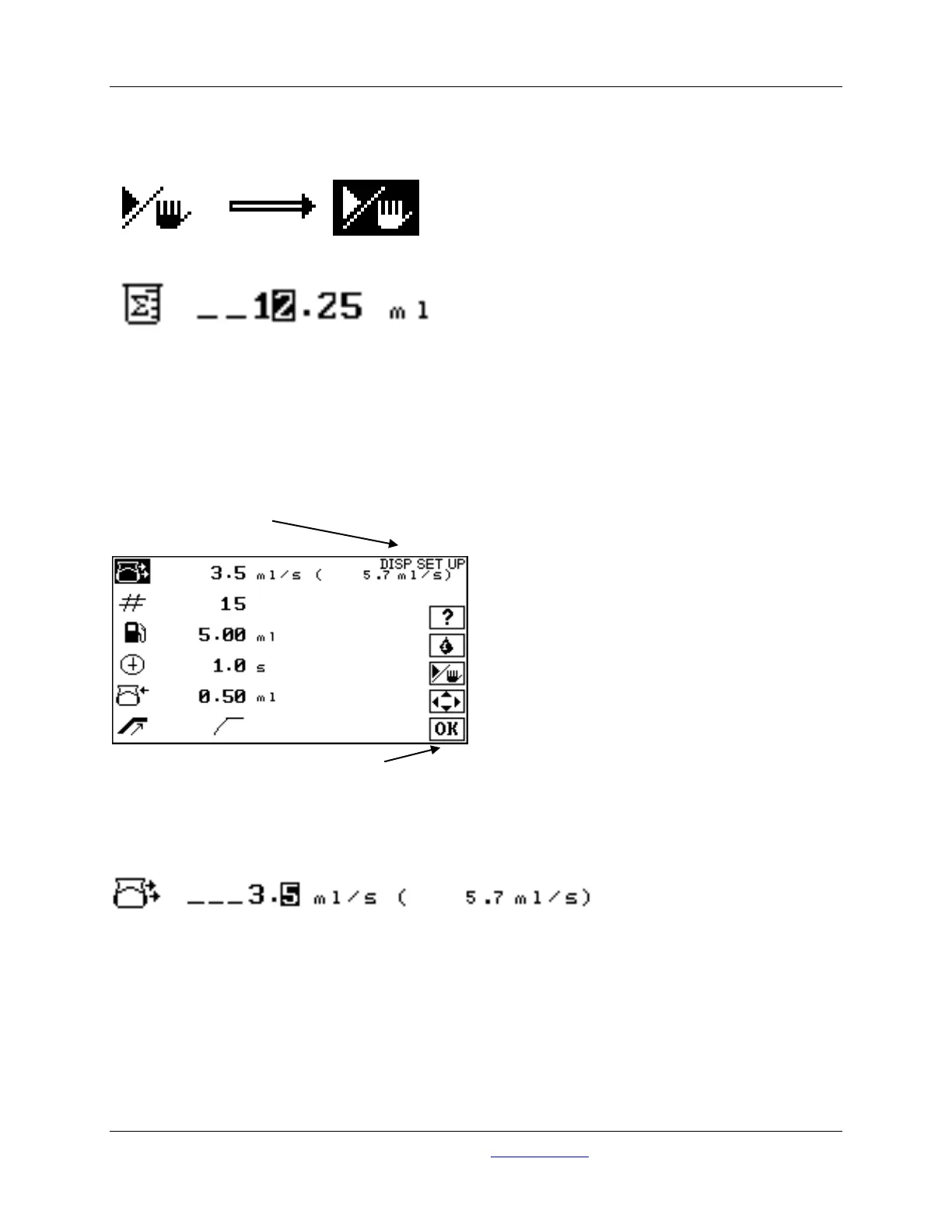
Press the START / STOP button to end the calibration dispense.
Use the UP and DOWN buttons and the LEFT and RIGHT buttons to enter the measured volume:
Press OK to enter the volume and complete the calibration procedure. Press OK again, to return to the
HOME screen.
11.0 Making Batch and Single Dose Dispenses
From the HOME screen, press OK to navigate to the DISPENSE SETUP screen:
11.1 Flow Rate
Use the UP and DOWN and the LEFT and RIGHT keys to enter the desired flow rate for the dispense.
Press OK when done.
Setup Mode
Maximum attainable flow rate based on tubing size, number of heads and calibration



 To Next Page