WHEATON
®
OmniSpense
®
ELITE Peristaltic Pump
WHEATON | 800.225.1437 (U.S. & Canada Only) | 856.825.1100 | www.wheaton.com | P/N 50099067 Rev. 5/15/12 WMAN_001
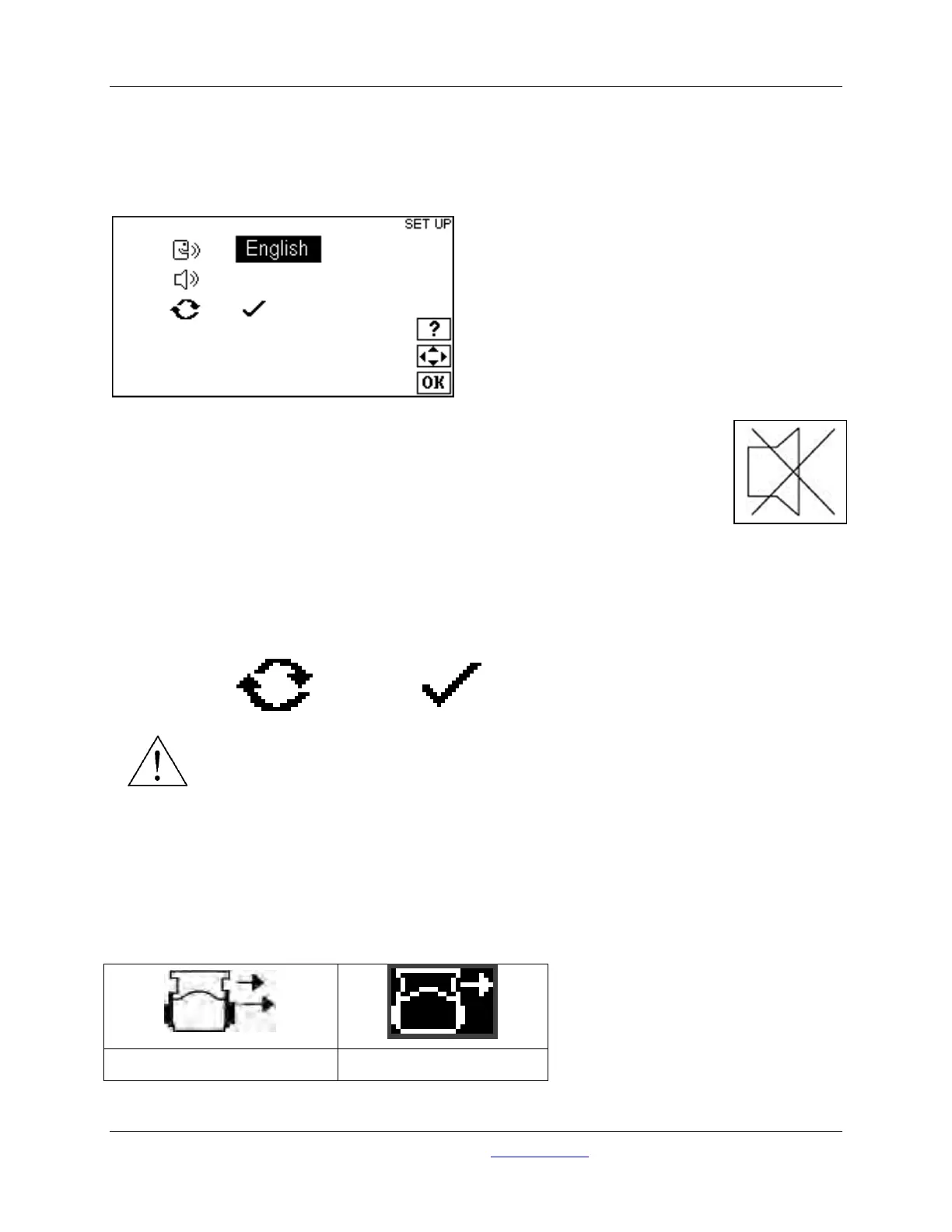
8.1 Language Selection
Press the UP and DOWN and the LEFT and RIGHT keys to access the Language Selection. Help
screens are available in the following languages: English, French, German, Spanish, Japanese, Chinese,
and Korean. Press OK when done.
8.2 Buzzer Function
Press the UP and DOWN and the LEFT and RIGHT keys to access the Buzzer
Function.
Turning the buzzer function ON will cause the unit to sound an end-of-dispense alert.
Turning the buzzer function OFF (shown) will disable the buzzer during the dispense cycle.
8.3 Unit Reset
Press the UP and DOWN and the LEFT and RIGHT keys to access the Unit Reset Function.
WARNING! – Resetting the unit will return the unit to factory setup parameters. It will NOT
clear any settings stored in memory as explained in the MEMORY STORAGE AND
RECALL section.
To reset the unit, highlight the ‘check’ mark, and press OK. A special tone will sound when the unit resets.
Press OK again to return to the HOME screen.
9.0 Preparing for Batch and Single Dose Dispensing
Use the LEFT and RIGHT arrow keys to set the unit to dispense mode:



 To Next Page