PAGE 5
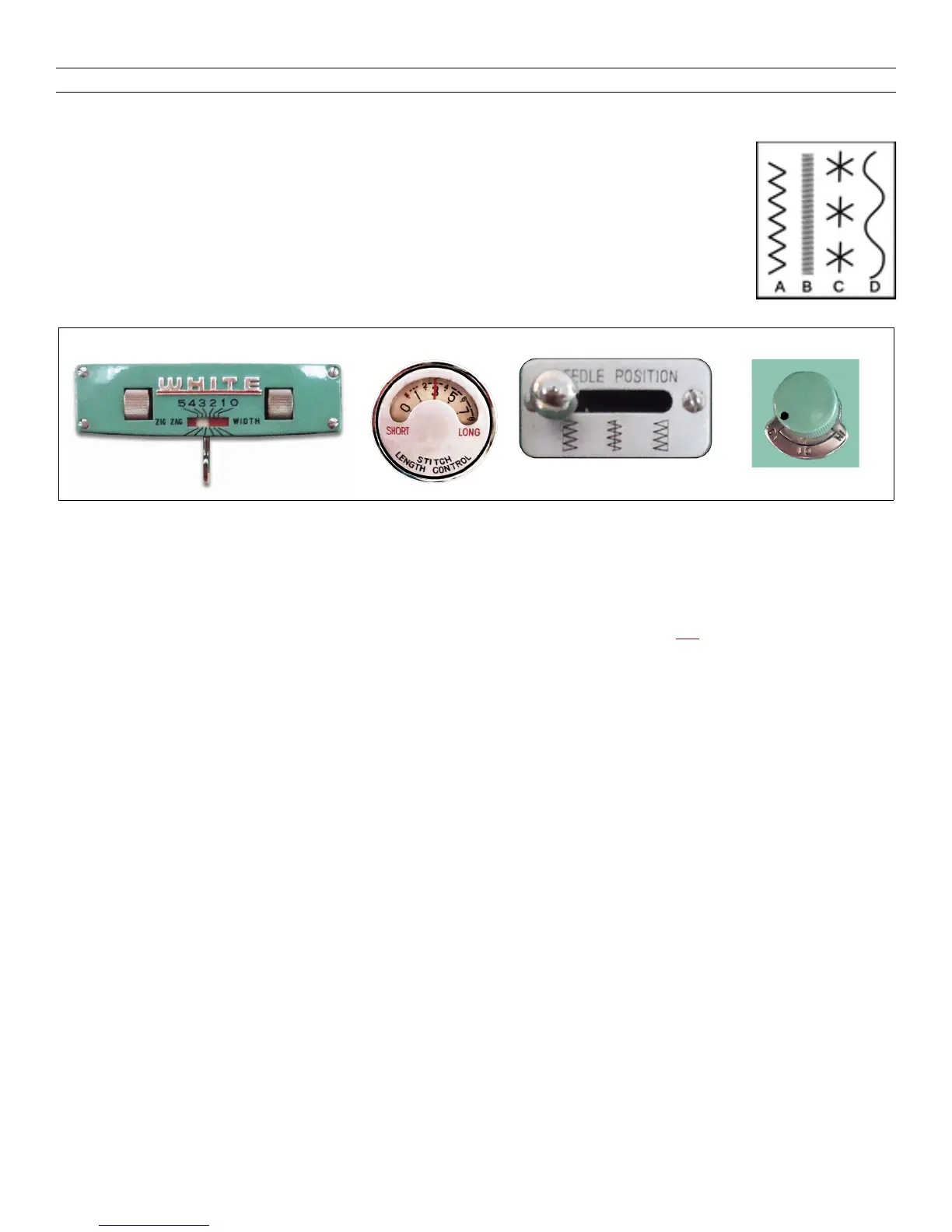
You Move Some Levers for Plain Zigzag — Satin Stitch — Creative Embroidery
There is no limit to the variety of stitch patterns you can sew
WITHOUT ANY CAM in the machine. Get well acquainted with the
use and effect of the four controls pictured below. Practice moving the
ZigZag Width Lever from side to side while running the machine. Do
likewise with the Needle Path Selector after pushing it in toward the
machine.
Plain Zigzagging (A) Set the Stitch LENGTH Dial at 4 — after a few stitches, vary the
length as desired. Set the Zigzag WIDTH so the dial’s white area extends from
1 to 5. Now sew, holding the Zigzag Width lever the LEFT side.
For Satin Stitching (B) Set the Stitch LENGTH Dial at marked ////// (about halfway
between 0 and 1). Set the Zigzag Dial’s white area for the width of the stitch
desired. Now sew, holding the zigzag lever to the LEFT. For variations, move
the lever right, left, and right while sewing.
Make Flower Petals (C) Turn the drop feed knob to DN. Set the ZZ Width Dial’s white
area to extend from 1 to 4. Sew three or four stitches holding the Zigzag lever to
the LEFT. Stop the machine with the needle down in the cloth at the center of
the petal design. Pivoting on the needle, turn the fabric to the next petal and
repeat the steps to complete. Turn the right side roller on the ZZ Width Dial so
that the lever goes right to 0. Put three or four stitches in the center of the
design to lock the threads.
Serpentine Stitching (D) Set the ZZ Width Dial’s white area to extend from 2 to 5.
Press the Needle Path Selector lever in toward the machine — then as you run
the machine, move that lever alternately from left to right continuing the motion
back and forth in rhythm.
ZIGZAG STITCH LENGTH OF STITCH NEEDLE PATH SELECTOR DROP FEED DIAL


 To Next Page