English
7
C535
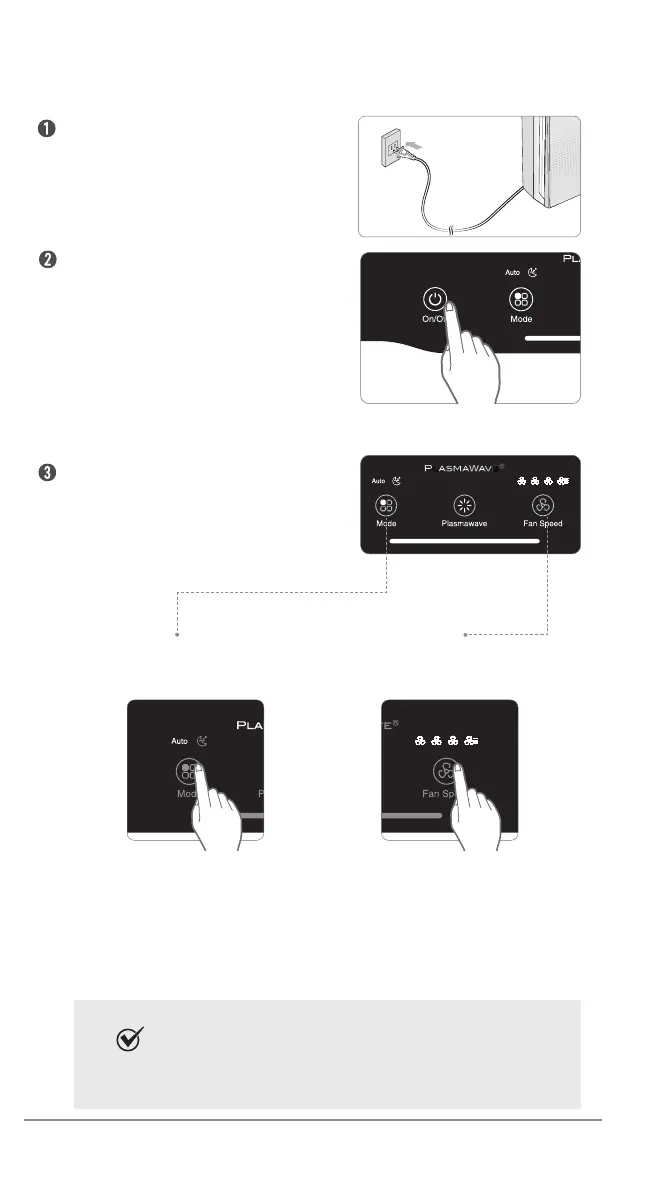
Set desired fan speed by
using Auto or Manual Mode.
By default, when the unit rst
powers on, the mode will be
set to Auto with PlasmaWave
®
enabled.
Insert the power cord
into an electrical outlet.
Press the "Power" button.
During the rst 30 seconds
of power up, the Air Quality
Indicator will cycle through
Blue, Amber and Red colors.
Smart Sensor (Odor Sensor) takes
approximately 4 minutes to gauge the air
quality in the environment before normal
operation begins.
INITIAL OPERATION
Auto Mode
Enables auto operation based
on air quality Smart Sensors.
1. Press the Mode button to select
Auto mode.
2. The LED ‘Auto’ light will indicate
when Auto mode is activated, and
operation will begin.
Manual Mode
Manually setting
the fan speed.
1. Press the Fan Speed button to set
the desired fan speed to Low, Medium,
High, or Turbo.
2. When Manual Mode is selected,
Auto Mode and Sleep Mode is
automatically disabled.
When in Auto mode the fan speed is automatically adjusted
according to the indoor air quality.
As the indoor air quality improves, the fan speed will
automatically be reduced. If the indoor air quality decreases,
the fan speed will automatically increase.
Note



 To Next Page