28
WPS-100-DVR-4CH Installation and Users Manual
6.1.1.1 DETECTION SETTINGS
The Detection Setting sub menu is used to customize motion detection settings including the motion
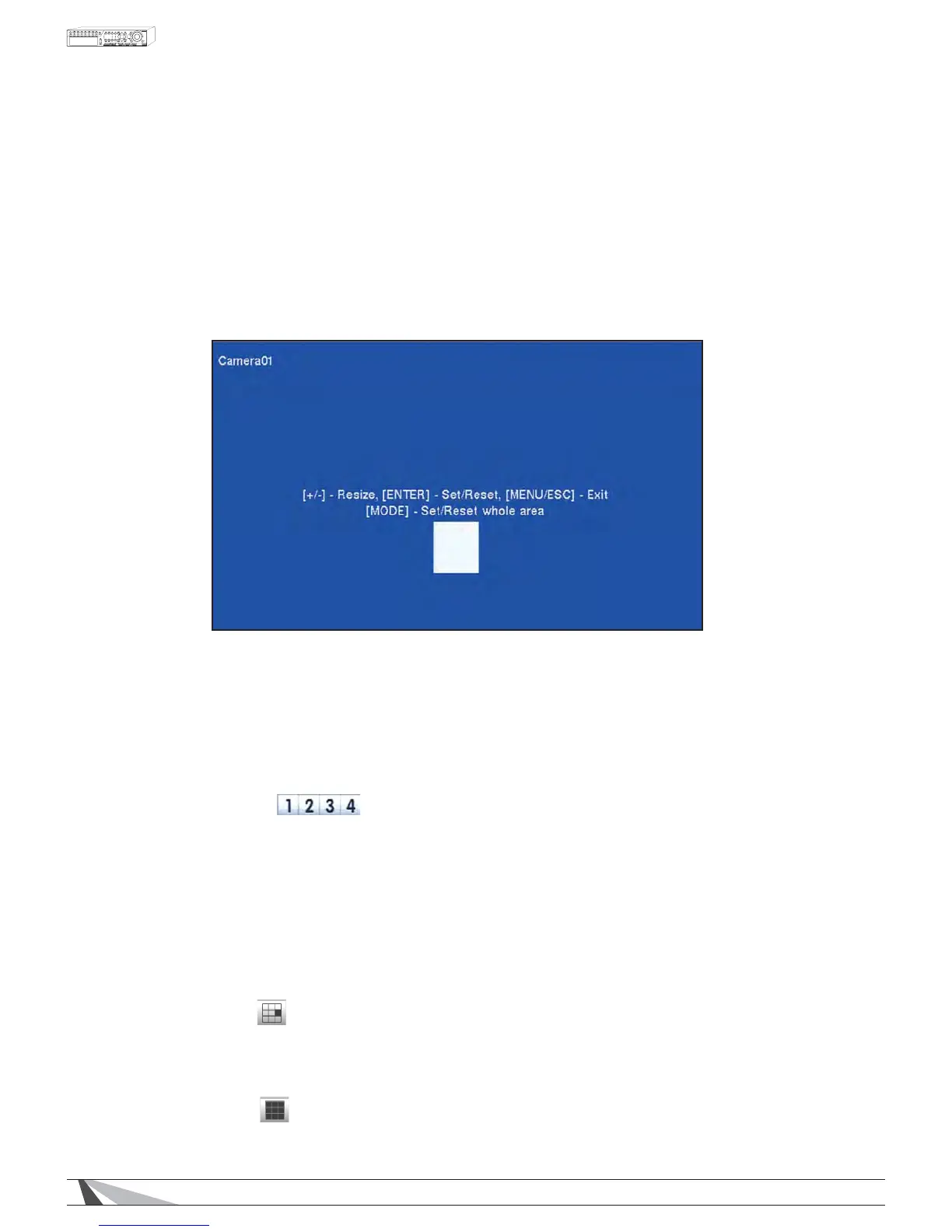
detection area(s) and sensitivity. In the Motion SetupPHQXKLJKOLJKWSettings in Detection and press
the ENTER button on the remote control to display the Motion Detection Settings sub menu for the
VHOHFWHGFDPHUD2QFHLQWKH0RWLRQ'HWHFWLRQVHWWLQJVXEPHQXDYLGHRZLQGRZLVGLVSOD\HGZLWKWKH
area divided into grids.
*ULGVgray in color indicate the area which WILL be used for motion detection.
Transparent grids indicate the area that will NOT be used for motion detection.
Yellow grids indicate the currently selected area referred to as the Mask area.
1RWH7KHGHÀQHGGHWHFWLRQDUHDDQGVHQVLWLYLW\DUHDOVRXVHGIRUWKHSmart Search feature
(Section 8.3). Smart Search will only use information stored “inside” of the detection area.
7KHUHZLOOQRWEHDQ\PRWLRQLQIRUPDWLRQVWRUHGE\WKH'95WKDWLV´RXWVLGHµRIWKHGHWHFWLRQ
DUHD(YHQLIPRWLRQGHWHFWLRQLVGLVDEOHGIRUDJLYHQFDPHUDLWLVUHFRPPHQGHGWRHQDEOH
the entire area if the Smart Search feature may be used.
7KHIROORZLQJLVDEULHIGHVFULSWLRQIRUHDFKLWHPLQWKHVXEPHQXDQGLWVVSHFLÀFRSHUDWLRQV
180(5,&
Press these buttons on the remote control to change the camera.
$OWHUQDWLYHO\XVHWKHPRXVHWRVHOHFWWKHGHVLUHGFDPHUD
ʆʈʉʇ
Press these buttons on the remote control to move the Mask window (grids yellow in color).
$OWHUQDWLYHO\XVHWKHPRXVHWRVHOHFWDQGPRYHWKHMask window (grids yellowLQFRORUE\´OHIW
FOLFNLQJµDQGGUDJJLQJWKHPRXVHRYHUWKHGHVLUHGDUHD
Press these buttons on the remote control to resize the Mask window
(grids yellow LQFRORU$OWHUQDWLYHO\XVHWKHPRXVHWRVHOHFWDQGPRYHWKHMask window (grids
yellowLQFRORUE\´OHIWFOLFNLQJµDQGGUDJJLQJWKHPRXVHRYHUWKHGHVLUHGDUHD
(17(5
Press this button on the remote control to Set/Reset the area of the
Mask window (grids yellow in color). Additional areas may be selected and added to the
GHWHFWLRQDUHD$OWHUQDWLYHO\XVHWKHPRXVHWRVHOHFWWKHSet/Reset icon and adjust the Mask
window (grids yellow in color).
02'(
Press this button on the remote control to Set/Reset the whole video area.
$OWHUQDWLYHO\XVHWKHPRXVHWRVHOHFWWKLVLFRQ


 To Next Page