6
WPS-100-DVR-4CH Installation and Users Manual
2. FRONT AND REAR PANELS AND REMOTE CONTROL
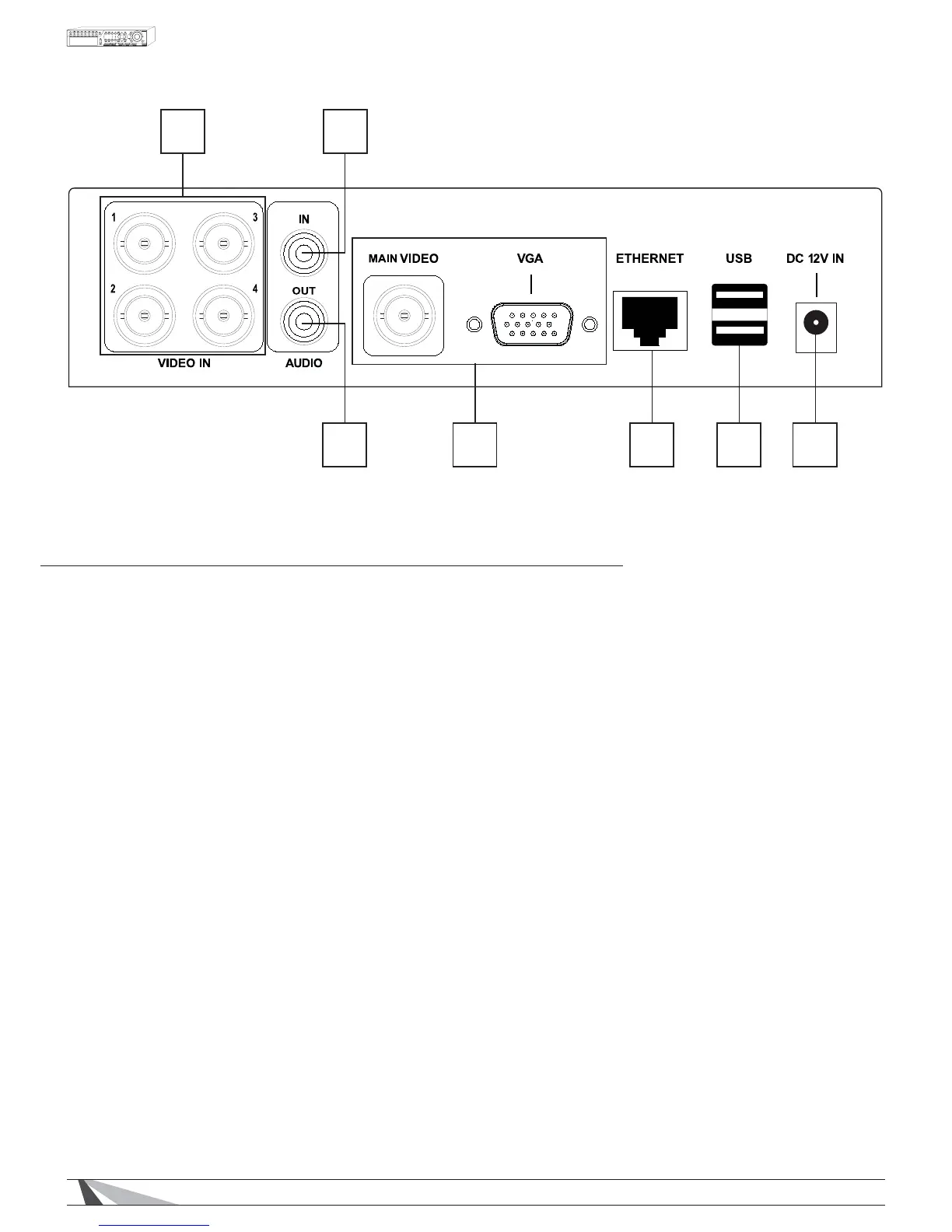
2.1 REAR PANEL
1. Video Input Connectors (4)
Connect system cameras to these BNC connectors.
2. Audio Input Connector (AUDIO IN)
5&$FRQQHFWRUIRUOLQHLQDXGLRVLJQDOVVXSSOLHGIURPH[WHUQDOGHYLFHVXFKDVDPLFURSKRQHDPSOLÀHU
3. Audio Output Connector (AUDIO OUT)
6XSSOLHVOLQHRXWDXGLRVLJQDOWRDQH[WHUQDOGHYLFHVXFKDVDQDPSOLÀHUFRQQHFWHGWRDVSHDNHU5HFRUGHGDXGLRZLOO
be supplied from AUDIO OUT during playback.
4. Main Monitor Output Connectors (BNC/VGA)
Connection to TV monitors via BNC or VGA connector for main monitor display.
5. Ethernet Connector
Connect this unit to a 10/100Base-T Ethernet network through this port.
6. USB connector
&RQQHFWWKHVXSSOLHG86%PRXVHDQGRU86%FRPSDWLEOHVWRUDJHGHYLFHVXFKDV86%GLVNGULYH'9'5:
FDUGUHDGHUHWF
7. Power Connection (DC IN)
Connect the supplied External Power Supply. Acceptable Range: 12V / 3.0A DC
1
45673
2


 To Next Page