30
WPS-100-DVR-4CH Installation and Users Manual
6.1.2 SCHEDULED RECORD
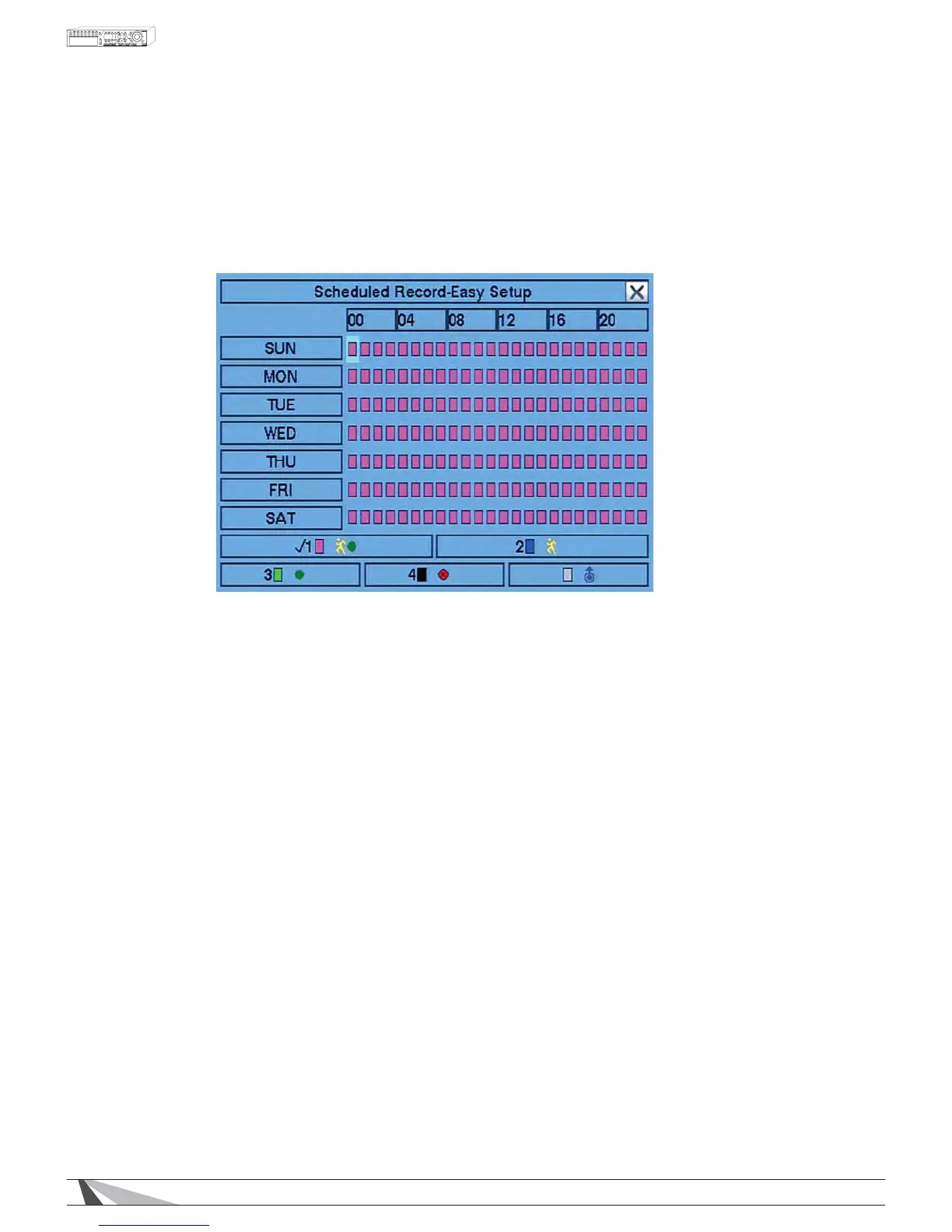
Within the Scheduled RecordPHQXEasy Setup allows the administrator to use a more visual method to setup the
scheduled record of the system.
Press the Mode button on the remote control to select Easy Setup from the Scheduled Record menu.
$OWHUQDWLYHO\XVHWKHPRXVHWRVHOHFWWKLVVXEPHQX
Recording options include:
- Pink: $ODUP0RWLRQDQG1RUPDO9LGHRDQG$XGLR5HFRUGLQJ'HIDXOWVHWWLQJ
- Purple: Alarm and Motion Video and Audio Recording only
- Red: Alarm Video and Audio Recording only
- Blue: Motion Video and Audio Recording only
- Green: Normal Video and Audio Recording only
- Black: No recording at all
To navigate and operate this menu:
ʆʈʉʇ
Press these buttons on the remote control to change the focus recording type.
$OWHUQDWLYHO\XVHWKHPRXVHWRVHOHFWWKHIRFXVUHFRUGLQJW\SH
1XPHULF
Press these buttons on the remote control to select one of the Recording Modes listed above.
Or press the ENTER button on the remote control when the focus is on the appropriate Recording Mode to
DFWLYDWHLW$OWHUQDWLYHO\XVHWKHPRXVHWRVHOHFWWKHDSSURSULDWH5HFRUGLQJ0RGH
Press these buttons to set the focus interval in increments of one hour (one grid for each hour) to the active
Recording Mode. Or press the ENTER button on the remote control set the focus interval to the active
5HFRUGLQJ0RGH$OWHUQDWLYHO\XVHWKHPRXVHWROHIWFOLFNDQGWKHQGUDJWKHPRXVHWRVHOHFWWKH
appropriate grids.
(6&
Press the ESC button on the remote control to escape from this menu and return to the Scheduled Record
6HWXSGLVSOD\PHQX$OWHUQDWLYHO\XVHWKHPRXVHWRH[LWWKHVXEPHQXE\FOLFNLQJRQWKH´XµOnce Easy
Setup is complete, the time segments for each conditional in Scheduled Record will be updated accordingly.


 To Next Page