75
WPS-100-DVR-4CH Installation and Users Manual
8.5 REMOTE VIEWING WITH A SMARTPHONE
1. INSTALL THE APPLICATION
1. Install the application
1.1. On iPhone
®
L3DG
®
RUL3RGWRXFK
®
A. Access the App Store
SM
using iTunes
®
or your Apple
®
'HYLFHDQG
search for WPS-DVR (WPS-DVR-HD).
B. Install and run WPS-DVR or WPS-DVR-HD on your Apple
®
Device.
1.2. On Android
™
Device
A. Access the Android
™
Market using your Android
™
Device
and search for WPS-DVR.
B. Install and run WPS-DVR on your Android
™
Device.
2. ADD THE DVR IN THE DEVICE LIST
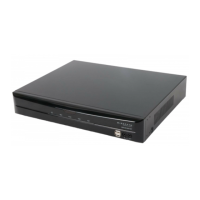
1. Select the Add button to add the
DVR to the Device List.
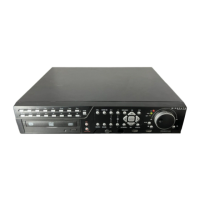
2. Enter a name for the DVR in Device Name.
3. Enter the DVR’s IP address or DDNS name
in Address.
,IFRQQHFWLQJRQDORFDOQHWZRUN
enter the IP address (Ex: 192.168.0.101).
,IXVLQJ''16HQWHUWKHUHJLVWHUHGGRPDLQ
name (such as smithdvr.dyndns.com).
Note: Do not precede the address with
´KWWSµRUDGGDSRUWQXPEHUWRWKH
end of the address.
4. Enter the Control Port and Data Port numbers
that match the settings of the DVR and the
URXWHUWKDWWKH'95LVFRQQHFWHGWR%\GHIDXOW
these numbers are 67 and 68 respectively.
5. Enter the User Name and Password for the
'95%\GHIDXOWWKHVHVHWWLQJVDUHuser and
1234 respectively.
6. Select Extra to connect to the DVR’s Extra
network stream or select Record to view the
0DLQVWUHDP:KHQ([WUDLVVHOHFWHGWKH
resolution of the live stream being viewed will be
determined by the Video Stream setting in the
Network Menu:KHQ5HFRUGLVVHOHFWHGWKH
resolution of the stream will match that of the
Best REC Resolution set in the Pre-Camera
Menu. The Record setting offers the most
resolution but requires a high-speed network
connection. The Extra setting will improve
the speed of the video but at a lower resolution.
,IHQDEOHGAuto Connect will establish a
connection with the DVR as soon as the
application is opened.
8. Select the OK button once settings are complete.
Recommendation: Enter two devices per DVR to the
'HYLFH/LVW2QHFRXOGEHQDPHG´/RFDOµDQGWKH
VHFRQG´5HPRWHµ:KHQWKHXVHULVFRQQHFWHGWRWKH
VDPHORFDOQHWZRUNDVWKH'95DQGVHOHFWV´/RFDOµ
the user will experience faster network speed. When
FRQQHFWHGWRDUHPRWHQHWZRUNWKHXVHUVKRXOGVHOHFW
´5HPRWHµWRVWLOOKDYHDFFHVVWRWKH'95
WPS-DVR


 To Next Page