37
WPS-100-DVR-4CH Installation and Users Manual
*$7(:$<
Enter the Gateway IP address for the system.
'16
If using DNSHQWHUWKH'RPDLQ1DPH6HUYHUDGGUHVVIRUWKHV\VWHP
86(51$0(
,I333R(LVXVHGHQWHUWKHUsername for the system.
3$66:25'
,I333R(LVXVHGHQWHUWKHPassword for the system.
''167<3(
Press +/- buttons on the remote control to select the Dynamic Domain. Name Server type to Dynamic,
Static, or Custom DDNSW\SH&RQWDFWWKH''166HUYLFH3URYLGHUWRJHWWKH''16W\SH''1685/
XVHUQDPHDQGSDVVZRUGRUUHIHUWRWKH'\Q'16''166HWWLQJVGRFXPHQWRQZHEVLWHIRUGHWDLOVRQKRZ
to use the free service from DynDns.
85/
Enter the DDNS URL if DDNS is used.
''1686(51$0(
Enter the DDNS Username if DDNS is used.
''163$66:25'
Enter the DDNS Password if DDNS is used.
(0$,/
Press ENTER on the remote to display the E-mail Setup menu.
$OWHUQDWLYHO\XVHWKHPRXVHWRHQWHUWKLVPHQX5HIHUWRSection 6.10.1 for details.
$'9
Press ENTER on the remote to display the Advanced Network Setup
PHQX$OWHUQDWLYHO\XVHWKHPRXVHWRHQWHUWKLVPHQX5HIHUWRSection 6.10.3 for details.
6.4.1 E-MAIL SETUP
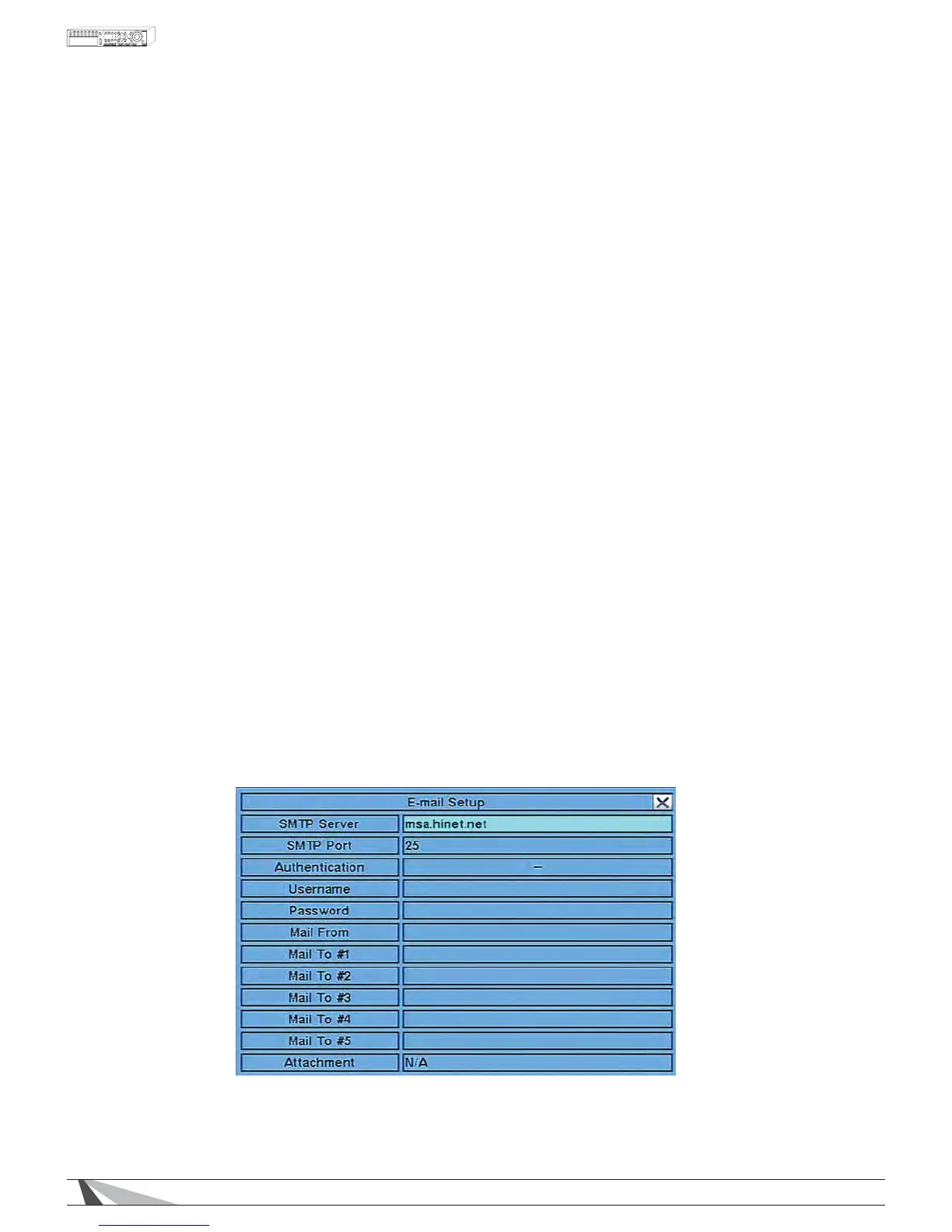
The E-mail Setup allows the administrator to set E-mail related parameters. When an event occurs and E-mail is
HQDEOHGIRUWKHFRUUHVSRQGLQJDFWLRQDQHPDLOZLOOEHVHQWEDVHGRQWKHSDUDPHWHUVVHWLQWKLVPHQX
In Network SetupSUHVVENTER to display E-mail Setup as shown when the highlighted option is E-mail.


 To Next Page