65
WPS-100-DVR-4CH Installation and Users Manual
8.3.4 PRE CAMERA
This feature is not available on WPS-100-DVR-4CH.
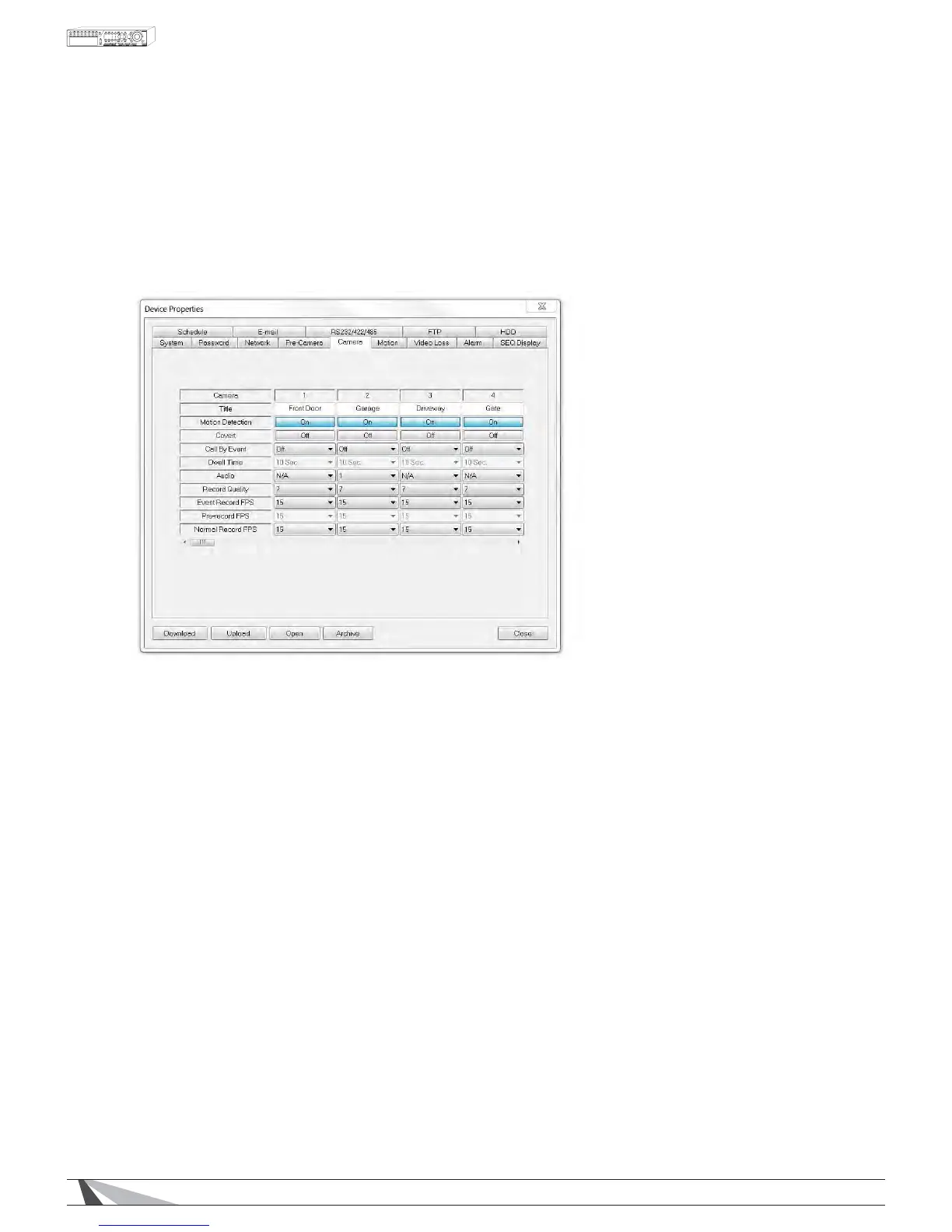
8.3.5 CAMERA
The CameraVHWXSDOORZVWKHDGPLQLVWUDWRUWRGHÀQHDGGLWLRQDODWWULEXWHVIRUHDFKFDPHUD
7KHIROORZLQJLVDEULHIGHVFULSWLRQIRUHDFKLWHPLQWKLVPHQXDQGLWVVSHFLÀFRSHUDWLRQV
7,7/(
Name each camera with a unique identifying name up to eight characters maximum.
027,21'(7(&7,21
Enable or disable motion detection for the selected camera. Default setting enables this feature.
1RWH7KLVKDVQRHIIHFWRQ6PDUW6HDUFKIXQFWLRQV
&29(57
,IDFDPHUD·VFRYHUWIXQFWLRQLVHQDEOHGWKHYLGHRRIWKLVFDPHUDFDQRQO\EHVHHQLIWKHXVHUKDVORJJHG
in as an Administrator. The default setting is disabled.
&$//%<(9(17
,IWKHIROORZLQJHYHQWVRFFXUIRUWKLVFDPHUDWKHPDLQGLVSOD\9*$RU%1&ZLOOVZLWFKWRWKHYLGHRRIWKLV
FDPHUDIRUDVSHFLÀHGSHULRGRIWLPHGZHOO2SWLRQVDUHOff, Motion, Alarm, Both0RWLRQ$ODUP
':(//7,0(
8VHGLQFRQMXQFWLRQZLWK&DOO%\(YHQWDwell TimeVSHFLÀHVKRZORQJWKHPDLQGLVSOD\ZLOOVKRZWKH
camera on the screen. The Dwell Time can be set from 3 to 60 seconds
$8',2
Select the corresponding AUDIO IN input for the camera. The audio for the selected AUDIO IN input will
be recorded along with the video for this camera. Selections include N/A or AUDIO Inputs 1 or 2. The
$8',2,13876FDQRQO\EHDVVLJQHGWRRQHFDPHUDHDFK7KHGHIDXOWVHWWLQJLV´1$µ
1RWH7KHDXGLRZLOORQO\EHKHDUGZKHQLQIXOOZLQGRZYLHZRIWKHFRUUHVSRQGLQJFDPHUDDQGWKH
$XGLR2XWEXWWRQLVHQDEOHG
5(&25'48$/,7<
Select the Record Quality for each camera. Values range from 1-9ZLWK1 the lowest quality and 9 the
highest quality.


 To Next Page