33
WPS-100-DVR-4CH Installation and Users Manual
Press the ESC button on the remote control to escape from this menu and return to the main menu.
$OWHUQDWLYHO\XVHWKHPRXVHWRH[LWWKHVXEPHQXE\FOLFNLQJRQWKH´Xµ,IWKHFRQWHQWVLQWKLVPHQXKDYH
EHHQPRGLÀHGDSave dialog box will be displayed requesting the user to save the changes. Press ENTER on
WKHUHPRWHFRQWUROWRH[LWDQGVDYHESC to exit without saving. Another method to escape is to use the
PRXVHWR´ULJKWFOLFNµDQGH[LWWKHVXEPHQX
7KHIROORZLQJLVDEULHIGHVFULSWLRQIRUHDFKLWHPLQWKLVPHQXDQGLWVVSHFLÀFRSHUDWLRQV
*8(67/(9(/
If Guest LevelLVHQDEOHGDXVHULVDEOHWRDFFHVVWKHV\VWHPDWDSUHVHWOHYHOAdministrator, Supervisor,
OperatorZLWKRXWORJJLQJLQWRWKHV\VWHP6HOHFW´´WRGLVDEOHWKLVIHDWXUHGHIDXOWVHWWLQJ3UHVV+/-
EXWWRQVRQWKHUHPRWHFRQWUROWRFKDQJHWKHOHYHO$OWHUQDWLYHO\XVHWKHPRXVHWRVHWWKLVIHDWXUH
WARNING – This feature could allow unwarranted access to the DVR. Caution is strongly advised when
enabling this feature.
$872/2*287
,IWKHUHLVQRXVHURSHUDWLRQLQWKHWLPHVHOHFWHGIURPPLQXWHWRKRXUVWKHXVHUZLOODXWRPDWLFDOO\EH
ORJJHGRXW6HOHFW´´WRGLVDEOHWKLVIHDWXUHGHIDXOWVHWWLQJ3UHVV+/- buttons on the remote control to
FKDQJHWKLVVHWWLQJ$OWHUQDWLYHO\XVHWKHPRXVHWRVHWWKLVIHDWXUH
/2*,11$0(
Enter a unique Name for each user. Follow the Text Input method described in Section 4.1 to enter this
information.
3$66:25'
Enter a unique Password (numbers only) for each user. Follow the Text Input method described in
Section 4.1 to enter this information.
/(9(/
Select the appropriate access level (Administrator, Supervisor, Operator, or Customized) for each user.
Press +/-EXWWRQVRQWKHUHPRWHFRQWUROWRFKDQJHWKLVOHYHO$OWHUQDWLYHO\XVHWKHPRXVHWRVHWWKHOHYHO
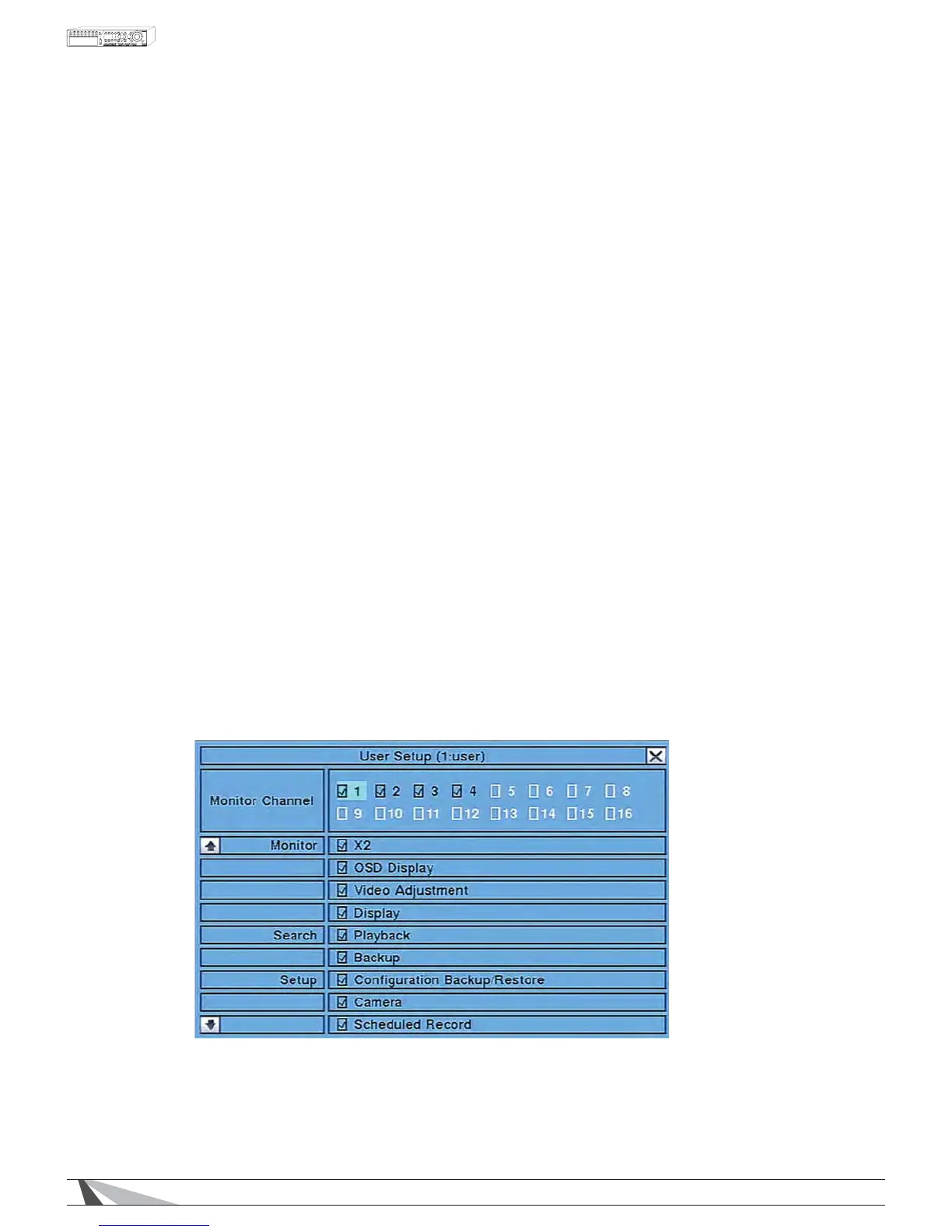
$'9
For CustomizedDFFHVVSHUXVHUSUHVVENTER on the remote control to display the Advanced User Setup as
shown in Section 6.7.1 below.


 To Next Page