45
WPS-100-DVR-4CH Installation and Users Manual
To navigate and operate this menu:
02'(
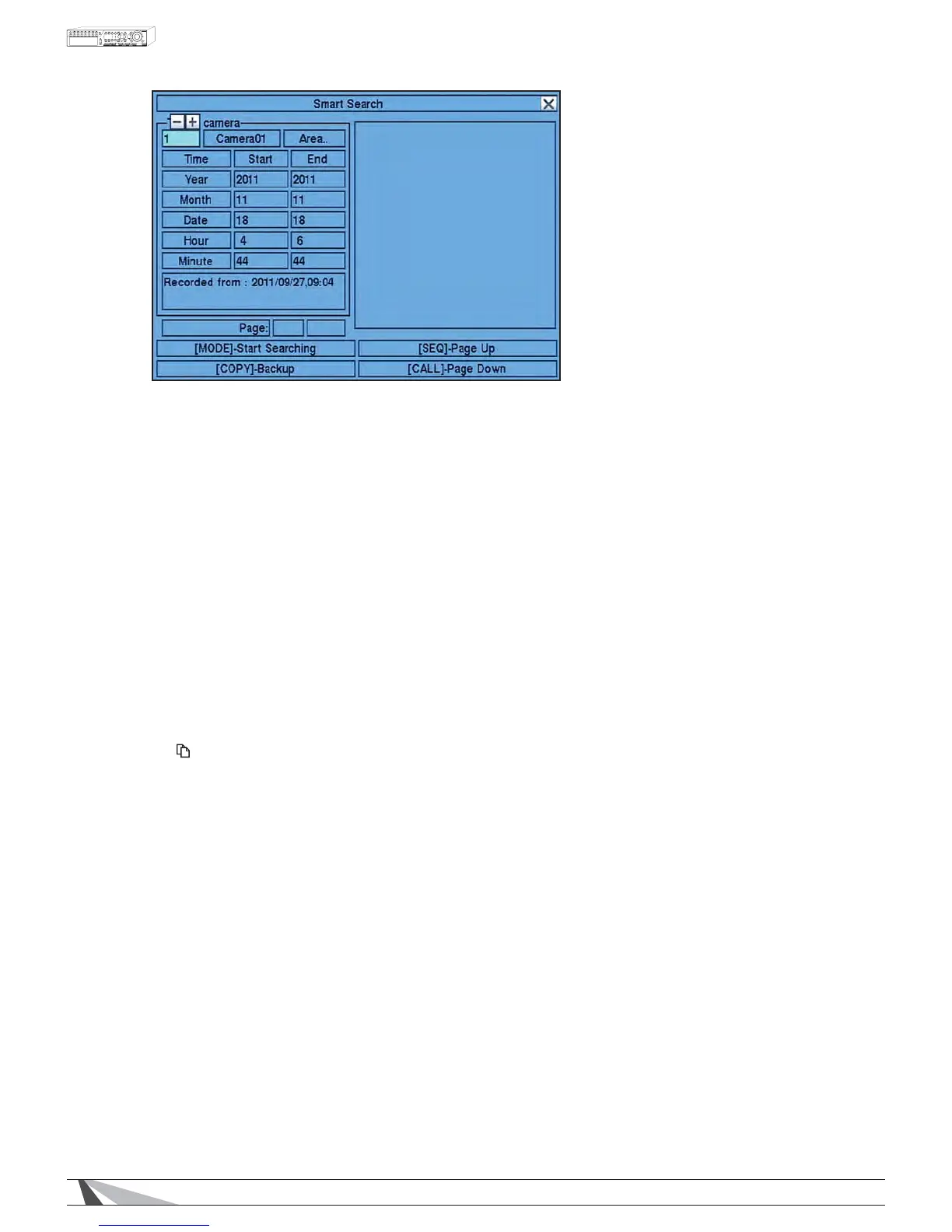
Press the Mode button on the remote control to begin searching the recorded video and audio based
on the selected search Time, Camera, and Motion Area$OWHUQDWLYHO\XVHWKHPRXVHWRVHWWKHSDUDPHWHUV
and begin the search. The search results will be displayed on the right half of the dialog box.
1RWH7RSUHYHQWWKH Smart SearchIHDWXUHIURPRYHUORDGLQJWKHV\VWHPDPD[LPXPRIXSWR
PDWFKHGÀOHVRU*%RIKDUGGULYHVWRUDJHIRUHDFKUHFRUGSDUWLWLRQZLOOEHVHDUFKHGEDVHGRQWKH
start time entered.
SEQ
Use the SEQ button on the remote control to scroll the results Page Up.
$OWHUQDWLYHO\XVHWKHPRXVHWRVHOHFWWKHPage Up option.
&$//
Use the CALL button on the remote control to scroll the results Page Down.
$OWHUQDWLYHO\XVHWKHPRXVHWRVHOHFWWKHPage Down option.
1XPHULF
Press the numeric buttons on the remote control followed by the ENTER button to select the display page of
WKHUHVXOWV$OWHUQDWLYHO\XVHWKHPRXVHWRFOLFNWKH3DJH1XPEHUER[
&RS\ )
Select the COPY button from the remote control to backup (copy) the selected type of recorded video
(beginning from the Search Time) to the connected backup device. The Backup menu (described in the
Archive portion of Section 8.6ZLOOEHGLVSOD\HG$OWHUQDWLYHO\XVHWKHPRXVHWRVHOHFWWKHCOPY button.
7KHIROORZLQJLVDEULHIGHVFULSWLRQIRUHDFKLWHPLQWKLVPHQXDQGLWVVSHFLÀFRSHUDWLRQV
&$0(5$,'
Press +/-EXWWRQVRQWKHUHPRWHFRQWUROWRFKDQJHWKHFDPHUD,'WREHVHDUFKHGIRUPDWFKLQJÀOHV
Altenatively use the mouse to enter the Camera ID number.
67$57(1'7,0(
Press +/- buttons on the remote control to modify the beginning and end of the search time for the
recorded video and audio. Enter the appropriate Year, Month, Date, Hour, and Minute$OWHUQDWLYHO\XVH
the mouse to enter these parameters.
0$7&+('),/(/,67
The results of the Smart SearchZLOOEHGLVSOD\HGLQWKHULJKWVLGHRIWKHGLDORJER[7KHÀOHVDUHVKRZQ
from oldest to newest and a page number is shown on the lower-left corner of the dialog box.
The user may:
1. Press the ENTER button on the remote control to select or deselect DPDWFKLQJHYHQWÀOHLQWKHUHVXOWV
OLVW0XOWLSOHHYHQWVFDQEHVHOHFWHGLQWKLVPDQQHU$OWHUQDWLYHO\XVHWKHPRXVHWRVHOHFWRU
deselect each event.


 To Next Page