EN-23
Withings Aura
v2.0 | July, 2015
Using the Connected Alarm Clock
Using the Reading Light
Your Connected Alarm Clock oers a reading light feature.
• You can turn on the light by gently tapping the top.
• You can turn o the light by gently tapping the top one more time.
• You can change the color and intensity of the light by swiping your hand up or
down on the right side while the light is on.
Setting an Alarm
Adding a new Alarm from the Withings Health Mate app
You can add dierent alarms for dierent days of the week. To add an alarm,
perform the following steps:
1. Open the Withings Health Mate app.
2. Go to Devices.
3. Look for your Aura.
4. Touch Next alarm.
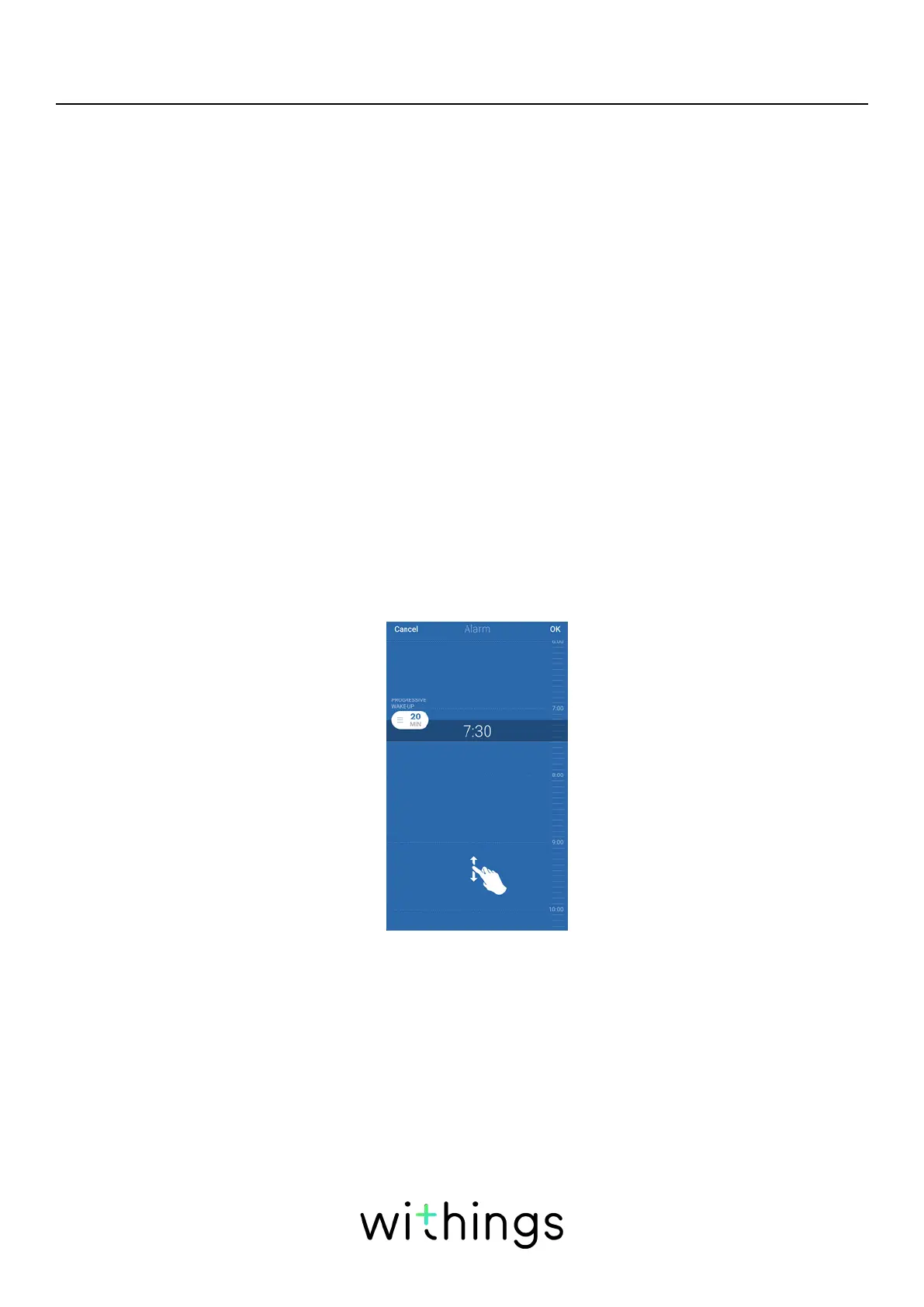
5. Tap and slide the wake up time up or down to select the desired alarm time.
You can only select times in multiples of five minutes.
6. Tap and slide Progressive Wake-Up to decide when it should be triggered
(optional).
You can set it to up to 20 minutes.
Refer to “Progressive Wake-Up Feature” on page29 for more information.
If you have a Sleep Sensor, the Progressive Wake-Up feature is replaced with
the Smart Wake-Up feature.
Refer to “Smart Wake-Up Feature” on page29 for more information.
7. Tap Save.


 To Next Page