EN-52
Withings Aura
v2.0 | July, 2015
Using the Sleep Sensor
Tracking Your Sleep
Overview
Once you’ve set up your Sleep Sensor, it lets you track your sleep without
requiring any action on your part. All you have to do is lay in bed: it will do the
rest on its own.
If you want to stop tracking your sleep at any point, refer to “Deactivating sleep
tracking” on page53.
Retrieving your sleep data
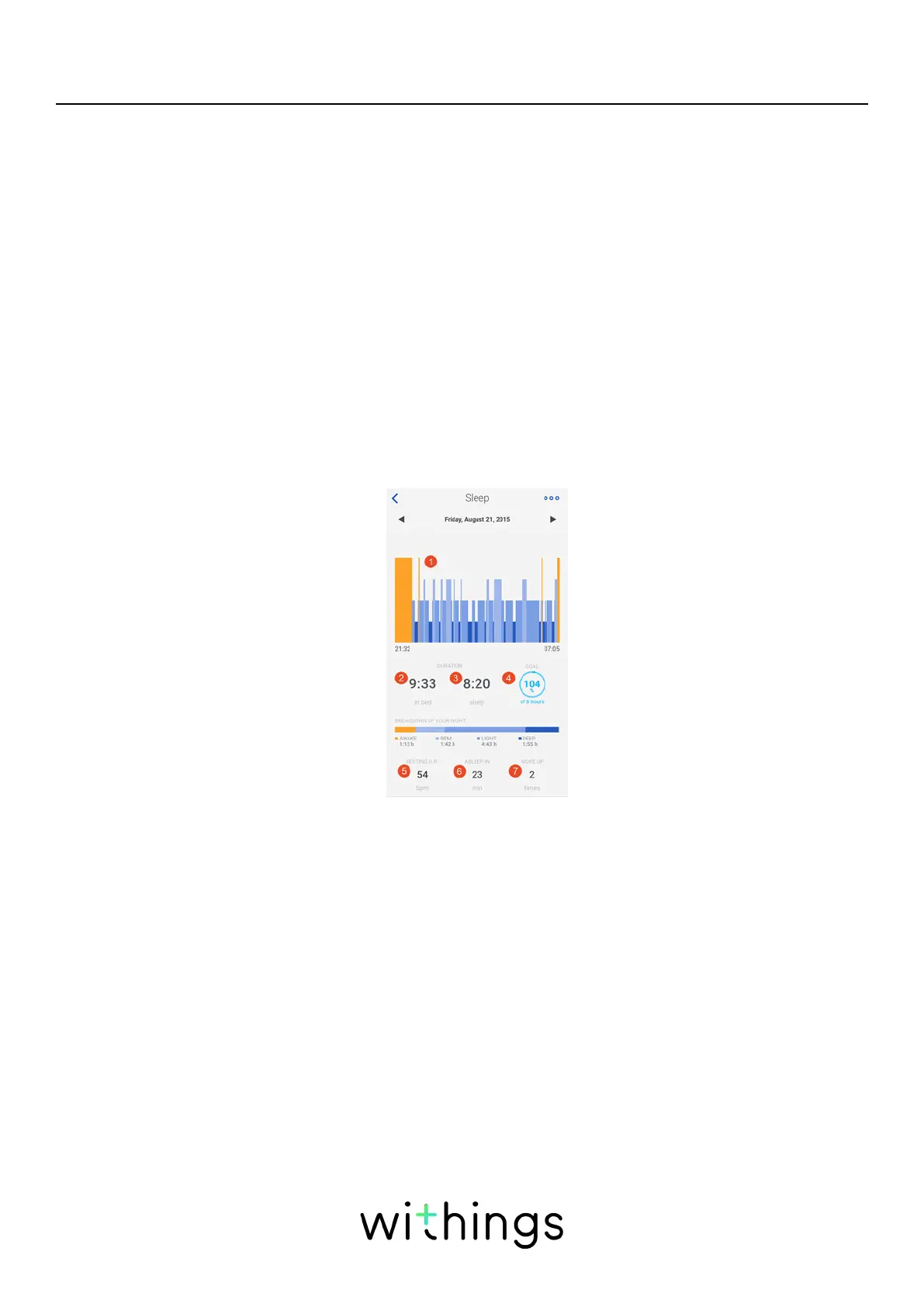
You can retrieve the sleep data collected by your Sleep Sensor in your Timeline
or on your Dashboard in the Withings Health Mate app.
(1)Breakdown of your
night:
- Time spent awake
(orange)
- Duration of REM sleep
(light blue)
- Duration of light sleep
cycle (medium blue)
- Duration of deep sleep
cycle (dark blue)
(2)Time spent lying in
bed
(3)Total time spent
sleeping
(4)Percentage of the
sleep goal (of 8 hours)
(5)Resting heart rate
(6)Time it took for you
to fall asleep
(6)Number of wake-ups
The Withings Health Mate app keeps your entire history, allowing you to easily
track how your sleep data evolves over time.


 To Next Page