Personnel:
n
Operator
Prerequisites:
• The slide switch is in the “ON” position (ChronoMaster Air
only).
• The device is connected to the PC or tablet computer.
• The “Chronoscope Service” display software has been
started.
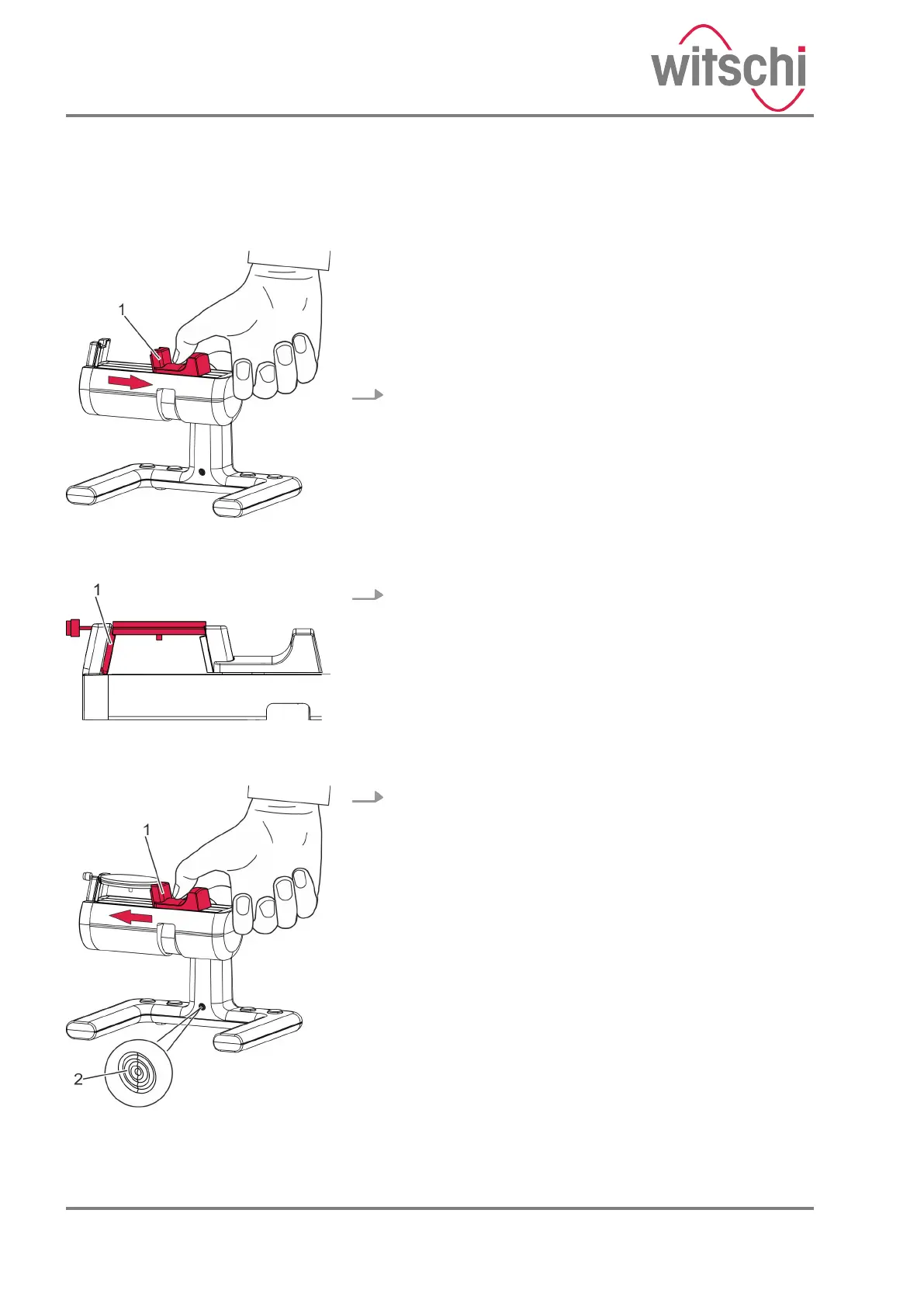
1. Pull the clamping jaw (Fig. 15/1) outwards and hold it.
2. Place the watch movement on the clamping area so that
the plate is positioned above the signal sensor (Fig. 16/1).
3. Carefully guide the clamping jaw (Fig. 17/1) to the watch
movement.
ð
• The watch movement without housing is clamped.
• The LED on the device (Fig. 17/2) flashes at the
same frequency as the watch beats.
• The measuring process starts automatically
(Fig. 18).
Alternatively, the measurement can be started using
the “Restart” button in the display software.
Clamping the watch movement
without housing
Fig. 15: Tightening the clamping
jaws
Fig. 16: Watch movement clamped
without housing
Fig. 17: Releasing the clamping jaw
24.03.2021Precision measuring device ChronoMaster / ChronoMaster Air32



 To Next Page