29 VoIPNetworkServicesGmbH,Justus‐von‐Liebig‐Str.26,31535Neustadt
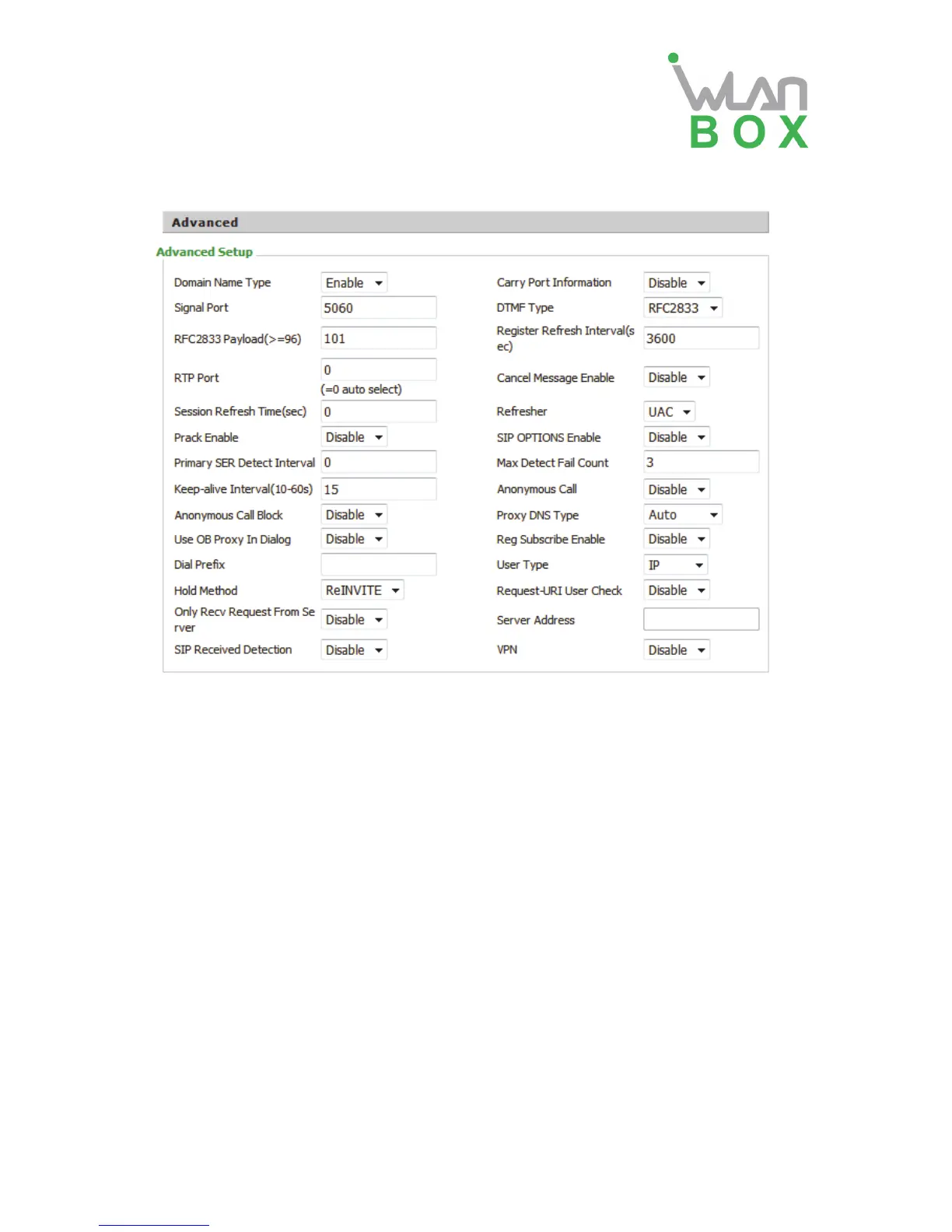
4) Advanced
Field Name Description
Domain Name Type If or not use domain name in the SIP URI.
Carry Port Information If or not carry port information in the SIP URI.
Signal Port The local port of SIP protocol, default is 5060.
DTMF Type Choose the DTMF type from Inbound, RFC2833 and SIP
INFO.
RFC2833 Payload (>=96) User can use the default setting.
Register Refresh Interval The interval between two normal Register messages. You
can use the default setting.
RTP Port Set the port to send RTP. The device will select one idle
port for RTP if you set “0”; otherwise use the value which
user sets.
Cancel Message Enable When you set enable, an unregistered message will be
sent before registration, while you set disable, unregistered
message will not be sent before registration. You should
set the option for different Proxy.
Session Refresh Time (sec) Time interval between two sessions, you can use the
default settings.
Refresher Choose refresher from UAC and UAS.
Prack Enable If or not enable prack.
SIP OPTIONS Enable When you set enable, the device will send SIP-OPTION to
the server, instead of sending periodic Hello message. The
sending interval is Keep-alive interval.


 To Next Page