13 VoIPNetworkServicesGmbH,Justus‐von‐Liebig‐Str.26,31535Neustadt
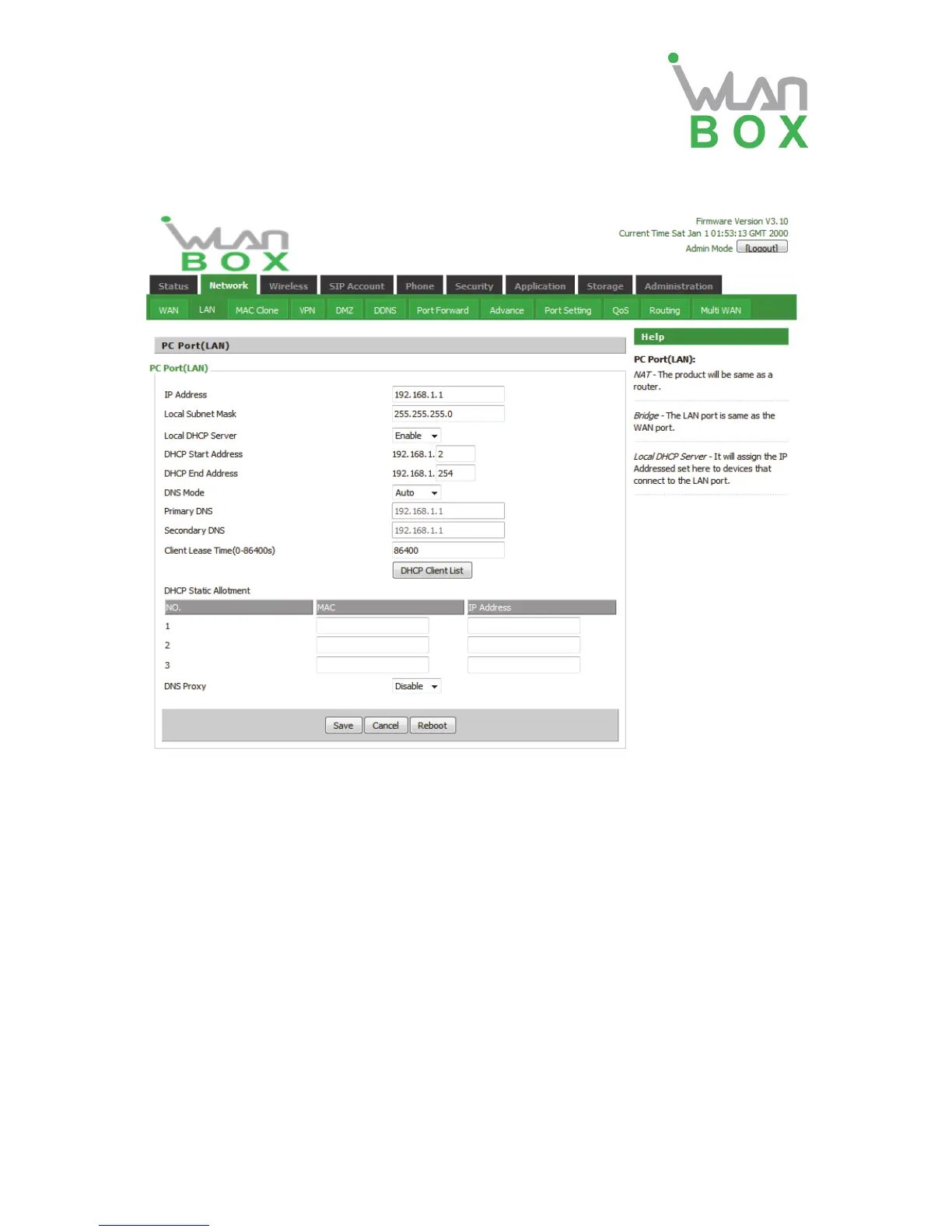
4.2.2 LAN
Field Name Description
IP Address Enter the IP address of the router on the local area network, all the
IP addresses of the computers which are in the router’s LAN must
be in the same network segment with this address, and the default
gateway of the computers must be this IP address. (The default is
192.168.1.1)
Local Subnet Mask Enter the subnet mask to determine the size of the network
(default is 255.255.255.0/24)
Local DHCP Server If or not enable Local DHCP Server
DHCP Start Address Enter a valid IP address as a starting IP address of the DHCP
server, and if the router’s LAN IP address is 192.168.1.1, starting
IP address can be 192.168.1.2 or greater, but should be less than
the ending IP address.
DHCP End Address Enter a valid IP address as an end IP address of the DHCP server.
DNS Mode Select DNS mode, options are Auto and Manual:
When DNS mode is Auto, the device under LAN port will
automatically obtains the preferred DNS and alternate DNS.
When DNS mode is Manual, the user should manually
configure the preferred DNS and alternate DNS


 To Next Page