20 VoIPNetworkServicesGmbH,Justus‐von‐Liebig‐Str.26,31535Neustadt
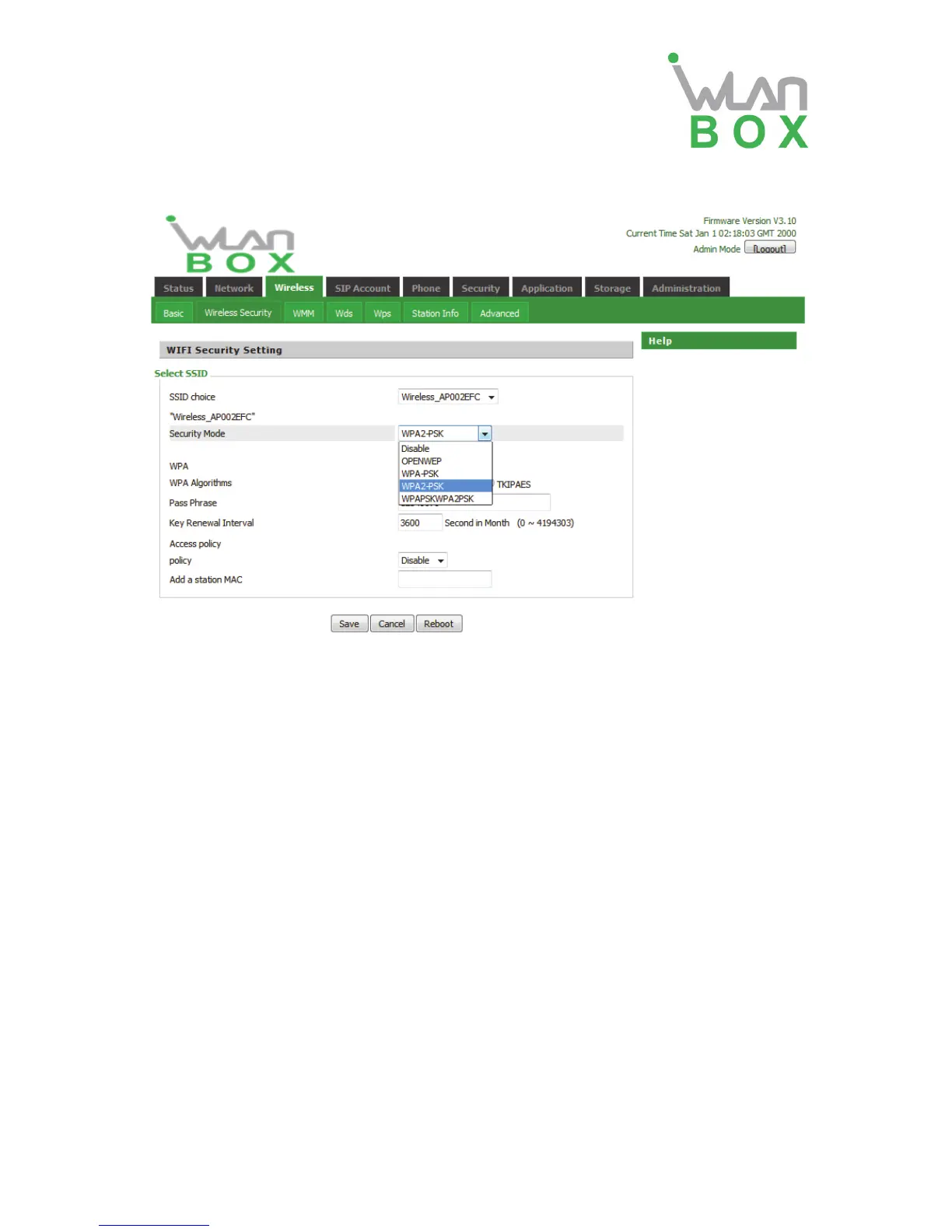
4.3.2 Wireless Security Setting
SSID choice Select a SSID from SSID, multi SSID1, multi SSID2. multi-SSID3.
Security Mode Select an appropriate encryption mode to increase the security and
privacy features of wireless dhome gateway.
Select a different encryption mode, the web interface will be different, user can configure the
corresponding parameters under the mode you select. Here are some common encryption
method:
OPENWEP,
A handshake way of WEP encryption, encryption via the WEP key: WEP represents Wired
Equivalent Privacy, which is a basic encryption method.
Security Mode This is used to select one of the 4 WEP keys, key settings on the
clients should be the same with this when connecting.
WEP Keys Set the WEP key. A-64 key need 10 Hex characters or 5 ASCII
characters; choose A-128 key need 26 Hex characters or 13 ASCII
characters.
WPA-PSK,
the router will use WPA way which is based on the shared key-based mode:
WPA Algorithms This item is used to select the encryption of wireless dhome
gateway algorithms, options are TKIP, AES and TKIPAES.
Pass Phrase Setting up WPA-PSK security password.
Key Renewal Interval Set the key scheduled update cycle, default is 3600s.
WPA2-PSK,
the router will be based on shared key WPA2 modes:


 To Next Page