32 VoIPNetworkServicesGmbH,Justus‐von‐Liebig‐Str.26,31535Neustadt
Handset Volume Adjust the output gain from 0 to 7.
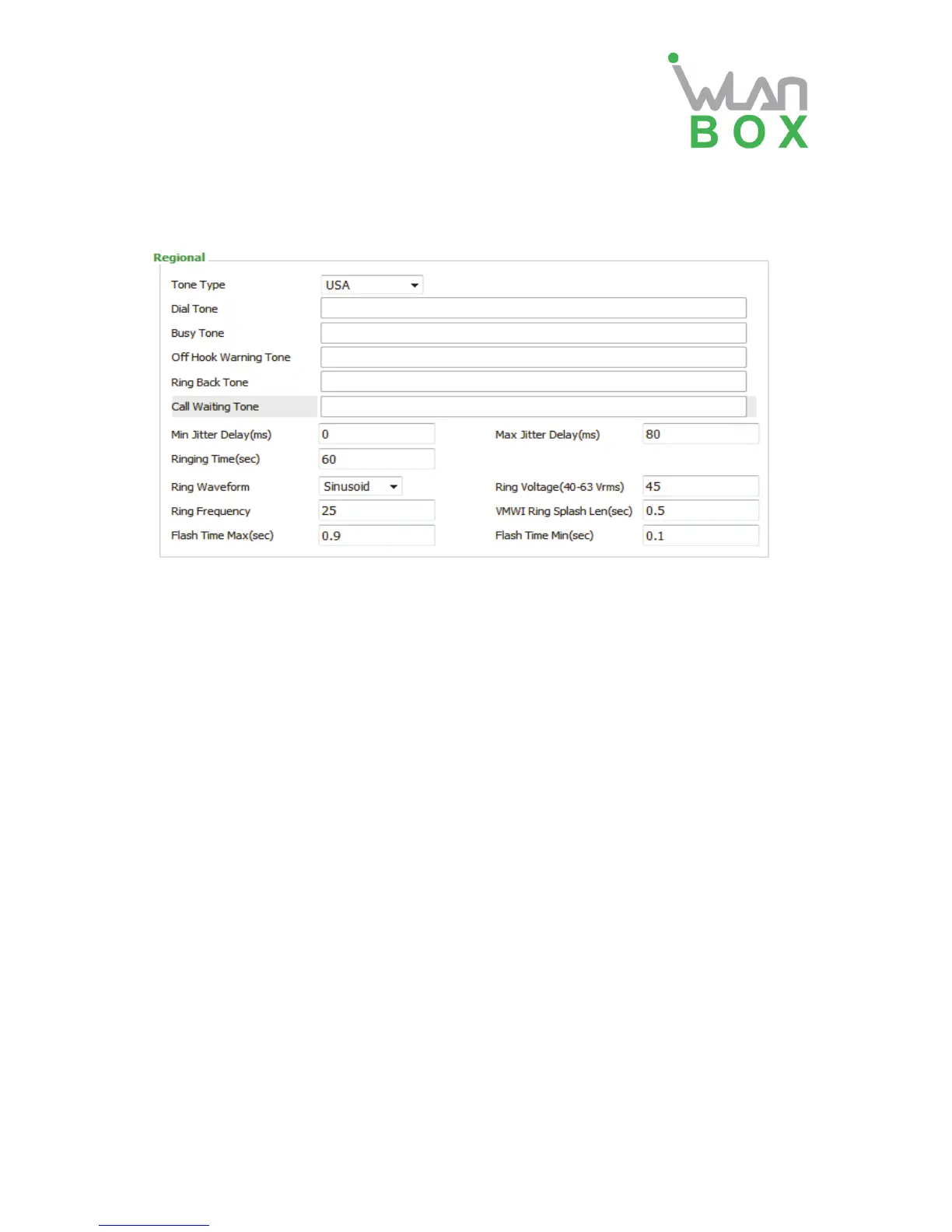
2) Regional
Field Name Description
Tone Type Choose tone type form China, US, Hong Kong and so on.
Dial Tone Dial Tone
Busy Tone Busy Tone
Off Hook Warning Tone Off Hook warning tone
Ring Back Tone Ring back tone
Call Waiting Tone Call waiting tone
Min Jitter Delay The Min value of home gateway’s jitter delay, home gateway is an
adaptive jitter mechanism.
Max Jitter Delay The Max value of home gateway’s jitter delay, home gateway is an
adaptive jitter mechanism.
Ringing Time How long WB100A will ring when there is an incoming call.
Regional Ring Waveform Select regional ring waveform, options are Sinusoid and
Trapezoid, the default Sinusoid.
Regional Ring Voltage Set ringing voltage, the default value is 70
Regional Ring Frequency Set ring frequency, the default value is 25
VMWI Ring Splash Len(sec) Set the VMWI ring splash length, default is 0.5s.
Flash Time Max (sec) Set the Max value of the device’s flash time, the default value is
0.9
Flash Time Min (sec) Set the Min value of the device’s flash time, the default value is 0.1


 To Next Page