38
User Manual WMF1200F
Settings | Basic settings
5.3.12 PIN entry and PIN protection
Touch to open the change PIN menu
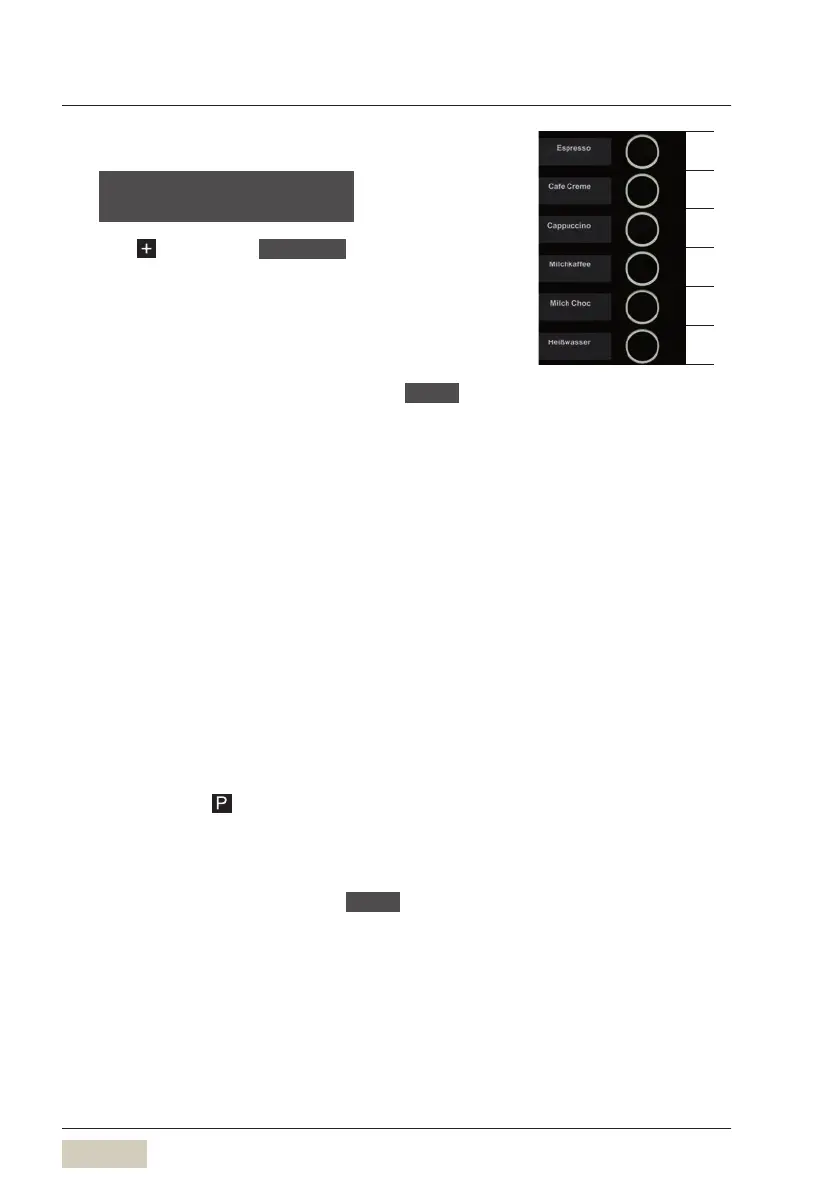
Enter the PIN using the beverage buttons. The
uppermost button is 0, the second is 1, the third is
2,etc.
Initial PIN entry (activate PIN)
When shipped from the factory, the PIN is 00000 .
Briefly press the uppermost beverage button five
times
Each time it is pressed, a“zero” is entered and appears
on the display.
Enter the desired PIN
PIN protection
The activated PIN affects the following functions.
• Counters
Counters can be cleared only after entering the PIN.
• When self-service mode is active, the functional
pads are deactivated (unilluminated.)
The functional pads can be activated again only
after the PIN has been entered.
Activate the care pad with PIN protection
Touch and hold
for longer than 3seconds
The care pad is displayed again.
Deactivate PIN protection
Enter the current PIN and set to
00000
change PIN
OK: P change: -/+
0
1
2
3
4
5
Use beverage buttons to enter
the PIN
Counters
w page 39
SB mode (self-service mode)
w page 37



 To Next Page