69
User Manual WMF1200F
Safety and warranty
Cleaning instructions
33 2668 9010 1.0 08.2013
Cleaning instructions WMF1200F
Please refer to the User Manual.
Follow the overview of the cleaning interval schedule in the Care chapter in the
UserManual.
Prior to the first cleaning, read the User Manual, Care chapter.
The combi spout must be installed for all automatic cleaning programs.
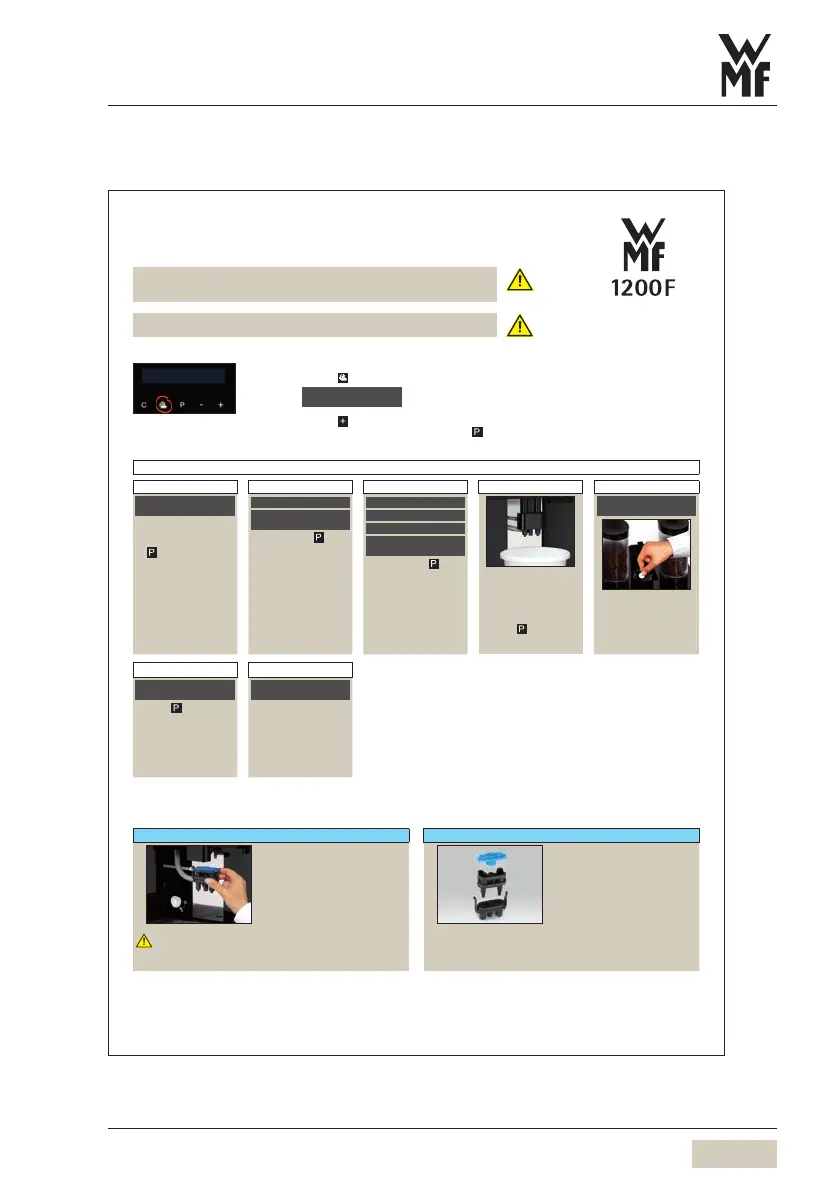
Call up the care programs
Access acare program without amessage having appeared on the display.
Touch
Touch until the desired program is displayed
Access the displayed program by pressing
Cleaning programs
Machine cleaning
1 2 3 4 5
cleaning
OK: P browse: -/+
Access the displayed
program by pressing
The display shows the
individual steps that must
be completed.
empty drip tray
OK: P cancel: C
DI_Rein_04
empty grounds cont.
OK: P cancel: C
Confirm with that
the drip tray and the
grounds container has
been emptied
Soak combi spout
OK: P cancel: C
DI_Rein_06
in cleaning solution
OK: P cancel: C
DI_Rein_07
at least
OK: P cancel: C
DI_Rein_08
once per day
OK: P cancel: C
Confirm with
Place acollection
container with
approx.2liters
capacity under the
combi spout
Touch
Rinsing starts.
insert tablet
into manual insert
Add acleaning tablet
and close the cover
6 7
start: P
Touch
Machine cleaning starts.
cleaning in progress
time remain: 7 min
Duration
approx.7minutes.
A minute countdown
timer shows the time
remaining in the
cleaningcycle.
Manual combi spout cleaning at least 1x daily Prior to cleaning switch off using the ON/OFF button. Disconnect mains plug.
A B
Caution.
Carefully disconnect
thecombi spout.
Pull forward the lever behind
the combi spout
Remove combi spout
Mix 5ml of WMFSpecial
cleaner with 0.5l of lukewarm
water
Dismantle combi spout
Place all parts of combi spout
in the cleaning solution
(3parts)
All parts must be completely
immersed in the cleaning
solution.
After 5hours, rinse all combi
spout parts
Reassemble combi spout
Replace combi spout
your selection pls
08:15 13.11.20 13
Care pad
select clean.program
browse: -/+



 To Next Page