72
User Manual WMF1300S
Software | Timer
Button layout
Options: • active
• inactive
Default value:
inactive
active Button layouts can be assigned automatically
via the timer.
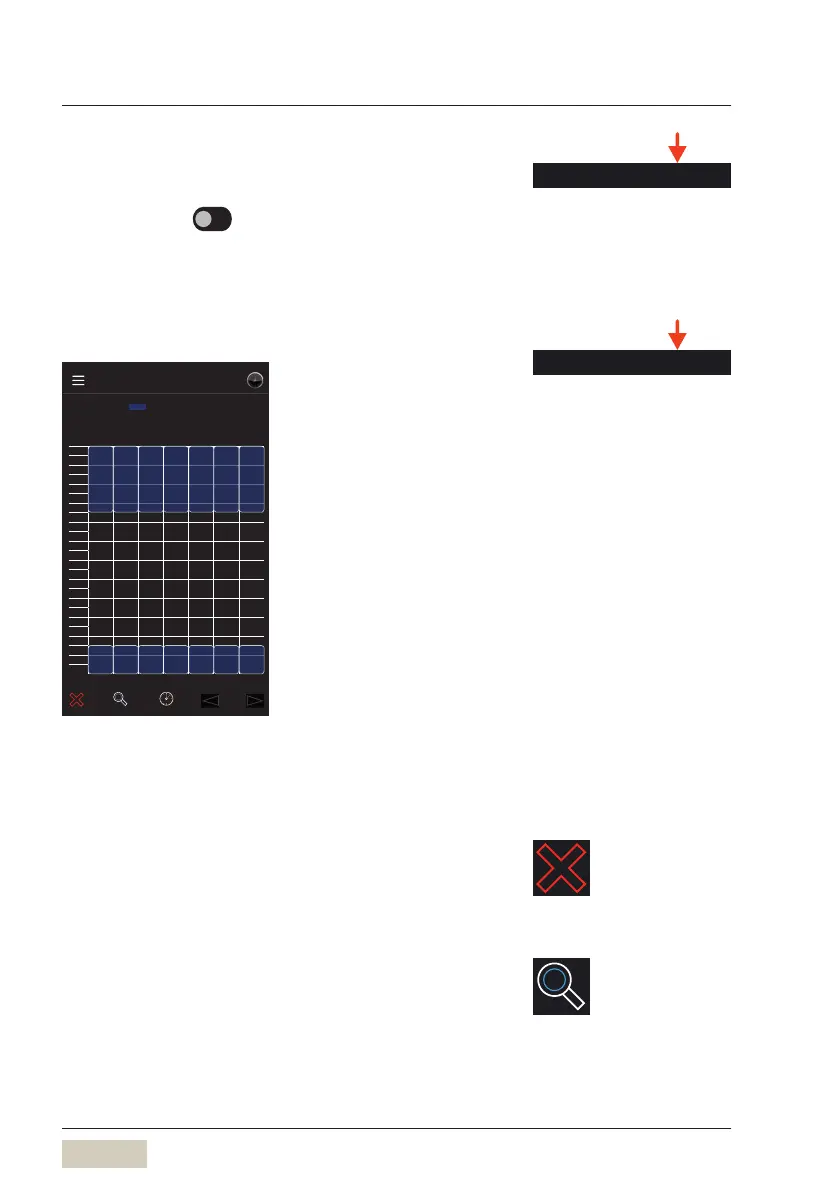
Timer overview
Mo Tu We Th Fr Sa Su
00:00
01:00
02:00
03:00
04:00
05:00
06:00
07:00
08:00
09:00
10:00
11:00
12:00
13:00
14:00
15:00
16:00
17:00
18:00
19:00
20:00
21:00
22:00
23:00
Timer
Timer overview
Button layout
00:00 06:.. 00:00 06:.. 00:00 06:.. 00:00 06:.. 00:00 06:.. 00:00 06:.. 00:00 06:..
21:00 00:.. 21:00 00:.. 21:00 00:.. 21:00 00:.. 21:00 00:.. 21:00 00:.. 21:00 00:..
The weekly overview of all switching times for the
button layout is displayed.
The settings can be modified directly in the overview.
Delete timer
To delete apreviously highlighted switching time, press
the Delete symbol.
Daily timer overview
Switching between daily and weekly overview.
Thedaily overview shows switching times for the
current day.
DS_04_11_00_05
Button layout
For example, self-service from
21:00to 06:00.
DS_03_10_00_03
Timer overview
The minimum time for displaying
abutton layout is 30minutes.



 To Next Page