27
User Manual WMF cafemat!
Software with SU
Chapter 3/1 Software with SU
3/1.1 Software overview
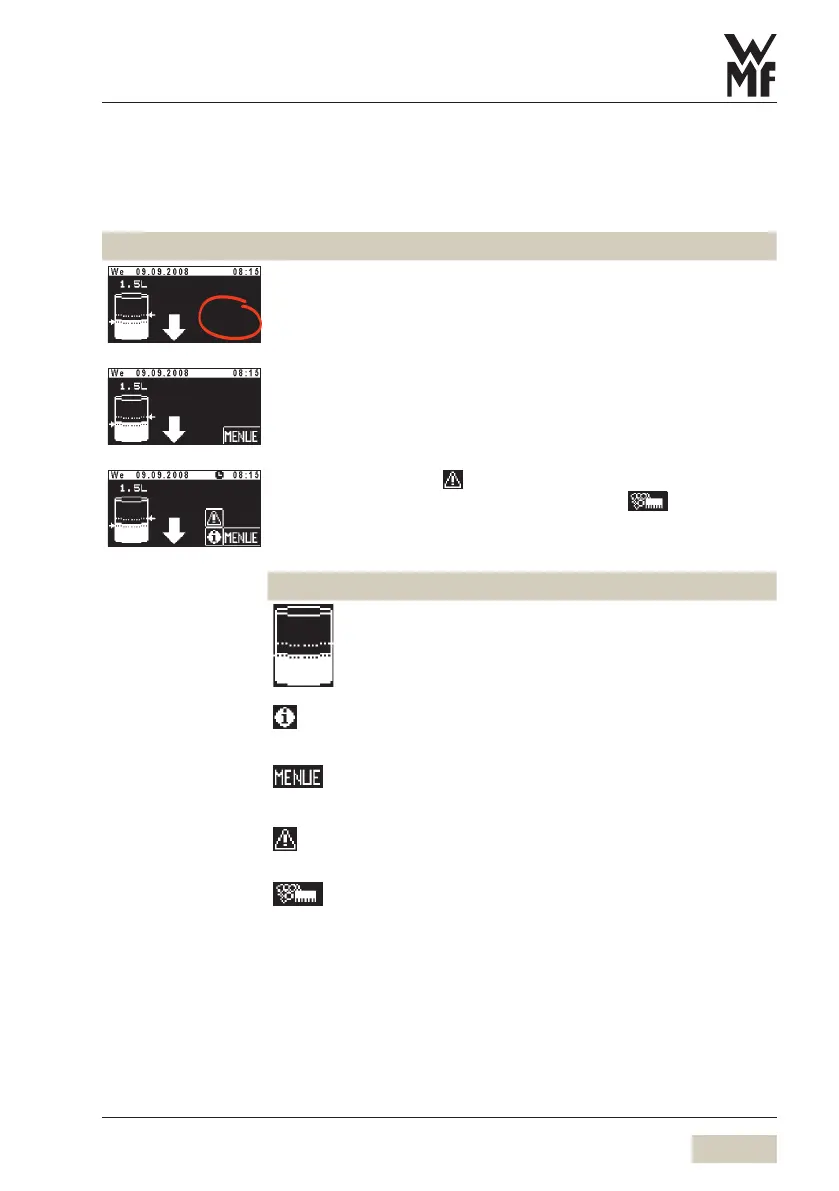
Ready to operate
Ready to operate display in self-service operation with SU display.
Touch clear pad on ready to operate display. Additional pads are
activated.
There are various options for the ready to operate display.
See “Ready to operate display“ for further options.
If there are errors, the pad is displayed.
If cleaning is required then a care message pad is displayed.
Pads on the ready to operate display
Chapter 3/1.2
Set preselection
Touching the symbol leads directly to the SU
preselection, Chapter 3/1.3.1
The field is not active in self-service mode.
Information
Chapter 3/1.2.2
Main menu (Menu)
Chapter 3/1.2.3
Error message
Touching the pad calls up the error message.
Care message
Touching the pad leads directly to the menu.


 To Next Page