52
User Manual WMF cafemat!
Software without SU
Switching times and events
Touch
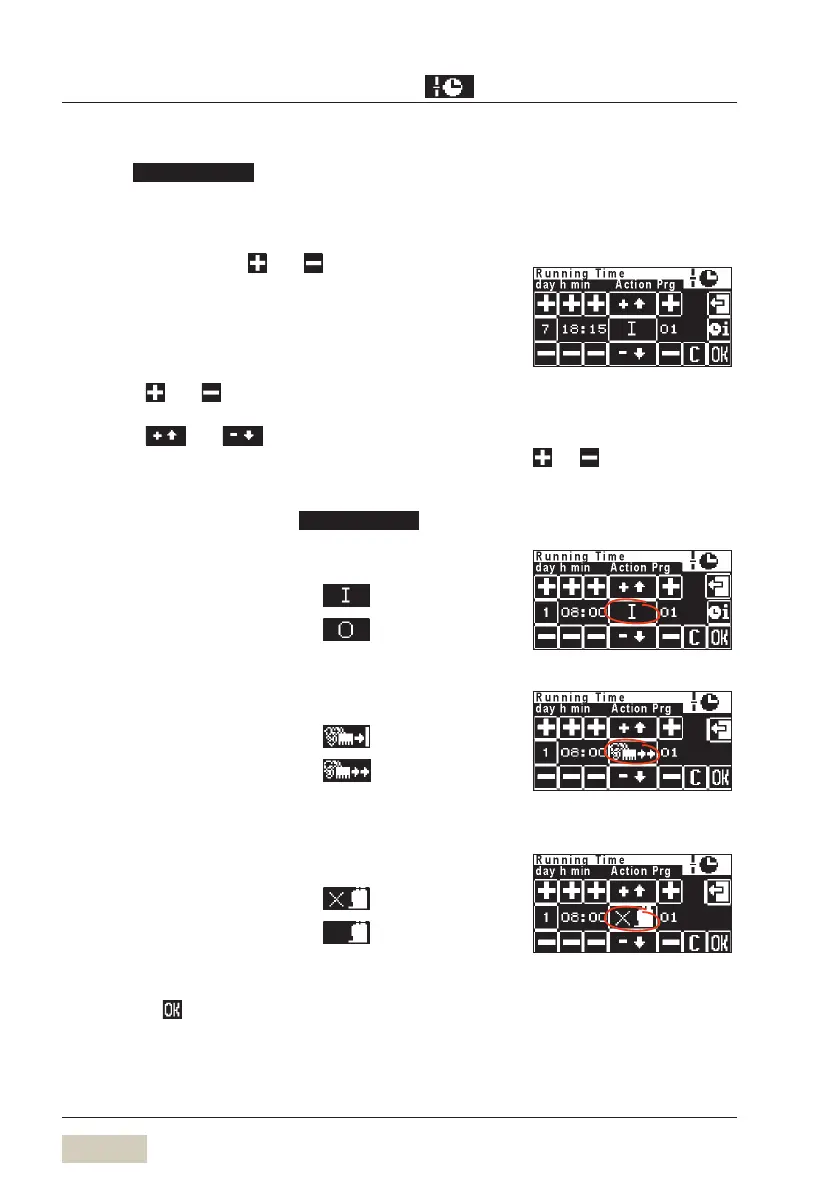
The run time display appears. Here the day, time and
desired operation are set.
Day
Set the day using the
and pads
1 = Monday •
2 = Tuesday, etc. up to 7 = Sunday •
1-5 = Monday to Friday (Weekdays) •
1-7 = Entire week (Monday to Sunday) •
h min (hours minutes)
Use the and pads to set the switch-on time
Event
Use the and pads to set the desired
operation
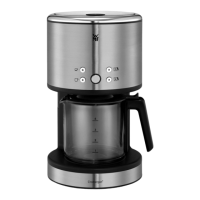
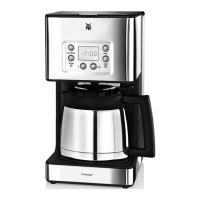
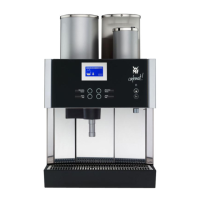
Symbols for timer operations
All operations can be set in the
menu.
Run time:
Switch on time =
Switch off time =
Cleaning:
Cleaning with switching off =
Cleaning without switching off =
Self service mode:
Normal operation =
Self service mode =
Confirm operation
Touch the pad to confirm the new timer operation
Example
For day 1-5 or day 1-7, the
switching times are copied to the
indicated days.
Adjust settings with the:
and pads.
On time 8:00 hrs
Cleaning without switch off begins
at 8:00 pm
Start normal operation after 8:00


 To Next Page