7
Left combination switch
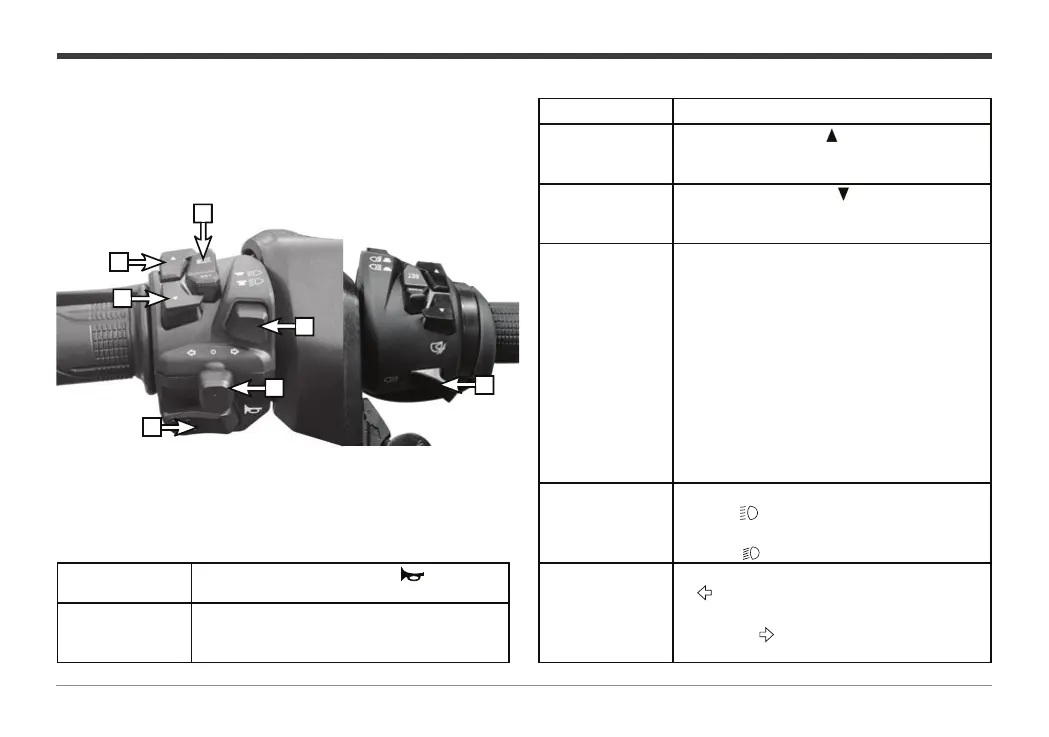
The main functions of the left handle switch are as follows:
4
2
6
1
5
3
Name Functional description
1. Windshield up
button
Press and hold the " " button, the electric
windshield gradually rises and release the
button to stop.
2. Windshield up
button
Press and hold the " " button, and the
electric windshield gradually lowers, and
release the button to stop.
3. Instrument
control button,
LCD instrument,
see instructions
on the right, TFT
instrument, see
TFT instrument
user manual
Long press the MODE key for more than 2
seconds to reset the TRIP, long press the SET
key to enter the clock setting, short press
the SET key for less than 2 seconds to adjust
the hour value, short press the MODE key
to immediately enter the minute setting
interface, short press the SET key to adjust the
10 minute value, short press the MODE key to
immediately ent
er the 1 minute setting, short
press the SET key to adjust the 1 minute value,
short press the MODE key to exit the clock
setting, and the clock will display normally.
4.Dimmer switch
When the lighting switch button is pressed to the
position“ ”, the high beam lamp is turned on.
When the lighting switch button is pressed to the
position“ ”, the low beam lamp will light up.
5. Tu r n s ignal
switch.
When the turn signal button is set to the
“ “position, the left turn signal circuit is
connected. When the turn signal button is
set to the“ “
position, the right turn signal
circuit is connected.
6. Horn button
Press and hold this button " " when the
vehicle needs to sound.
7. Overtaking light
switch
When the motorcycle needs to overtake at night,
press and release this switch continuously to
prompt the vehicle ahead.


 To Next Page