3064458_201811
29
15. Control unit
Display menu (info button)
To bring up the display level, briey press info button (3).
Use buttons 1 and 2 to scroll to the corresponding display value, e.g. I06.
Press button 6 or 7 to display the associated value.
Press button 1 or 2 to return to the display selection.
To exit the display menu, press the info button or wait for 2 min.
Name Description Display in
i00
1)
Flow sensor temperature (°C)
i01 Flow temperature (°C)
i02 Return sensor temperature (°C)
i03 DHW sensor temperature (°C)
i04 DHW solar inlet / DHW cylinder temperature (°C)
i05 Flue gas sensor temperature (°C)
i06 Outside temperature (rpm x 60)
i07 Fan speed (%)
i08 PWM pump speed (l / min)
i09 DHW ow rate bar
i10 Actual water pressure ON and OFF
i11 High limit safety cut-out (µA x 10)
i12 Flame current Version x.xx
i13 Firmware version
Info button (3)
1
2
7
6
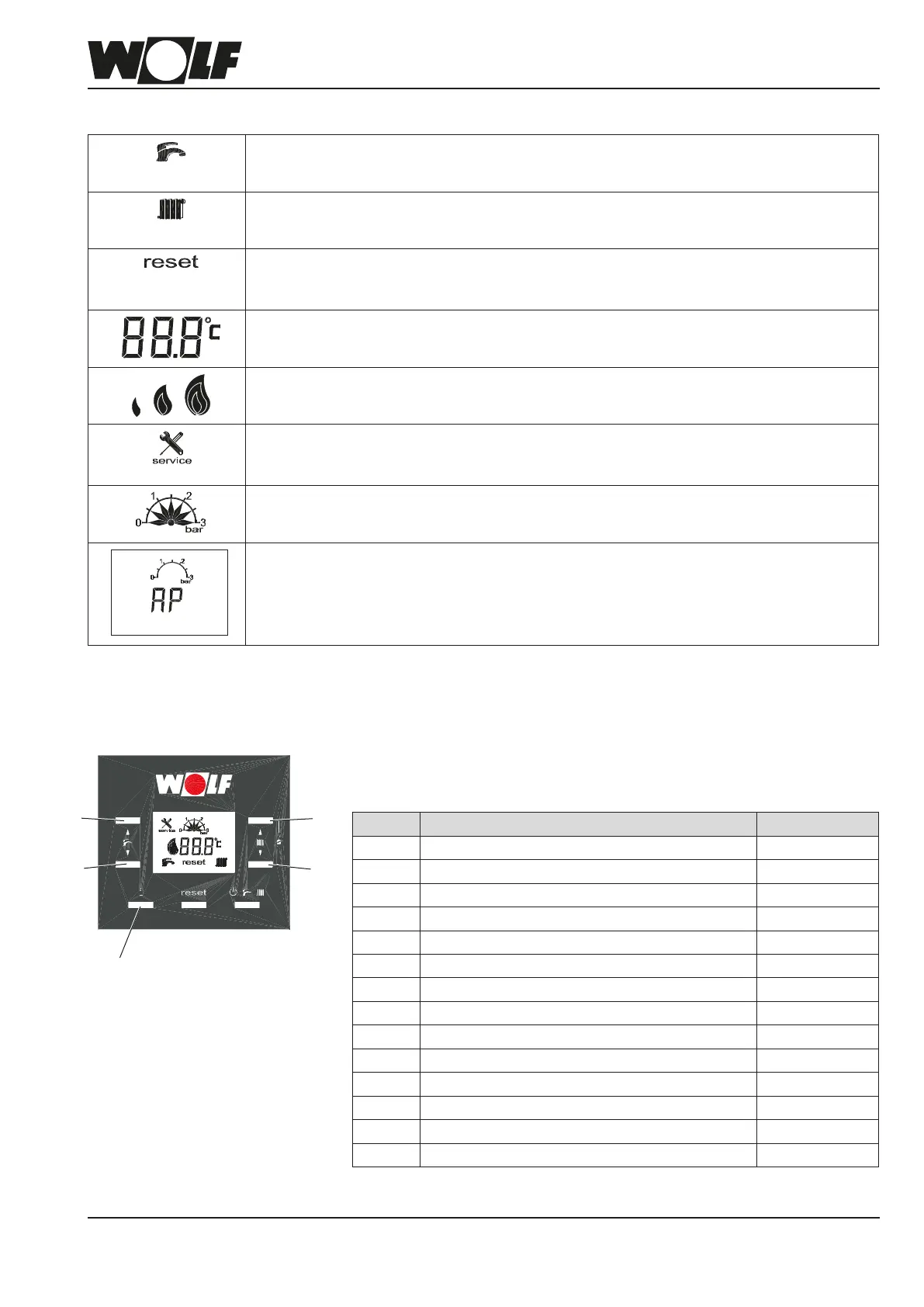
Display
DHW mode
(A ashing symbol indicates an active heat demand for DHW heating.)
Only shown if DHW heating is available.
Heating mode
(A ashing symbol indicates an active heat demand for heating operation.)
Changes are only possible when the heating curve is disabled.
Shown when there are active fault codes.
Reset button (press 1x briey).
Fault codes are reset.
Display of temperature, fault codes, HG parameters and set values.
In emissions test mode, the modulation level is displayed.
Burner modulating levels.
1% - 30%, 30% - 75%, 75 - 100%
Service
- Emissions test mode enabled.
- Fault is displayed.
Indication of water pressure in the heating system.
Venting program
When switching on the mains power, following a power failure, if the water pressure is below
0.5 bar or if the high limit safety cut-out is reset, the venting program runs for 2 minutes.
The gas fan runs for the rst 30 s and then stops. The pump and 3-way diverter valve are
activated alternately. To cancel, press "reset".
1)
from FW 1.10



 To Next Page