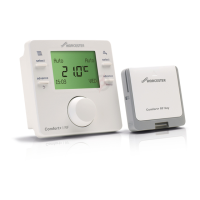
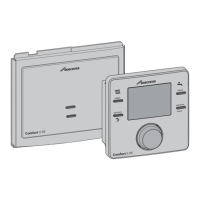
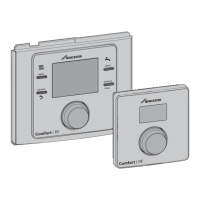
The Comfort+ II RF is a programmable, wall-mounted control unit designed for radio-controlled remote control of heating systems, paired with a Key that integrates into the heat source. This system is ideal for heat sources that are difficult to access, as all programming and adjustments can be conveniently made from the living space.
Function Description
The Comfort+ II RF control unit acts as a room temperature-dependent controller, capable of operating as a weather-compensated wireless controller when used with an optional outside temperature sensor (wireless or tethered). Its primary function is to control a heating system via radio remote control, managing both central heating (CH) and domestic hot water (DHW) heating through a modulating heating controller. The modulation feature enables intelligent communication with the heat source, ensuring the desired room temperature is achieved as efficiently as possible. This intelligent control helps save fuel and money by minimizing temperature overshoots and allowing the burner to stop shortly before the target temperature is reached.
The control unit allows for up to six switching times to be set in both the central heating and DHW programs, offering flexible scheduling. The Key, an integral part of the system, communicates wirelessly with the control unit and is installed directly into the heat source. It features an LED to indicate various operating conditions, such as fault states, pairing mode, and normal operation.
Usage Features
The user interface of the Comfort+ II RF is designed for ease of use, featuring a display that shows temperature, time, date, heating and DHW status, fault codes, and menu symbols. A rotary push-button knob allows for selection, confirmation, and navigation through menus. Dedicated keys for DHW, Advance, and Menu provide quick access to specific functions.
Operating Modes:
The control unit offers several operating modes for heating and DHW:
- On: Heating/DHW is permanently on.
- Off: Heating/DHW is permanently off.
- Auto: Programmed switching times are executed.
- Adv (Advance): Allows for temporary override of the programmed schedule, either bringing forward the next programmed power-up/shutdown time or reverting to the original program. For DHW, an "Once" mode is also available, turning DHW on from the first programmed switch-on time to the last programmed switch-off time.
Temperature Setting:
Users can easily view and adjust the setpoint room temperature. In "Auto" mode, pressing the selector displays the setpoint. In "On" mode, it shows "Permanently" and the set permanent room temperature. In "Off" mode, it displays "Permanently" and a 5 °C temperature, indicating frost protection is active. The room temperature can be adjusted by turning the selector, with the new temperature flashing for three seconds before being applied.
Time Programs:
The control unit allows users to set detailed time programs for both heating and DHW. Up to six switching times can be configured for each, defining temperature changes or DHW activation/deactivation throughout the day and week. These programs can be set for different time periods (e.g., Mo-Fr, Sat-Sun, individual days). Switching times can also be deactivated if not needed.
Holiday Program:
A "Holiday" program allows users to set a start and end date for a holiday period. During this time, heating and DHW are switched off, with frost protection active to prevent freezing. The system automatically reverts to normal operation at the end of the holiday. This program can also be cancelled if plans change.
The "Info" menu provides useful system information, including:
- System Pressure: Displays the pressure in the heating circuit.
- Outdoor Temp.: Shows the current outside temperature if an external sensor is installed.
- DHW: Displays the current hot water temperature.
- Signal Strength: Indicates the wireless signal strength (0-10), which is crucial for optimal control unit placement.
- Energy Consumption: Provides daily mean fuel and electricity consumption for heating and hot water over 30 days.
The "Adjust" menu allows for customization of various settings:
- Language: Select between English (EN) and French (FR).
- Time/Date: Set the clock time and date, including options for 12-hour or 24-hour format and DST (Daylight Saving Time).
- Format: Choose date format (DD.MM.YYYY or MM/DD/YYYY).
- Sensor Calib.: Calibrate the room temperature sensor if the displayed temperature is inaccurate (±3 °C adjustment).
- Contrast: Adjust the display contrast level.
- Reset All: Resets all settings in the main menu to factory defaults.
Key Lock:
To prevent unintentional changes, a key lock feature can be activated by simultaneously pressing and holding the select heating key and selector. "Key lock" will be displayed, and interaction with the control unit will be disabled until the lock is deactivated using the same key combination.
Maintenance Features
The Comfort+ II RF control unit and Key require minimal maintenance, primarily focusing on battery replacement.
Battery Replacement:
The control unit displays a "low battery" symbol when the batteries need replacing. Users have approximately 60 days to replace them before programmed settings are lost. The control unit uses LR6/AA 1.5 V Alkaline batteries. To replace them, a flat-head screwdriver is used to open the locking device on the underside of the control unit, allowing it to be released from the wall socket. New batteries should be inserted, ensuring correct polarity, and then the control unit is re-fitted into the wall socket. Used batteries must be disposed of according to environmental instructions.
Cleaning:
The casing of the control unit can be cleaned with a dry cloth. Cleaning agents or solutions should not be used.
Maintenance Reminders (Installer Menu):
The system includes maintenance reminders that are visible in the installer menu. These reminders indicate when hardware maintenance is due, overdue, or next scheduled, providing a contact number for the installer. For council housing tenants, this feature allows a date to be set for annual service/maintenance, displaying a reminder 30 days prior and showing a contact telephone number. If the service display is not cleared by an engineer, the control unit will limit the room temperature 14 days after the maintenance date to a reduced set value.


 To Next Page

 General