What does error 207 mean on Worcester Control Unit?
- Kkyle76Sep 9, 2025
If your Worcester Control Unit shows error 207 indicating low system pressure, it means that the system pressure is low. Refill the system to increase the pressure.
What does error 207 mean on Worcester Control Unit?
If your Worcester Control Unit shows error 207 indicating low system pressure, it means that the system pressure is low. Refill the system to increase the pressure.
Why Worcester Control Unit says system pressure too low?
If the Worcester Control Unit displays error 1017 indicating low system pressure, it signifies that the system pressure is too low. You should fill the system to increase the pressure.
Why does my Worcester Comfort+ II RF say 'low system pressure'?
The 'low system pressure' error on your Worcester Control Unit indicates that the system pressure is low. To resolve this, you should fill the system.
What does Worcester Control Unit error 309x mean?
Error 309x (where x is the number of heating circuit) on your Worcester Control Unit indicates that the control unit temperature sensor is faulty because it is outside the permissible range. Replace the control unit.
What does Worcester Comfort+ II RF Control Unit error 1070 mean?
Error 1070 on your Worcester Control Unit indicates that maintenance is due soon. The hardware maintenance is due in the next 30 days. Notify the installer.
What does Worcester Comfort+ II RF Control Unit error 1071 mean?
Error 1071 on your Worcester Control Unit indicates that maintenance is now due. The hardware maintenance is due. Notify the installer.
What does Worcester Control Unit error 1072 mean?
Error 1072 on your Worcester Control Unit indicates that maintenance is overdue. The hardware maintenance is overdue by 14 days. Notify the installer.
What does error 1010 mean on Worcester Control Unit?
Error 1010 on your Worcester Control Unit indicates a lack of communication with the heat source via the EMS-BUS, despite the heat source being EMS-compatible. To fix this, replace the EMS connections or interfaces.
What to do if Worcester Comfort+ II RF shows error 1004?
Error 1004 on your Worcester Control Unit indicates a fault in another control unit within the system. You should check the other control units in the system for faults.
What does Worcester Control Unit error 1037 mean, and how to resolve it?
Error 1037 on your Worcester Control Unit means that weather-compensated control is enabled, but either no outside temperature sensor is connected or the sensor's batteries are dead. To resolve this, you can either select room temperature-dependent controls or connect an outside temperature sensor. If a sensor is already connected, replace its batteries.
| Display | LCD |
|---|---|
| Temperature control range | 5°C to 30°C |
| Power supply | 2 x AA batteries |
| Mounting | Wall-mounted |
| Control Type | Programmable |
| Compatibility | Worcester Bosch boilers |
| Type | Wireless Programmable Thermostat |
| Communication | Radio Frequency (RF) |
| Features | Frost protection, Holiday mode |
| Range | Up to 30 meters |
Explains warning signal words and symbols used in the manual.
Provides essential safety guidelines for users and describes the intended use and risks.
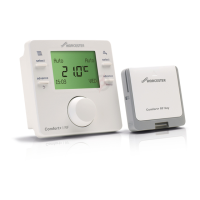
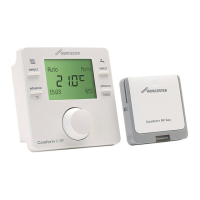
Describes the control unit as a room-dependent controller and its features.
Details how to install the Key in the heat source, including electrical safety precautions.
Provides guidance on installing the control unit, including placement and wireless range.
Details the elements shown on the control unit's standard display screen.
Explains how to view and set room temperatures for different operating modes.
Describes how to activate and deactivate the control unit's key lock function.
Guides on setting heating schedules and temperatures based on time.
Explains how to set the domestic hot water (DHW) heating schedule.
Details the procedure to disable specific heating or DHW switching times.
Describes how to reset the heating or DHW time programs to factory defaults.
How to adjust the desired temperature settings for heating and hot water.
Instructions for setting a holiday period to manage heating/DHW automatically.
How to access information like system pressure, outdoor temp, DHW, and signal strength.
Covers adjusting language, time, date, format, sensor calibration, contrast, and resetting settings.
Accessing system configuration data and heating circuit assignments.
Restoring all control unit settings to factory defaults.
Setting maximum flow temperature and control type for heating efficiency.
Accessing fault history and setting service reminders.
Displaying installation date, controller, and base station software versions.
Pairing and unpairing wireless components like the Key and control unit.
Configuring heating curve parameters for weather-compensated control.
Details pairing procedures for wireless components with the Key.
Lists common fault codes, their causes, and recommended actions for resolution.
Instructions on how to replace batteries in the control unit and safety warnings.