COMMISSIONING
Greenstar Si Compact
ErP
- 6 720 813 278 (2015/07)34
6.4 STARTING THE APPLIANCE
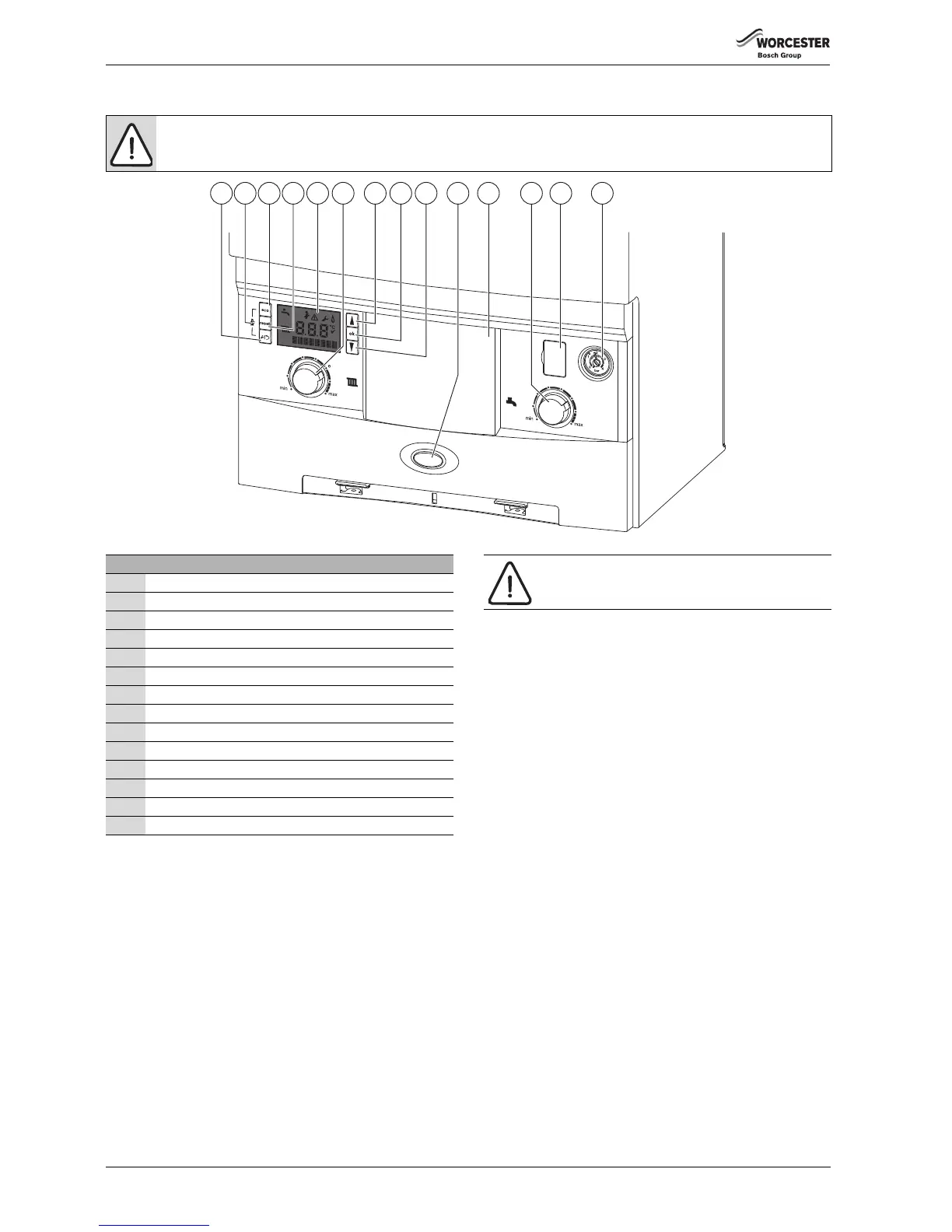
Fig. 52 Control panel
Switching the appliance on/off:
▶ Turn on the mains power supply, initially the “Boiler start up screens”
will be displayed (refer to figure 53).
▶ Turn on any external controls
▶ Set the thermostatic radiator controls to maximum temperature
▶ Set the clock/programmer to continuously ON and the room
thermostat to maximum temperature
The blue operation and fault indicator light will be illuminated when there
is a demand for heat or hot water.
Turn the boiler CH temperature control (6) to maximum.
The “burner on” flame symbol will be shown on the boiler display after a
successful ignition sequence.
If all controls are working correctly the radiator symbol will appear on the
display confirming a central heating demand has been received
If no radiator symbol is shown then check all controls as no demand has
been received.
If the boiler fails to light, a flashing fault code will be displayed.
To reset the boiler, press the reset button (4), the tick symbol will be
displayed briefly for a successful reset.
CAUTION: RUNNING THE APPLIANCE
▶ Never run the appliance when the appliance/system is empty or partially filled.
6720643358-02.1Wo
1 3 65 7 8 9 10 11 12 13 1442
Key to figure 52
1 Spanner/return button
2 Service engineer symbol
3 Eco button
4 Reset button
5 Boiler display
6 Central heating temperature control
7 Scroll up button
8 OK - Select/confirmation button
9 Scroll down button
10 Operation and fault indicator (blue)
11 Position for optional programmer
12 Hot water temperature control
13 Diagnostic port (for Worcester engineers use only)
14 System pressure gauge
NOTICE: RESET
▶ Do not press the blue operation/fault diagnostic
indicator (10) to reset the boiler.



 To Next Page