FAULT FINDING AND DIAGNOSIS
Greenstar Si Compact
ErP
- 6 720 813 278 (2015/07)68
8.5.7 USING THE TEST MENU
This menu enables the testing of the functionality of components in an
ON/OFF mode.The duration of each test is up to 60 seconds.
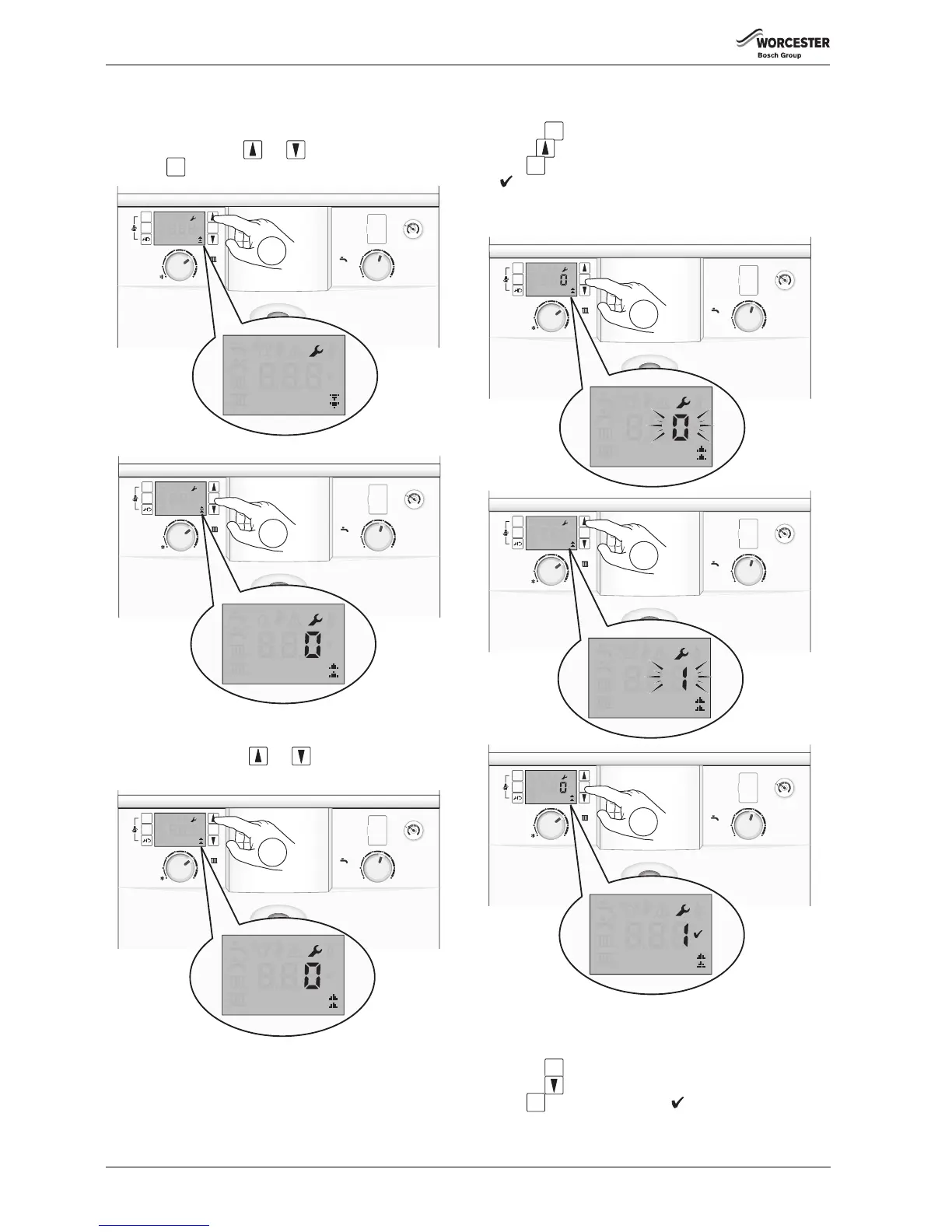
1. Select menu TEST via the and scroll buttons.
2. Press the button for one second to enter TEST.
Fig. 129 Selecting test menu
SELECTING A TEST COMPONENT
Refer to table 31 and use the and arrow buttons to scroll
through the various test options.
Fig. 130 Scroll through test options
TESTING THE COMPONENT
▶ Select a component to test.
▶ Press the button, the value 0 will flash.
▶ Use the arrow button to change the value to a flashing 1.
▶ Press to confirm the change, the value 1 will stop flashing and a
will displayed for 3 seconds.
The test will run for 30 to 60 seconds unless the value is changed back
to 0 before that time, the test may take 10 seconds to start.
Fig. 131 Testing component
RESETTING THE TEST COMPONENT
After completing the test:
▶ Press the button, the value 1 will flash.
▶ Press the arrow button, the value will change to a flashing 0.
▶ Press to confirm the change, a will display for 3 seconds.



 To Next Page