2 Buy Online! Wurtec.com Buy Online! Wurtec.com 3
Contents
Getting Started ...........................................................3
Introduction ..............................................................4
Before Programming the Wurtec S3 Communicator ...............................5
Quick Set-Up (from onboard keypad)
Programming Phone Numbers ...............................................6
Programming Site Identication Message .......................................6
Adjusting Onboard Volume ..................................................7
Adjusting Conversation Volume ..............................................7
Resetting to Factory Defaults ................................................8
Installation
Line Connection ..........................................................9
Power Requirements .......................................................9
Programming (Locally or Remotely)
Programming Phone Numbers ...............................................9
Programming Ring-Down Line ..............................................10
Programming Ring Time ...................................................10
Programming Messages (Site ID) ............................................11
Programming Messages (Announcements) ....................................11
Programming (Locally or Remotely) | Advanced Options
User Preferences - Announcements On/O ....................................12
User Preferences - Immediate Two-Way Conversation On/O ......................13
User Preferences - Call Cancellation On/O ....................................13
User Preferences - Maintenance Announcements On/O .........................14
User Preferences - Timing Out ..............................................14
Talk Time ...............................................................15
Access Code ............................................................15
Touch Tone ID ...........................................................16
Ring Count .............................................................16
Unit Number (Line Sharing) .................................................17
External Output ..........................................................17
Program Status ..........................................................18
Calling Into Remote Phone ..................................................19
Reset to Factory Defaults ...................................................19
Testing the Phone Line .....................................................19
Phone Line Volume ........................................................20
Flowchart ................................................................21
Troubleshooting ....................................................... 21-25
Glossary .................................................................26
Warranty Policy ...........................................................27
1.
Carefully open the shipping box and remove contents.
2.
Inspect the telephone(s) for any damage.
3.
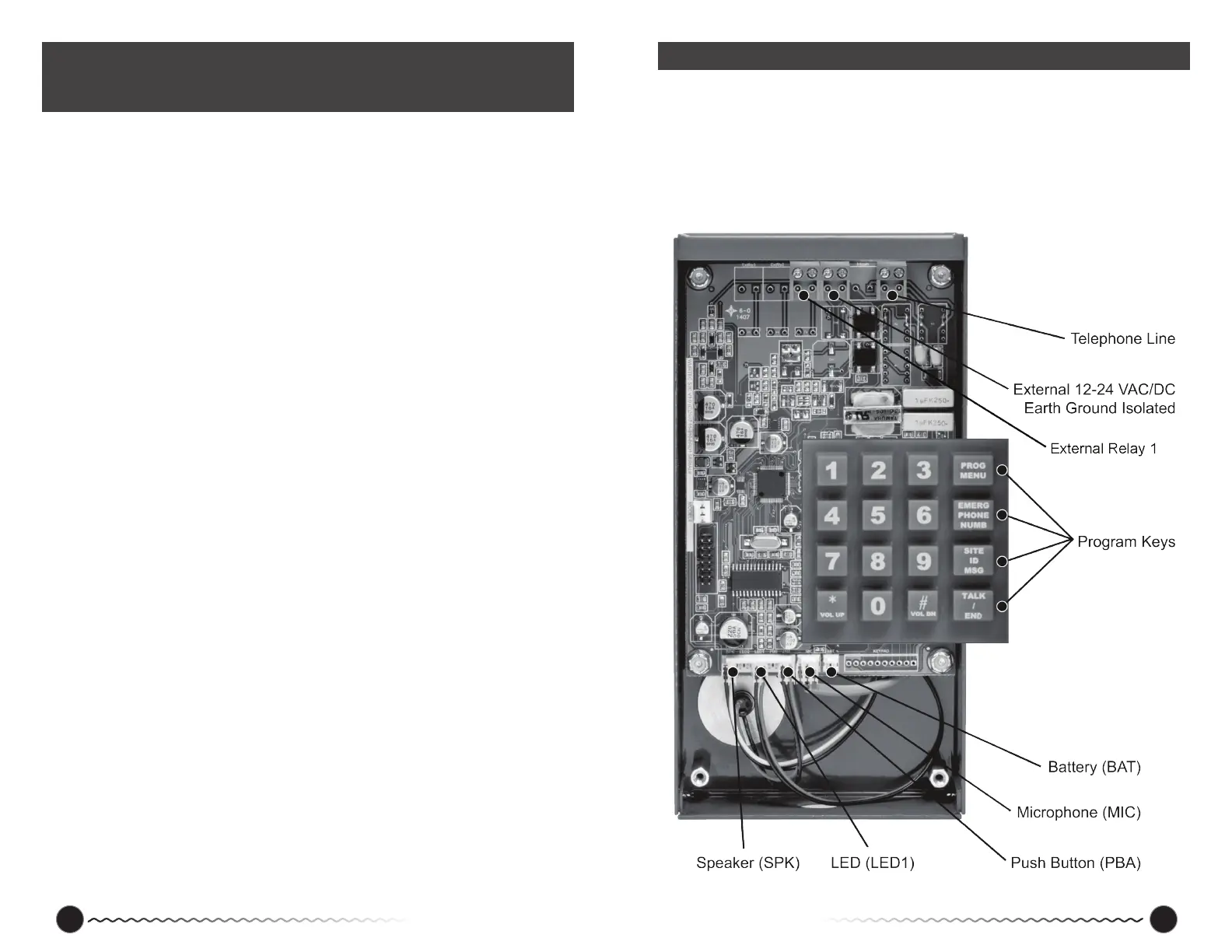
Make sure the microphone, speaker and LED are connected correctly to the pins. See
drawing below for locations.
If there is any damage call us for advice at 800-837-1066 or our tech line at 419-930-1066.
Getting Started
For Quick Set-Up go immediately to page 5!
Applies to Part Numbers: 11-930, 11-931, 11-932, 11-933, 11-935, 11-936, 11-939


 To Next Page