17 18
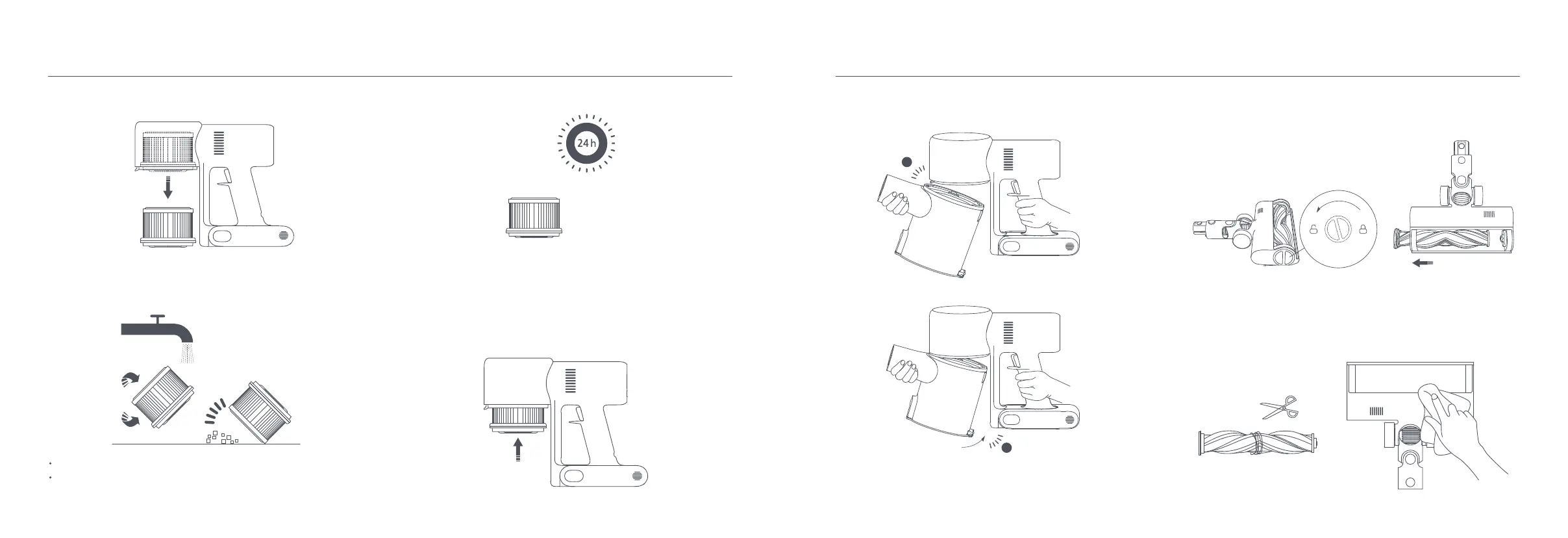
2. Reinstall the dust compartment.
Cleaning the High Torque Bush Bar
2. Use scissors to cut and pick out any hair or other debris tangled around the
roller brush. Wipe away excess dust from the slot and clear plastic cover
using a dry cloth or paper towel.
1. Turn the lock counterclockwise until it stops, then remove the roller brush
from the high torque brush bar.
Insert until it clicks into place
1
2
2. Remove the filter from the vacuum cleaner by pulling it down in the direction
shown in the figure.
3. Clean the filter with clean water. Make sure you rotate the filter 360° to
thoroughly remove all dust caught in the filter. Lightly tap the filter several
times to remove any excess dirt.
4. Allow the filter to thoroughly dry for at least 24 hours.
1. Insert the filter into the vacuum cleaner and gently press down, as illustrated.
Installing the Filter
Notes:
Only use clean water to clean the filter. Do not use detergent.
Do not attempt to clean the filter with a brush or finger.





 To Next Page