9 10
Using Different Accessories
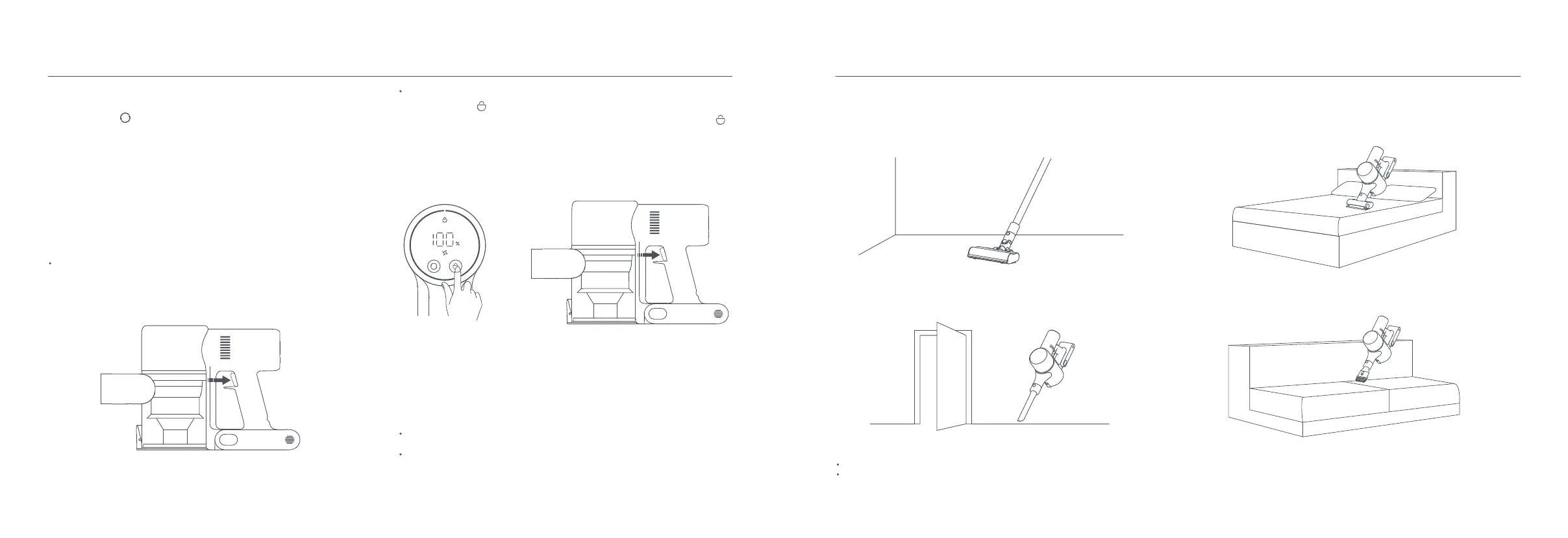
Mini Electric Brush: For vacuuming dirt, pet hair, and other stubborn debris from
sofas, bedding, and other fabric surfaces.
2-in-1 Brush Nozzle: For vacuuming curtains, sofas, vehicle interiors, coffee
tables, etc.
Notes:
If any rotating part becomes stuck, the vacuum cleaner may shut off automatically. Remove any trapped foreign objects, then resume use.
When the high-temperature protection for the battery is triggered, the vacuum cleaner will automatically stop working. Wait until the battery temperature returns
to normal, then resume use.
Crevice Nozzle: For vacuuming narrow crevices and areas around doors,
windows, baseboards, corners, stairs, etc.
Note: The high torque brush bar can be attached directly to the vacuum
cleaner.
High Torque Brush Bar: For cleaning different types of flooring such as wood,
marble, tile, and carpet.
Working Modes
The vacuum cleaner has two working modes, you can select the desired one
based on your cleaning needs.
Non-continuous Mode
Hold down the power button to start the vacuum cleaner, then release to
stop it.
Continuous Mode
Notes:
In Continuous Mode, the vacuum cleaner will enter into standby mode when
pressing the power button, and resume running if pressing the button again.
When the vacuum cleaner keeps in standby mode for more than 10 seconds,
its display screen will go off and the vacuum cleaner will then exit the
Continuous Mode.
Continuous Mode
Press the button to enable Continuous Mode, then press the power button
to turn the vacuum cleaner on. To exit Continuous Mode, press the button .
Enabling the Continuous Mode allows the vacuum cleaner to run continuously
without having to hold down the power button, which can help release your
fingers.
How to Use
Switching Suction Levels
Non-continuous Mode
Press the button to cycle through the vacuum cleaner's suction levels of
Eco, Standard, and Turbo. The corresponding suction level indicator will be
highlighted on the display.
Note: After the vacuum cleaner is turned off and turned back on again, the
suction level will be the last used one.








 To Next Page