15 16
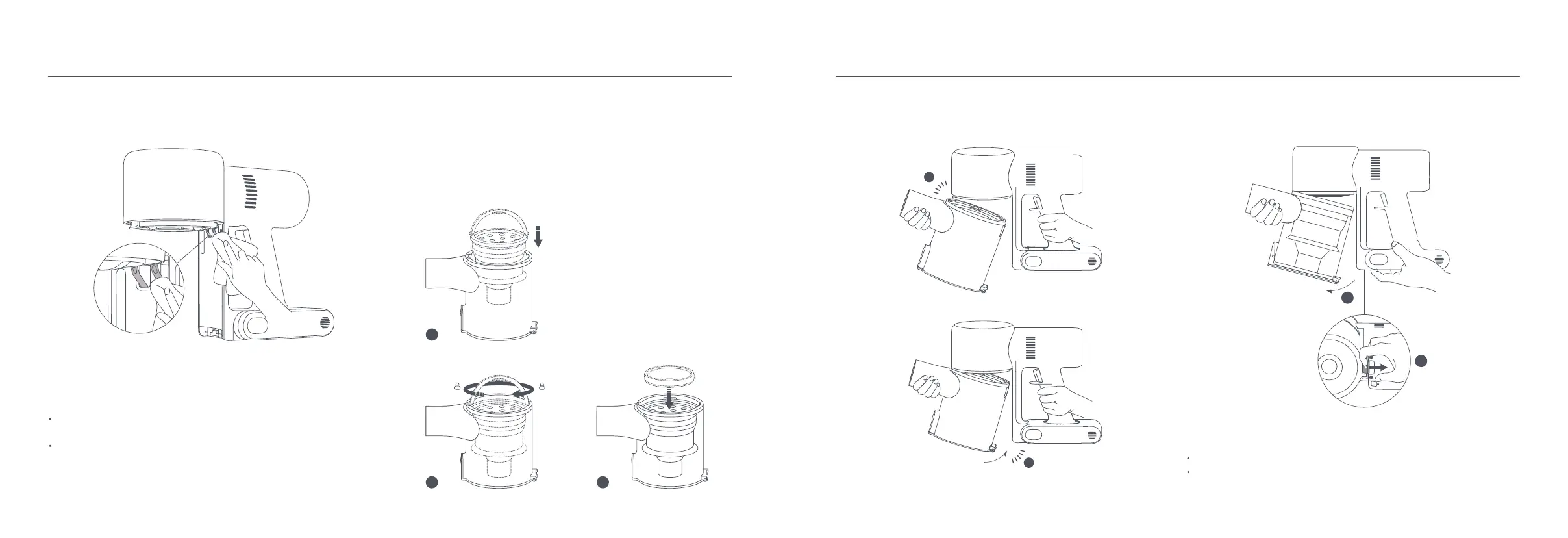
3. Slightly tilt the dust compartment so its slot aligns with the clip on the
vacuum cleaner. Then gently push the dust compartment until it clicks into
place.
Insert until it clicks into place
Cleaning the Filter
1. Remove the dust compartment as shown in the figure.
Dust Compartment Release Switch
It is recommended to clean the filter once every 4 to 6 months.
It is recommended to replace the filter once every 6–12 months according
to the actual using condition of the filter.
Notes:
1
2
1
2
2
1
3
6. Wipe the contact points of the vacuum cleaner with a soft dry cloth if they
are dirty.
1. Insert the cyclone assembly vertically into the dust compartment, and make
sure that the handle of the cyclone assembly line up with the slot on the left
side of the dust compartment. Turn the handle clockwise until it locks, then
flip the handle down.
2. Place the pre-filter with its front side facing up into the cyclone assembly.
Installing the Dust Compartment, Pre-filter, and Cyclone
Assembly
Do not use detergents, polishes, or air fresheners to clean the dust
compartment.
Do not clean the dust compartment, pre-filter, or cyclone assembly in a
dishwasher or washing machine, nor attempt to dry any component in a
tumble dryer, oven, microwave, or near an open fire.
Notes:
Pre-filter








 To Next Page