25 26
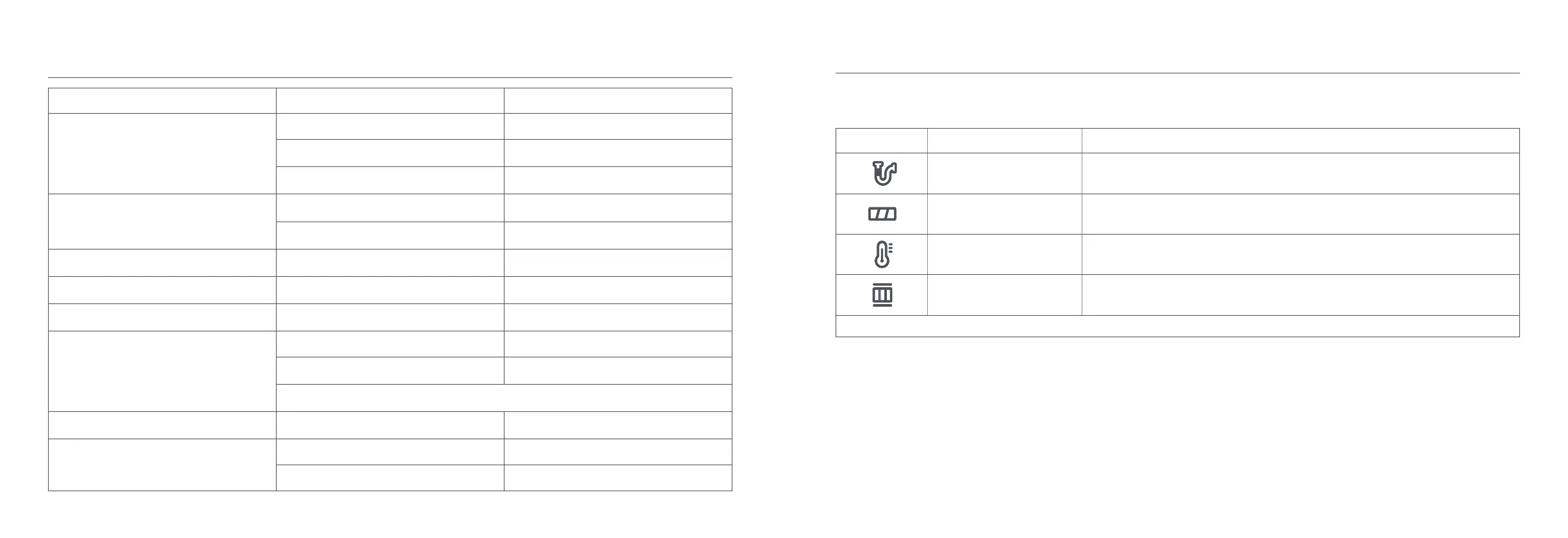
Error Icon Error Message Solution
Airway Blocked Check if any blockages caught in the dust compartment, extension rod, and/or high torque brush bar.
Roller Brush Stuck
Refer to "Cleaning the High Torque Brush Bar" in the Care & Maintenance section for directions on
how to remove hair and other debris caught in the roller brush.
High-temperature Alert Wait until the battery temperature normalizes before resuming use.
Filter Not Installed Ensure that the filter and pre-filter are installed correctly.
If one of the error codes from E0 to E4 appears on the display, please contact the after-sales service team for repair.
Error Icon
If the vacuum cleaner is not working properly, the screen display will show an error message. Please refer to the table below to find your solution based on the error
message.
Troubleshooting
Issue Possible Cause Solution
The vacuum cleaner does not work.
It is out of battery or has low battery. Fully charge the vacuum cleaner, then resume use.
It enters into overheat protection mode triggered by
a blockage.
Clear any blockages and restart the vacuum cleaner
when it cools down.
Its suction opening or airway passage is blocked.
Clear any blockages from suction opening or airway
passage.
The suction power reduces.
The dust compartment is full and/or the filter is
clogged.
Empty the dust compartment and clean the filter.
The high torque brush bar, the extension rod, or
other parts are blocked.
Clear any blockages from the high torque brush bar,
the extension rod, or other parts.
The motor makes a strange noise.
The main suction opening or the extension rod is
blocked.
Clear any blockages in the main suction opening or
the extension rod.
The first indicator is red after turning on the vacuum
cleaner.
Battery pack is damaged.
Please contact after-sales service to arrange
maintenance.
The first indicator blinks red when charging the
vacuum cleaner.
The charger is incompatible.
Only use the original charger to charge the vacuum
cleaner.
The battery indicator does not light up while
charging.
The charger is not connected to the vacuum cleaner. Make sure the charger is plugged in correctly.
The battery is fully charged and went into sleep
mode.
The vacuum cleaner can be used normally.
If the problem still persists after ruling out the above two possibilities, please contact after-sales service for
help.
The battery charges slowly. The battery temperature is too low or too high.
Wait until the battery temperature normalizes, then
resume use.
The water tank does not dispense water, or
dispenses water slowly.
The water dispenser filter is clogged. Clean or replace the water dispenser filter.
The mop pad is dirty. Clean or replace the mop pad.





 To Next Page