21 22
The vacuum cleaner contains a removable rechargeable lithium-ion battery pack which has a limited number of recharge cycles. After extended use, the battery
pack may no longer hold a charge. If this happens, it means the battery pack has reached the end of its life cycle and needs to be replaced.
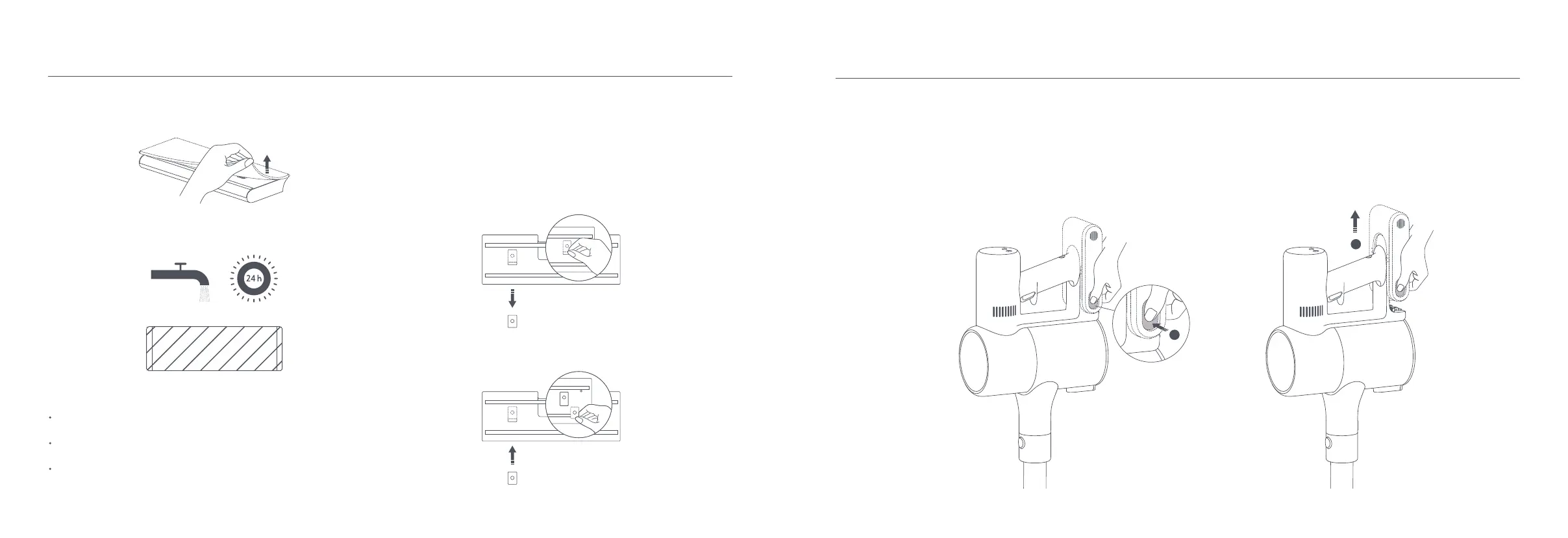
1. Press down the battery pack release button and slide the battery pack to the right, as illustrated, to remove it.
2. Install the new battery pack.
Battery Pack
2
1
3. Remove the mop pad from the water tank.
4. Clean and dry the mop pad.
The water dispenser filter should be replaced if the water tank dispenses water
too slowly or becomes clogged.
To ensure optimal mopping effectiveness, it is recommended to replace water
dispenser filters once every 3 to 6 months depending on water quality and
frequency of use.
1. Use your fingers to slide out old water dispenser filters on the left and right
sides of each slot.
2. Insert the new water dispenser filters and check to ensure they are installed
correctly.
Water Dispenser Filter
Notes:
When the vacuum cleaner is charging or not in use, remove the water tank and
drain any remaining water to prevent mildew or lingering odor.
After mopping, remove the mop pad and clean it to avoid blocking the water
outlet with dirty water.
A worn or damaged mop pad that no longer sticks to the water tank should be
replaced to ensure optimal cleaning performance.








 To Next Page