9. FAQ
Q1: FAILED TO GENERATE DIAGNOSTIC REPORT
1. Currently only perform diagnostic functions, that is, read ECU
information, read code and clear code, live data, freeze frame, which
can trigger a diagnostic report. Other functions, such as immobilization
and maintenance services will not be displayed in the report.
2. After entering the Diagnostic menu, you need to perform one specific
function before the system can generate a Diagnostic report normally.
3. After the Diagnostic is completed, you need to step back to the previous
menu step by step to generate the Diagnostic report successfully. If the
APP is killed directly, the report cannot be triggered.
4. If the report still cannot be generated after troubleshooting according to
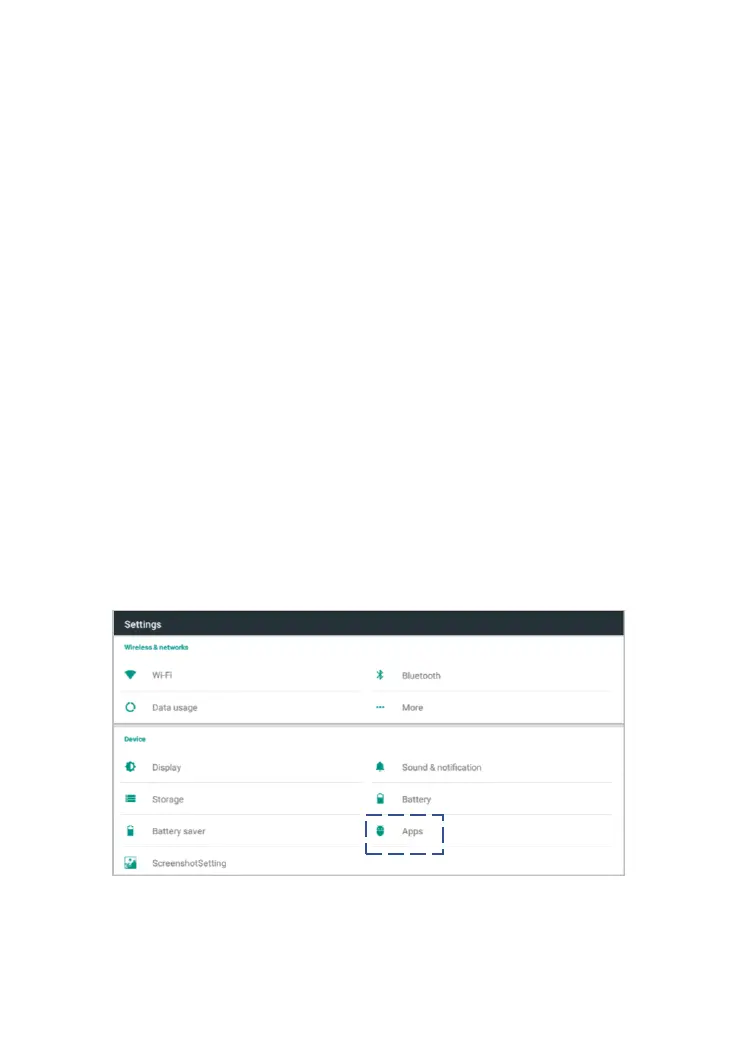
the above prompts, please try to exit the APP, enter the system settings,
and then choose to clear the APP cache.
Enter the path: Android System Setting>>Apps>>Diagnostic>>Clear
Cache
Sample as follows:
Fig 9-1 Select the APPs



 To Next Page