R90 ONLINE USER’S MANUAL UNINTERRUPTIBLE POWER SUPPLY (UPS)
Xtreme Power Conversion Corporation (Rev 3/7/14) Page 32
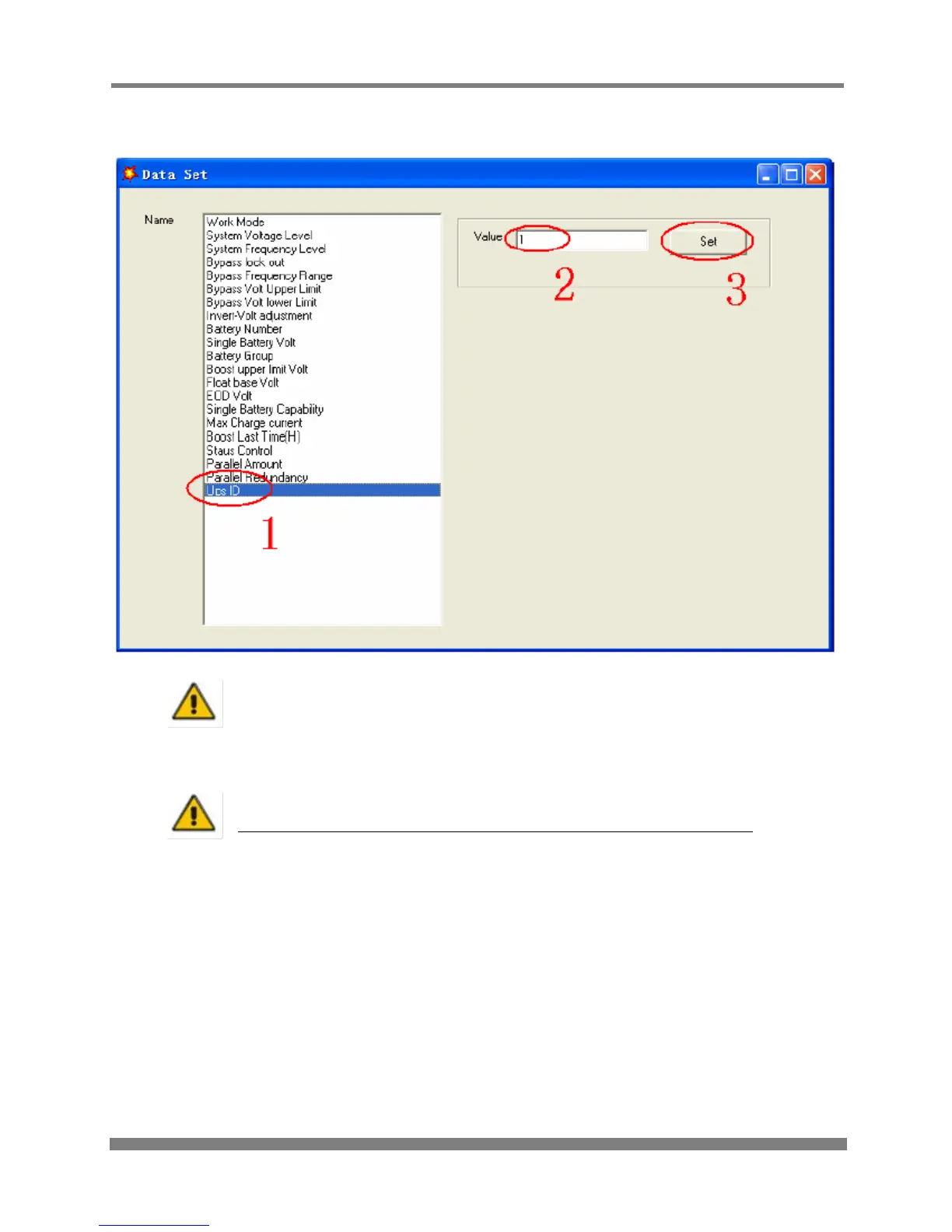
At the window of “Data Set”, select “UPS ID”, enter the Value for the parallel UPS ID at the right side,
then select “Set” as shown in the figure below. If the UPS “beeps” it means the setting is correct.
CAUTION!
After changing the parallel system ID, the connection between Muser4000 and
equipment might be interrupted. If this occurs, re-connect in accordance with the
instructions described earlier in this manual.
CAUTION!
Parallel cable cannot be connected when setting the parallel parameters
• After setting the UPS’s that need to be paralleled, power OFF all the UPS’s. Connect all the UPS’s
according to “parallel cable installation”, and then power ON the UPS’s.
Note:
If installing 5-6 units in parallel, remove the jumper cap J30 on the control inspection board
(MHTBJHR1CU04 in all UPS to be connected in parallel.
If installing 7-10 units in parallel, remove the jumper cap J30/J31 on the control inspection board
(MHTBJHR1CU04 in all UPS to be connected in parallel.



 To Next Page