FT-252 OperaTing Manual24
Memory Mode
Labeling Memories
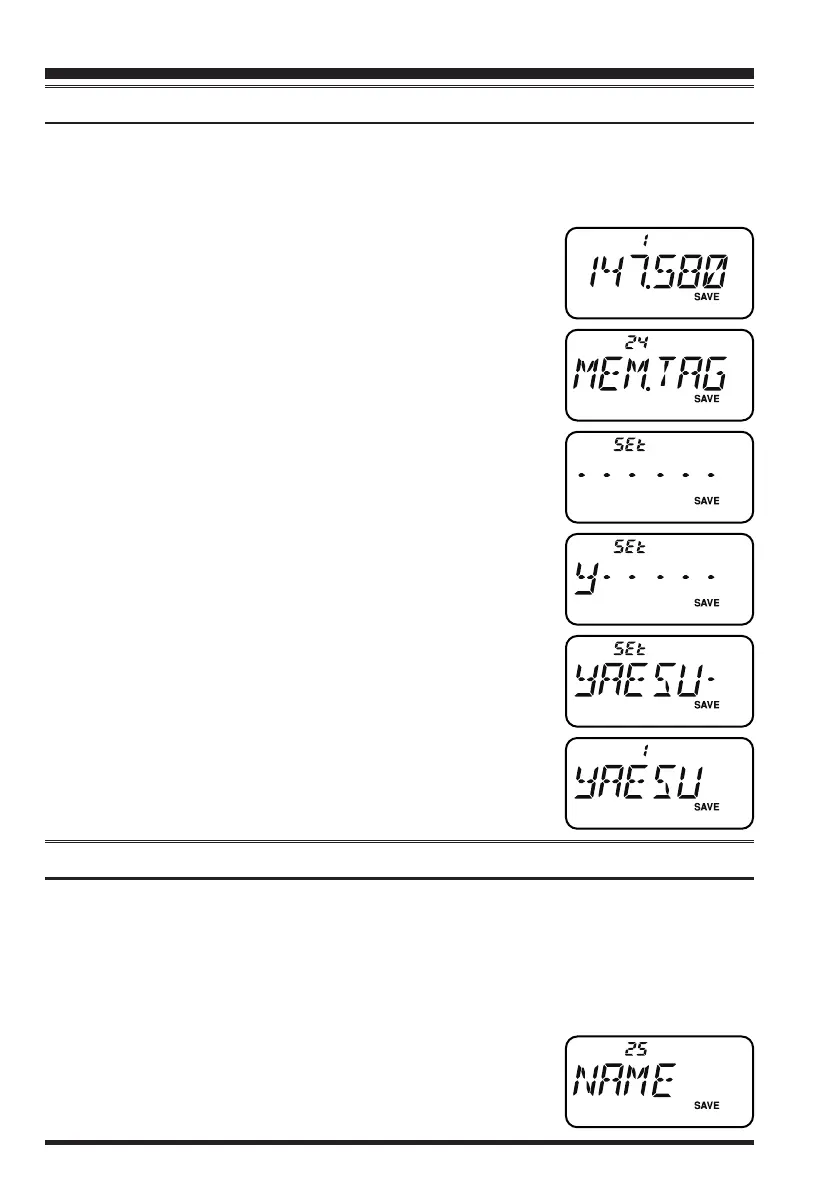
You may wish to append an alpha-numeric “Tag” (label) to a memory or memories, to
aid in recollection of the channel’s use (such as a club name, etc.). This is easily accom-
plished using the Set Mode.
1. Recall the memory channel on which you wish to append
a label.
2. Press the
[
SET/ATS
]
key to enter the Set mode.
3. Rotate the
DIAL
knob or press the
[
p
]
/
[
q
]
key to select
Set Mode Item 24:
MEM.TAG
.
4. Press the
[
SET/ATS
]
key momentarily to display the pre-
viously stored label (if any).
5. Press the
[
F/MW
]
key to clear any previous label.
6. Rotate the
DIAL
knob to select the rst digit of the desired
label.
7. Press the
[
F/MW
]
key to move to the next character.
8. If you make a mistake, press the
[
q
]
key to back-space
the cursor,
then re-enter the correct letter, number, or symbol.
9. Repeat steps 5 through 7 to program the remaining letters,
numbers, or symbols of the desired label. A total of six
characters may be used in the creation of a label.
10. When you have programmed a label which is under 6 char-
acters, press and hold in the
[
F/MW
]
key for one second
to conrm the label (if the label is exactly 6 characters in
length, you do not need to press and hold in
[
F/MW
]
key).
11. When you have completed the creation of the label, press
the
PTT
switch to save the label and return to the memory
recall mode.
Enable the Memory Alpha-Numeric Tag display
There are two methods to enable/disable the Alpha-Numeric Tag display. Set Mode Item
24 may be used to enable/disable the tags for all memory channels. Alternately, the tags
may be enabled/disabled directly for each memory channel individually.
1) Set Mode Setting:
1. Press the
[
SET/ATS
]
key to enter the Set mode.
2. Rotate the
DIAL
knob or press the
[
p
]
/
[
q
]
key to select
Set Mode Item 25:
NAME
.
3. Press the
[
SET/ATS
]
key momentarily to enable adjust-
ment of this Item.
honbun_130313.indd 24 2013/03/13 19:47:55


 To Next Page